
Disclosure: This review contains affiliate links. I may earn a commission if you buy through them, at no extra cost to you. Written by Michael Montoya. Last updated: November 8, 2026.
Lots of people have a computer that still powers on but is too slow, too old, or too risky to trust with online banking. Windows 10 lost Microsoft’s regular security updates in October 2025, which added millions of machines to that pile. StartMeStick is FixMeStick’s answer: a USB stick with its own operating system, so you can start an old PC or Mac from the stick instead of from Windows.
The question is whether it does what it claims, and what it costs over time, since it runs on a subscription. To answer that in this StartMeStick review, I read FixMeStick’s product, business, order, refund and history pages, its own review page, Microsoft’s end-of-support notice, Trustpilot, and BBB.

A USB stick with its own locked-down operating system for web, email, banking and video calls on old or unsupported computers. Not a repair tool, and it runs on a subscription.
- Keeps an old computer usable for web, email and banking
- Starts fresh each time; nothing written to your disk
- One plan covers unlimited PCs and Macs
- Returnless 30-day money-back guarantee
- Doesn't repair or speed up Windows
- Won't run installed Windows programs
- Yearly subscription after the trial
- Macs from 2018 on aren't supported
Quick Verdict
 StartMeStick is a real product from a Montreal company that has sold computer USB tools since 2012. It gives an old or unsupported computer a clean, locked-down system for the web, email, banking, and video calls. The catch is what it isn’t: FixMeStick itself says, “It’s not a repair tool. It doesn’t fix, speed up, or reinstall Windows, and it won’t open your existing Windows programs.” It’s also a subscription, at $19.99 for a 30-day trial or $79.99 for a year, and the company’s Trustpilot page sits at 1.8 out of 5, with complaints about auto-renewal. It’s worth a look if all you need is safe browsing on an old computer.
How StartMeStick Works Day to Day
 On paper, it’s simpler than switching operating systems for good. You plug the stick in and start the computer from it, and FixMeStick says you get a separate system that goes online. When you take it out and restart, your old Windows or macOS setup is still there, untouched.
The business page lists two steps to start it: “1) Insert key, and 2) Double-click “StartMeStick”.” If double-clicking from Windows doesn’t work, the stick also has a boot menu so the computer can start from it directly. That menu “Supports new UEFI firmware and Windows SecureBoot,” per the company.
What you give up is your Windows software. You won’t run Microsoft Office, games, or other installed programs while you’re on the stick, though FixMeStick says you can still reach your files. I’d think of it as a second, web-only computer that happens to live on your keychain.
What is StartMeStick?
 StartMeStick is a USB stick that holds its own operating system. FixMeStick calls it “a slimmed down, locked down, open source operating system focused only on what you can do online.” It’s made by FixMeStick Technologies, the company behind the FixMeStick virus-removal stick, and the company’s history page says StartMeStick launched in 2019.
The product page sums up the idea in one line: “Don’t buy a new computer.” Instead of replacing a PC that Microsoft no longer supports, you start it from the stick and use it for everyday online tasks.
Who StartMeStick Is For
FixMeStick describes it as “Especially good for a computer that’s old, slow, or no longer safe.” From what it does and doesn’t do, these people fit it best:
- Someone with a Windows 10 or older PC who mainly uses the web, email, banking, and video calls.
- A household with a spare computer they’d like to keep using instead of recycling.
- Someone who wants a clean system for banking on a computer they don’t fully trust.
- A business that wants employees to work from home on a locked-down system.
I’d skip it if you need your installed Windows programs, own a Mac from 2018 or later, or want your Windows itself repaired or sped up.
StartMeStick Features
 Here’s what FixMeStick says the stick does, and where I’d be careful.
A Clean System Every Time
The product page says it’s “Designed to never slow down, break down, or become infected” and that “It is like brand new every time you use it.” The business page explains why: “No write access to the StartMeStick or the host’s disk.” Your sessions leave nothing behind on the stick or the computer’s disk; only FixMeStick’s own updates are stored on the stick. I’d still treat the no-infection promise as the maker’s claim, since I found no independent test of it.
USB Device
FixMeStick describes a “Capless design built-in latch” so it can go on your keys. FixMeStick says to “Clip it on your keychain and use it on as many computers as you like.” Every plan on the order page says “Use on unlimited PCs & Macs.”
Its Own Operating System
The stick runs its own system instead of Windows or macOS. It updates itself: “Automatic updates are fetched and stored directly on the StartMeStick.” That’s likely what the subscription pays for. The refund policy says the sticks are “continuously updated with security and feature improvements.”
Speed on Old Computers
A light system can run quicker on old hardware than an aging Windows install, and buyers on FixMeStick’s own review page say so. That’s believable, though I found no speed test, and the maker is clear that it doesn’t speed up Windows itself. Whatever speed you get is only while you’re running from the stick.
Privacy, Not a VPN
An older version of this page said it had a built-in VPN that hides your IP address. FixMeStick’s current pages don’t list a VPN, so I wouldn’t count on one. What it does offer is a system that keeps very little: the business page says it “Doesn’t store anything” and it “Ships with strong security settings, and prevents changes to settings.”
Waterproof, Dustproof, and Shockproof
The maker credits “Chip on Board (COB) technology” and says it “Enables the StartMeStick to be waterproof, shockproof, and dustproof.” No rating, such as an IP number, is given.
Internet Connection
According to the business page, the stick “automatically seeks an Internet connection when it starts” and has WiFi drivers that “support most WiFi hardware.” Started from Windows, it can reuse the Wi-Fi network Windows already knows.
What StartMeStick Can and Can’t Do
 Here it is plainly, in FixMeStick’s own words.
- It can give an old or unsupported computer a clean system for “web, email, banking, and video calls.”
- It can let you reach your files, which FixMeStick says you “can still access.”
- It can be used on several computers, since every plan covers unlimited PCs and Macs.
- It can’t repair Windows. The product page says, “It’s not a repair tool.”
- It can’t run your Windows programs. It “won’t open your existing Windows programs.”
- It isn’t an antivirus tool. Virus removal is a different product, the FixMeStick.
- It can’t help a Mac made in 2018 or later. FixMeStick says those “are not yet compatible.”
One limit is easy to miss: setting up a Bluetooth mouse or keyboard needs a wired one first, every session. FixMeStick says it “requires the use of a wired mouse/keyboard for Bluetooth device setup each session.”
Pros And Cons Of StartMeStick
The short version, from the maker’s pages and buyer reports:
How to Use StartMeStick
 The steps are short. This is the order the company describes, plus a fallback.
- Plug the StartMeStick into a USB port on the computer.
- On a Windows PC, double-click “StartMeStick,” as the business page describes.
- If that doesn’t work, restart and pick the stick from the computer’s boot menu. The key for that menu differs by maker, so check your computer’s manual.
- Let it connect to the internet. It looks for a connection on its own, or you can pick your Wi-Fi network from a list.
- When you’re done, shut down, remove the stick, and the computer will start normally next time.
If it won’t start, contact FixMeStick’s support; its store page says “our support is in-house and never outsourced.”
What Buyers Say About StartMeStick
There’s no separate Trustpilot page for StartMeStick, so the closest independent picture is FixMeStick’s company page. I checked it on November 8, 2026: a TrustScore of 1.8 from 32 reviews, with 85% one-star. Trustpilot notes the company “Hasn’t replied to negative reviews.” A BBB search for FixMeStick returned no business profile.
Minoo Engineer, Trustpilot, January 2026: “I have nothing but positive experience from the customer service.”
A reviewer named Dbs, Trustpilot, November 2025, who raised their rating from 1 to 4 stars: “Take the time to check your account and make sure that you don’t have the auto renewal on.”
Timothy Stolz, Trustpilot, June 2026: “This product is a SCAM!”
The company’s own review page, where it picks the quotes, is far more positive. One buyer wrote, “My computer doesn’t start normally any more- I only get the Blue Screen of Death,” and said StartMeStick let them use it for the internet again. Another, on Windows 7, added a fair caveat: “Laptop is still fast but some comfort features are not there.”
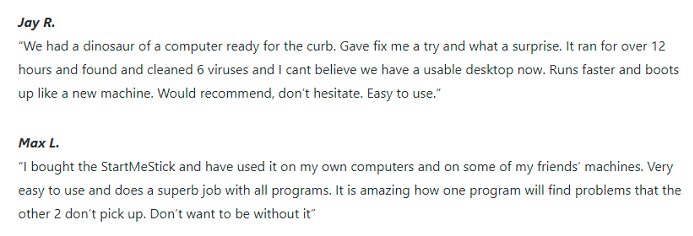
The screenshots below are testimonials FixMeStick publishes; some are about its FixMeStick virus-removal stick, not StartMeStick.


Where to Buy StartMeStick, and How Much Is It?
 FixMeStick sells it directly at fixmestick.com. Its refund policy notes that purchases from other retailers (it names Best Buy, Amazon, and Staples) follow those stores’ policies, not FixMeStick’s.
FixMeStick’s order page listed these plans on November 8, 2026:
| Plan | Price | Shipping |
| 30 Day Trial | $19.99 | Not listed as free |
| 1 Year | $79.99 | $4.95 shown as free |
| 2 Years | $109.99 | $4.95 shown as free |
These are higher than the prices an older version of this page listed ($9.99, $69.99, and $99.99). The 2-year plan works out to about $55 a year. Before you pay for the trial, check what happens when the 30 days end.
Refunds and Renewals
FixMeStick’s refund policy is plain. It says, “we offer a 30-day money-back guarantee on every product.” For StartMeStick, refunds are returnless: “you don’t need to send anything back. Just share the serial code on the side of your device so we can deactivate it.”
Renewal is where buyers run into trouble, so I read that part closely. The policy says “Renewing your subscription is optional” and “Auto-renewal is also optional.” If you turn it on, you get a renewal discount and price protection. Renewals get the same 30-day guarantee, and after that, “we’ll refund the unused portion of your subscription on a pro rata basis.”
So the terms are fair on paper. Given the auto-renewal complaints on Trustpilot, I’d check the setting in your account at app.fixmestick.com right after you order.
Is There a Free Alternative?
Yes, for some people. Google offers ChromeOS Flex, which it says is “provided free of charge” and can be installed on PCs and Macs “using a USB drive.” The difference is that Flex is mainly meant to be installed in place of the computer’s system, while StartMeStick is used only from the stick and leaves Windows untouched. Google also says Flex is “only officially supported on certified models.” If you’re comfortable setting up a computer yourself, I think Flex is worth comparing. If you want something you just plug in, with email and chat support from the maker, StartMeStick is simpler.
StartMeStick Claims Vs What I Found
| Claim | What I found | Where I checked |
| “Don’t buy a new computer.” | True only for web-based tasks; it won’t run your Windows programs. | FixMeStick product page |
| “never slow down, break down, or become infected” | Plausible since nothing you do is saved, but no independent test shown. | FixMeStick product and business pages |
| “Trusted by over 2 million users.” | A company figure, likely across all its products; not one I could check. | FixMeStick site banner |
| “4.2 at Best Buy” | Shown on FixMeStick’s site next to a FixMeStick testimonial, so likely for FixMeStick, not StartMeStick. Trustpilot’s company score is 1.8. | FixMeStick site, Trustpilot |
| Built-in VPN (older version of this page) | No VPN listed on FixMeStick’s current pages. | FixMeStick product and business pages |
Frequently Asked Questions (FAQs)
These answers come from FixMeStick’s and Microsoft’s own pages.
Will StartMeStick Fix a Slow or Broken Computer?
No. FixMeStick says it “doesn’t fix, speed up, or reinstall Windows.” It gives you a separate system to use instead.
Will StartMeStick Remove a Virus?
No. StartMeStick doesn’t remove viruses; that’s what the separate FixMeStick is for. StartMeStick doesn’t write to your computer’s disk, so it gives you a clean system to work in while you sort the problem out.
Does StartMeStick Work on a Mac?
Only on Intel Macs from 2006 to 2017. FixMeStick says “2018 and later systems are not yet compatible.”
What Are the Minimum Requirements?
FixMeStick lists “All PCs made after 2001,” 1 GB of RAM, a USB port, and an internet connection.
Is Windows 10 Really Unsupported Now?
Yes, for most people. Microsoft says that after “October 14, 2025, your computer running Windows 10 will no longer receive security updates.” The exception is its consumer Extended Security Updates program, which Microsoft says “can protect your Windows 10 device till October 12, 2027.”
Is There a Refund If It Doesn’t Work Out?
Yes, within 30 days when bought from fixmestick.com, and you don’t have to mail it back. Store purchases follow the store’s policy.
Who Is the Supplier?
FixMeStick Technologies Inc. makes and sells StartMeStick. The company’s history page says the original FixMeStick was developed in 2011, launched online in 2012, and appeared on the Canadian TV show Dragons’ Den in 2014. Its head office is in Montreal, Quebec, and Trustpilot lists its address as 642 rue de Courcelle. The product page also lists a U.S. patent, No. 11,392,390.
Support Team Contact
Support is by email or chat, and FixMeStick says, “We’re in the office: Monday through Saturday: 10 A.M.-6 P.M. Eastern Time.” You can also reach it at support@fixmestick.com, the address its refund policy gives.
Final Verdict
Yes, if you have an old or unsupported computer and only need it for the web, email, banking, and video calls, without your Windows programs. I gave it 8.0 out of 10 overall for its simple plug-in setup, a clean system each time, unlimited computers per plan, and a returnless 30-day refund. It isn’t higher because it can’t repair Windows or run your programs, it costs $79.99 a year, newer Macs aren’t supported, and the company’s Trustpilot reviews are poor. If you try it, check the auto-renewal setting the day you order.


