
Every morning, my mom had to get up, walk to the window, reach for the chain, and pull it open. Every night, she had to do it again for privacy. It sounds small until you watch someone you love repeat that uncomfortable task every day.
So I started looking for a way to make the shades easier for her. I didn’t want a complicated installation or a full smart-blind setup. I just wanted something simple that could let her control the shades without getting up.
That’s when I found RYSE SmartShade.
It is a retrofit smart shade motor that works with existing beaded-chain shades, letting you open and close them through an app and other smart controls. For me, that meant making one daily routine a little easier, safer, and more comfortable for my mom.
In this RYSE SmartShade review, I’ll share my real experience with setup, app control, SmartBridge, pros, cons, and whether it’s worth buying.
RYSE SmartShade is a retrofit smart shade motor that turns compatible beaded-chain shades into motorized smart shades. Instead of replacing the whole shade, it attaches to the existing chain and moves the shade for you.
- Easy smart shade upgrade
- App and voice control
- Schedules control save time
- Can be pricey
Quick Verdict
RYSE SmartShade is worth considering if you already have compatible beaded-chain shades and want smart control without replacing the entire window covering. It is less ideal if you want a completely silent, hub-free, or low-cost setup for multiple windows.
RYSE SmartShade at a Glance
Before getting into my full RYSE SmartShade review, here’s the quick version of what this device does, who it makes the most sense for, and what you should know before buying it.
| Feature | Details |
| Product type | Retrofit smart shade motor |
| Main use | Motorizing beaded-chain shades |
| Control options | Buttons, app, SmartBridge-enabled smart-home control |
| Power options | Plug-in or BatteryPack |
| Battery life | 3–6 months per charge, depending on use |
What Is RYSE SmartShade?
RYSE SmartShade is a retrofit smart shade motor that turns compatible beaded-chain shades into motorized smart shades. Instead of replacing the whole shade, it attaches to the existing chain and moves the shade for you.
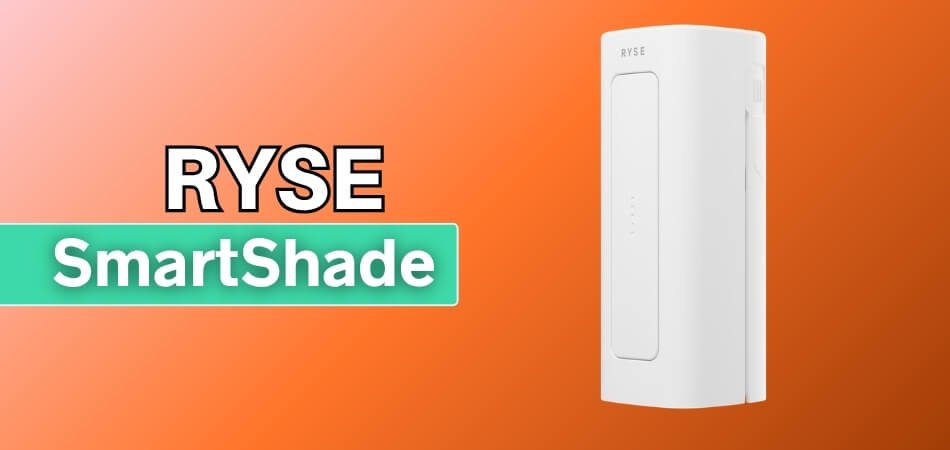
With RYSE SmartShade, the shade can be controlled in a few ways:
- Physical buttons: Open or close the shade directly from the device.
- RYSE app: Control the shade from your phone.
- SmartBridge: Adds more smart-home features.
- Voice assistants: Available with the right SmartBridge setup.
The important thing to understand is that RYSE SmartShade is not a full smart blind system. It is an upgrade for the shades you already own. If your shade uses a compatible looped beaded chain, RYSE SmartShade can motorize it without changing the shade itself.
My RYSE SmartShade Setup: What I Tested It With
Before getting into installation, I want to explain my setup because RYSE SmartShade is not a one-size-fits-all product. Your experience can depend on the type of shade you have, how smooth the chain feels, and whether you use the basic app setup or add SmartBridge.
Here’s the setup I tested:
- Product tested: RYSE SmartShade.
- Shade type: Existing window shade.
- Chain type: Beaded chain.
- Main goal: Easier daily shade control.
- Primary user: My mom.
- Control method tested: App control.
- Installation type: Retrofit setup.
- Shade replacement: No.
What I liked about this setup was that it did not change the actual shade. The window still looked familiar, but the daily routine became easier. For my mom, that was the point. I was not trying to build a flashy smart-home setup. I just wanted to remove one small task she had to repeat every day.
Check Compatibility Before Buying RYSE SmartShade
Before buying RYSE SmartShade, check whether your current shade uses a compatible looped beaded chain. This product is not made for every blind, curtain, or window covering, so compatibility is the first thing to confirm.
RYSE SmartShade works best when the existing shade already moves smoothly by hand. If the chain feels stiff, uneven, or difficult to pull, adding a motor may not solve the problem.
Here are the main things to check:
- Chain Style: Your shade should use a looped beaded chain.
- Chain Movement: The chain should move smoothly when pulled by hand.
- Chain Tension: The chain should not feel too loose or too tight.
- Connectors Or Stoppers: Bulky pieces on the chain may interfere with movement.
- Shade Condition: The shade should not feel stuck, uneven, or hard to lift.
- Power Setup: Choose between a plug-in setup or the BatteryPack version.
The simple rule is this: If your shade already works smoothly, RYSE SmartShade has a much better chance of working well.
RYSE SmartShade Installation: My Setup Experience
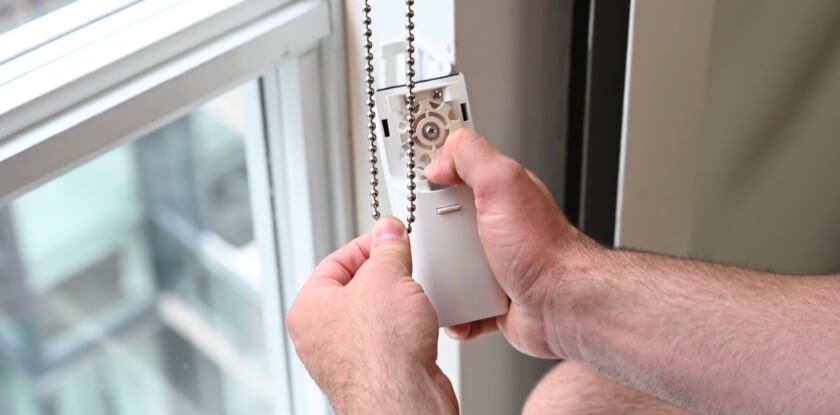
RYSE SmartShade installation is fairly simple if your existing shade uses a compatible beaded chain and moves smoothly by hand. The setup mainly involves mounting the device, fitting the chain, connecting the app, and setting the open and close limits.
For me, the installation felt more mechanical than technical. The app setup mattered, but the chain position and shade movement mattered more.
- Mounting the Device: The unit needs to sit close enough to the chain so it can pull straight without twisting or rubbing.
- Fitting The Chain: The beaded chain has to sit properly inside the motor so it moves smoothly without slipping, skipping, or getting stuck.
- Checking Chain Tension: The chain should feel balanced before testing, because too much slack or tightness can affect how smoothly the shade moves.
- Connecting The App: The RYSE app helps connect the device, control the shade, and guide the basic setup after powering it on.
- Setting Shade Limits: You need to set the open and closed positions so the motor knows exactly where the shade should stop.
- Testing Shade Movement: The first full test shows whether the chain alignment, motor pull, and open-close limits are working correctly together.
- Making Small Adjustments: If the shade pulls unevenly or stops too early, small changes to chain position or app limits may be needed.
Overall, I would describe the installation as DIY-friendly, but not completely hands-off. If the shade already works smoothly, RYSE SmartShade is much easier to set up.
How To Use RYSE SmartShade
RYSE SmartShade is used by attaching it to a compatible beaded-chain shade, connecting it through the RYSE app, and controlling the shade with buttons, app controls, or smart-home features, depending on your setup.
Once installation is done, using it is simple. The device handles the chain movement, so you do not need to pull the shade manually every time.
Here is the basic use process:
- Use The Buttons: Press the physical buttons on the device to move the shade directly.
- Use The RYSE App: Open the app to raise, lower, or adjust the shade from your phone.
- Set The Limits: Choose the fully open and fully closed positions during setup.
- Adjust The Position: Move the shade to a partial position when you only want some light or privacy.
- Add SmartBridge: Use SmartBridge for schedules, remote access, grouping, and smart-home control.
- Use Voice Control: With SmartBridge, connect to Alexa, Google Home, or Apple HomeKit for hands-free control.
For everyday use, the easiest method depends on the situation. The buttons are best when someone is already near the window. The app is better when sitting across the room. SmartBridge makes the most sense when you want automation or voice control.
Daily Use: What It’s Like Living With RYSE SmartShade
After the setup, the real question was simple: would RYSE SmartShade actually make daily life easier, or would it feel like an extra gadget to manage?
For my mom’s routine, the biggest improvement was convenience. Instead of getting up every morning and night to pull the shade chain, she could control the shade from the app. That made the product feel less like a flashy smart-home device and more like a small comfort upgrade.
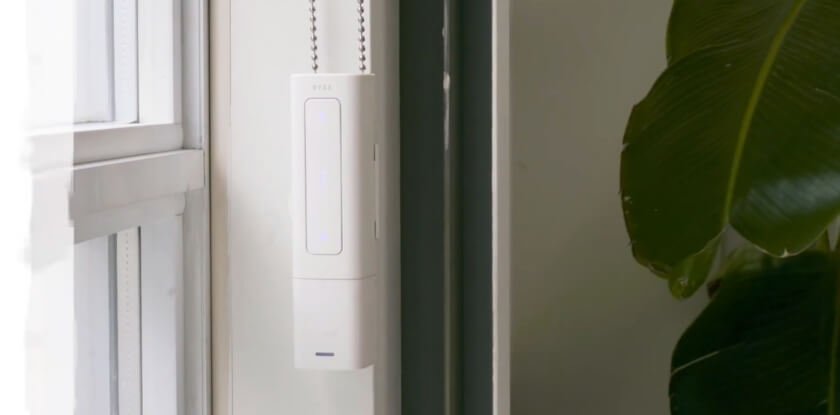
In daily use, RYSE SmartShade is mainly about three things:
1. Less Manual Effort
The main benefit is not complicated. It removes the need to walk over to the window and pull the chain every time the shade needs adjusting.
2. Easier Privacy Control
At night, closing the shade becomes easier and more consistent. That matters if the shade is part of someone’s daily privacy routine.
3. More Control From One Place
Being able to adjust the shade from a phone makes the window easier to manage, especially when standing up repeatedly is uncomfortable.
From an everyday-use perspective, RYSE SmartShade makes the most sense when the shade is something you already adjust often. If you only touch a shade once in a while, the upgrade may feel less essential. But if opening and closing the shade is part of your daily routine, the convenience becomes easier to appreciate.
RYSE SmartShade App Control
The RYSE app is where the product starts to feel more like a smart-home upgrade. Once the device is connected, the app lets you control the shade without touching the chain, which was the main thing I wanted for my mom.
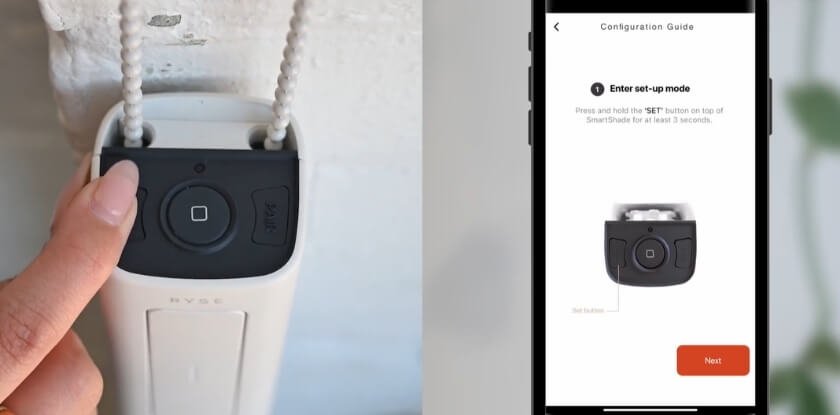
Instead of making this section too technical, I would explain the app experience around what actually matters in daily use.
What The App Adds
- App Control: Open or close the shade from the phone when connected through the RYSE app.
- Position Adjustment: The app makes it easier to move the shade to the level you want instead of only fully open or closed.
- Setup Guidance: During setup, the app helps connect the device and set the open and close limits for the shade.
- Routine Potential: With the right setup, the app can become part of a morning, evening, or privacy routine.
- Less Chain Pulling: The biggest benefit is simple: fewer trips to the window and less manual pulling throughout the day.
My App Experience
For my use case, app control was the feature that made RYSE SmartShade feel worth paying attention to. The device itself motorizes the shade, but the app is what makes it easier for someone to control the shade without getting up.
Physical Button Control: A Small Feature That Matters
RYSE SmartShade includes physical buttons, which means the shade is not locked behind the app. You can still open or close it directly from the device.
That matters more than I expected.
- The app is better when you are sitting down, helping someone from across the room, or setting the shade without walking to the window.
- The buttons are better when you are already near the window, your phone is not nearby, or someone else wants to adjust the shade quickly.
This made the product feel less intimidating for my mom. She did not have to think, “Where is my phone?” every time she wanted to move the shade. If she were nearby, the button was right there.
I also liked this because it makes RYSE SmartShade easier for other people in the house. A guest or family member does not need the app, an account, or smart-home access just to open or close the shade.
Scheduling And Automation: Where It Starts Feeling Smarter
RYSE SmartShade becomes more useful when you can automate repeated shade movements, like opening in the morning or closing at night. For my mom, that kind of routine was the whole reason the product made sense.
Instead of treating the shade like something she had to remember, automation makes it part of the day’s rhythm.
The Automation Use Case
- Morning: Open it from the app instead of walking over and pulling the chain.
- Daytime: Lower it when sunlight gets too strong, or the room starts heating up.
- Evening: Close it for privacy without adding another task to the night routine.
Why This Matters
For a normal smart-home setup, scheduling may feel like a nice extra. But in my case, it felt more practical than that. The value was not just “smart control.” The value was reducing a repeated movement my mom had to do every day.
Voice Control And Smart Home Use
RYSE SmartShade needs RYSE SmartBridge for full smart-home control with voice and automation. Without it, the device feels more like an app-controlled shade motor than a complete smart-home product.
With SmartBridge, you get access to features like:
- Alexa Control: Use voice commands through Amazon Alexa.
- Google Home Control: Connect RYSE SmartShade with Google Home routines.
- Apple HomeKit Control: Add it to an Apple smart-home setup.
- Remote Access: Control it when you are away from home.
- Grouped Control: Manage multiple RYSE SmartShade units together.
- Automation Routines: Create morning, daytime, or evening shade schedules.
Voice control removes another step for my mom. She does not always need to open the app or walk to the window. She can use the smart-home setup to control the shade more easily.
RYSE SmartShade Noise, Speed, And Reliability
RYSE SmartShade is convenient for daily shade control, but it is not completely silent or instant. It works best when the existing beaded-chain shade moves smoothly, and the chain stays properly aligned.
Noise
The motor is noticeable when it runs. I would not call it painfully loud, but it is not silent either. In a living room, that may not matter much. In a quiet bedroom early in the morning, it matters more.
Speed
RYSE SmartShade is not something I would describe as fast. It moves at a steady pace, which is fine for normal use. Since I was using it for convenience rather than speed, that did not bother me much.
Reliability
Reliability depends a lot on the original window setup. If the beaded chain sits properly and the shade moves smoothly, the experience feels much better. If the chain slips, pulls unevenly, or the shade already feels stiff, the motor has a harder job.
For my mom’s use, the convenience mattered more than speed or silence. The real benefit was reducing how often she had to walk over and pull the chain herself.
Is RYSE SmartBridge Worth Adding?
RYSE SmartBridge is worth adding if you want RYSE SmartShade to work beyond basic app and button control. It is not essential for every buyer, but it matters if you want the device to feel like part of a real smart-home system.
For a single window, basic control may be enough. But for a daily-use setup, especially for my mom, SmartBridge makes more sense because it reduces how often she has to manage the shade manually.
Best Way To Decide
- Skip SmartBridge if: You only want simple control for one RYSE SmartShade unit.
- Add SmartBridge if: You want automation, voice control, remote access, or smart-home integration.
- Think twice if: You are trying to keep the total cost as low as possible.
My Take
I would not call SmartBridge mandatory for everyone. But if the reason you are buying RYSE SmartShade is convenience, routines, or easier control for someone else, SmartBridge becomes much easier to justify.
What I Liked About RYSE SmartShade
The thing I liked most about RYSE SmartShade is that it solved a real problem without forcing a full window upgrade. For my mom, that mattered more than having the most advanced smart-home setup.
The Biggest Positives
- No Full Shade Replacement: Upgrades the existing window shade without replacing the whole setup.
- Easier Daily Control: Makes opening and closing the shade less repetitive for my mom.
- Helpful For Routine Use: Morning light and evening privacy become easier to manage.
- App Control: Phone control makes the product feel practical in daily use.
- Physical Buttons: Buttons keep control simple when the app is not needed.
- Hard-To-Reach Windows: Works well where pulling the chain feels inconvenient.
- Smart-Home Potential: SmartBridge adds more value through automation and voice control.
My Favorite Part
For me, the best part was not the “smart” label. It was the fact that one small daily task became easier for my mom. That is where RYSE SmartShade felt most valuable.
What I Didn’t Like About RYSE SmartShade
RYSE SmartShade is useful, but it is not the kind of product I would recommend blindly. The experience depends a lot on your existing window setup, and there are a few things I would want buyers to know first.
Where It Falls Short
- Compatibility Matters: Works best with the right beaded-chain shade setup.
- SmartBridge Adds Cost: Full smart-home features may require an extra accessory.
- Some Motor Noise: Not silent, but still manageable for everyday use.
- Setup Needs Adjusting: Chain alignment and calibration may take a little patience.
- Multiple Windows Add Up: Automating several windows can get expensive quickly.
My Honest Take
The biggest downside is not one single flaw. It is that RYSE SmartShade works best under the right conditions. If your shade is compatible, smooth, and worth keeping, the product makes sense. If not, the limitations become much harder to ignore.
RYSE SmartShade vs Full Smart Blinds vs Curtain Bots
RYSE SmartShade is not the only way to automate window coverings, but it fits a very specific category. It is best compared against full smart blinds and curtain bots, because each option solves a different problem.
| Option | Best For | Main Advantage | Main Trade-Off |
| RYSE SmartShade | Existing beaded-chain shades | Keeps the shades you already have | Compatibility matters |
| Full Smart Blinds | New window setups | Cleanest built-in look | Higher replacement cost |
| Curtain Bots | Curtains on rods or tracks | Easy curtain automation | Not made for chain shades |
| Budget Motorized Shades | Starting from scratch | Simple all-in-one option | May not match current decor |
RYSE SmartShade is best for upgrading existing beaded-chain shades, while full smart blinds are better for new setups, and curtain bots are better for curtains.
Who Should Buy RYSE SmartShade?
RYSE SmartShade makes the most sense for people who already have shades they like and want to make them easier to control. It is not for every window setup, but for the right person, it solves a very specific daily problem.
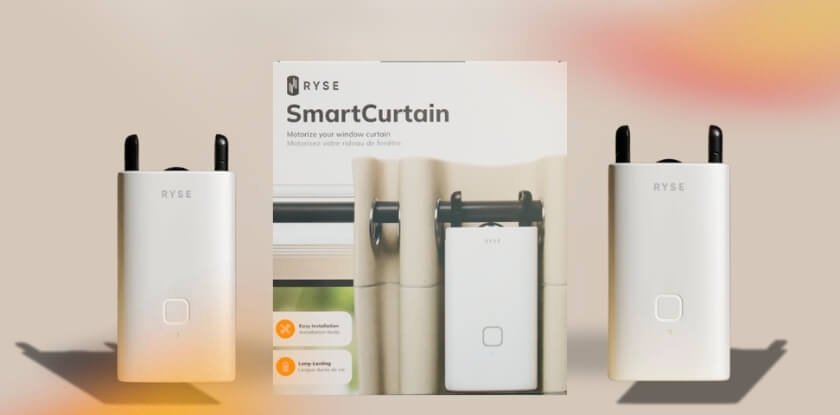
Buy RYSE SmartShade If You…
- Have Beaded-Chain Shades: Your current shades use a compatible looped beaded chain.
- Want To Keep Your Existing Shades: You like your current window covering and do not want to replace it.
- Need Easier Daily Control: Opening and closing the shade feels repetitive, uncomfortable, or inconvenient.
- Care About Privacy Routines: You want an easier way to manage morning light and nighttime privacy.
- Have Hard-To-Reach Windows: The chain is awkward to reach or annoying to pull manually.
- Want Smart-Home Control: You plan to use SmartBridge for automation, voice control, or routines.
Skip RYSE SmartShade If You…
- Use A Different Shade Type: Your blinds or curtains do not use a compatible beaded chain.
- Want A Built-In Look: Full smart blinds may look cleaner and more seamless.
- Need Several Low-Cost Units: Automating many windows can raise the total cost.
- Dislike Extra Accessories: SmartBridge may be needed for the best smart-home experience.
RYSE SmartShade is best for people who want to upgrade existing beaded-chain shades instead of replacing them.
RYSE SmartShade Price, Discount, And Value
Price is where RYSE SmartShade needs a little context. It is not the cheapest smart-home upgrade, but it can make more sense than replacing shades you already like. At the time of writing, the offer page shows bundle savings, with the biggest package offering up to 40% off.
| Package | Offer | Current Price | Savings |
| 1 RYSE SmartShade | Single unit | $199.99 | Save $20 |
| 2 RYSE SmartShades | Buy 1, Get 1 50% Off | $329.99 | Save $109.99 |
| 3 RYSE SmartShades | Buy 2, Get 1 Free | $439.98 | Save $219.99 |
| 5 RYSE SmartShades | Buy 3, Get 2 Free | $659.97 | Save $439.98 |
The offer page also shows free shipping on each package, along with monthly payment options through Klarna, Affirm, and Afterpay.
For my mom’s setup, I would not judge the value only by the price tag. One unit made sense because it solved a real daily problem without replacing the whole shade. The larger bundles are more useful if you already know you want to automate several windows.
Where To Buy RYSE SmartShade
I bought RYSE SmartShade through the official offer page because it kept the package details, shipping terms, and buyer information in one place. Since pricing and bundle deals can change, that felt like the safest place to check the current offer before ordering.
My recommendation is to buy from the official offer page instead of a random third-party listing. With a product like this, compatibility, package details, warranty, and return terms matter, so it is better to order from a page that clearly explains what is included.
Before checkout, check three things:
- Package Quantity: Make sure the order includes the number of units you actually need.
- Buyer Terms: Review the warranty, return policy, and shipping details before paying.
- Current Offer: Confirm the latest bundle deal or discount, since promotions may change.
I also recommend starting with one unit if you are unsure about compatibility. Once you know it works well with your shade setup, the larger bundles make more sense for multiple windows.
Is RYSE SmartShade Worth It?
RYSE SmartShade is worth it if you already have compatible beaded-chain shades and want easier control without replacing the whole window covering. The value is strongest when the shade is part of a daily routine, like morning light, glare control, or nighttime privacy.
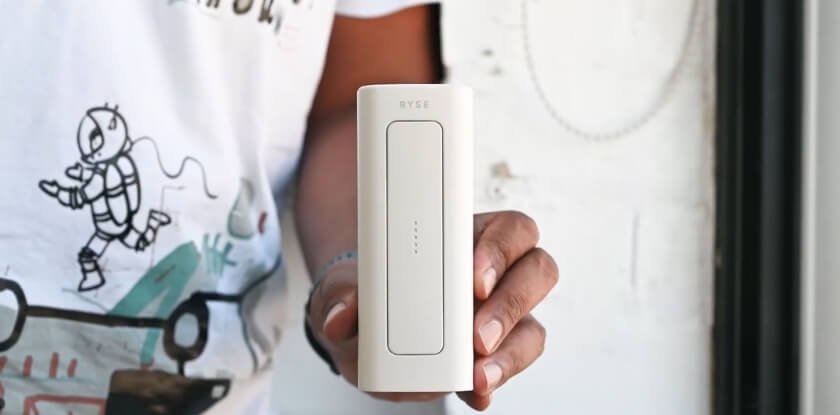
For me, the product made sense because I was not trying to build a fancy smart-home setup. I wanted to make one repeated task easier for my mom. From that angle, RYSE SmartShade felt useful because it upgraded something she already used every day.
The value is highest when:
- Your Existing Shades Are Worth Keeping: RYSE SmartShade makes more sense when you already like the window covering you have.
- The Chain Setup Is Compatible: A smooth beaded-chain setup gives the product a much better chance of working well.
- Daily Control Feels Inconvenient: The upgrade feels more valuable when opening and closing the shade is already part of your routine.
- You Want More Than Manual Control: App control, automation, and SmartBridge support can make the setup feel more complete.
It may feel less worth it if you are trying to automate many windows cheaply, avoid all extra accessories, or replace your window coverings anyway.
Final Recommendation
My RYSE SmartShade review comes down to this: I would recommend it if you already have compatible chain-operated shades, want app or smart-home control, and do not want to replace the whole setup. I would think twice if your shades are not compatible, you need to automate many windows, or you want the cleanest built-in smart blind look.
For the right home and the right window, RYSE SmartShade is a practical upgrade that makes regular shades feel much more modern.
RYSE SmartShade FAQs
Before buying a product like this, most people are not just asking, “Does it work?” They want to know whether it will work for their window, their routine, and their budget. These are the questions I would ask before buying RYSE SmartShade.
Will RYSE SmartShade Work With My Current Shades?
RYSE SmartShade is mainly for shades that use a looped beaded chain. If your window covering uses a wand, cord, pull tab, or curtain track, this is probably not the right product.
What Should I Check Before Ordering?
Check the chain type, chain movement, available wall space near the chain, outlet location, and whether the shade already moves smoothly by hand.
Can Someone Use It Without Being Tech-Savvy?
Yes. App control is useful, but the physical buttons keep it simple for someone who does not want to rely on a phone every time.
Is It Worth Buying For Just One Window?
Yes, especially if that window gets used every day or feels inconvenient to reach. For a rarely used window, the value is harder to justify.
Will It Make The Room Look Messy?
The device is visible, so it will not look as invisible as built-in smart blinds. The BatteryPack setup usually looks cleaner than running a cable down the wall.
What Happens If The App Is Not Working?
You can still use the physical buttons on the device. That makes it feel more reliable than a product that depends completely on the app.
Should I Buy SmartBridge Right Away?
Not always. Start without it if you only want basic control for one window. Add SmartBridge if you want the setup to feel more automated and connected.
What Is The One Thing I Would Check First?
I would check whether the existing shade moves smoothly by hand. If the chain already feels stiff, uneven, or frustrating, fix that before adding RYSE SmartShade.
RYSE SmartShade is a retrofit smart shade motor that turns compatible beaded-chain shades into motorized smart shades. Instead of replacing the whole shade, it attaches to the existing chain and moves the shade for you.
- Easy smart shade upgrade
- App and voice control
- Schedules control save time
- Can be pricey


