
Disclosure: This review contains affiliate links. I may earn a commission if you buy through them, at no extra cost to you. Written by Michael Montoya. Last updated: November 8, 2026.
Many people keep their most sensitive files in the least secure places: a tax return on the desktop, passwords in a notebook, a scan of a passport in an email folder. An ordinary USB stick doesn’t help much, because anyone who picks it up can open it.
Omni DataSafe is a USB drive with a built-in number keypad. The offer page calls it “a revolutionary new encrypted USB drive that uses unbreakable AES-256 military grade encryption and a physical keypad to keep your sensitive data 100% safe and secure.” I wanted to see what that promise covers, what’s missing from the page, the real price, and who it’s for. I went through the offer page and its reviews, read the NIST page for the AES standard and CISA’s advice on backups, and checked Trustpilot and the BBB.

A PIN-keypad USB drive with AES-256 encryption and organizing software for wills, medical and financial files. A sensible secure copy for families; keep a backup and ignore the unbreakable marketing.
- PIN keypad on the drive
- AES-256 encryption
- Locks when unplugged
- Organizing software included
- $79, bundles from about $59 each
- Unbreakable claims overstate it
- Storage size and PIN recovery not listed
- No certification shown
- One drive is one copy
- No Trustpilot or BBB record
Quick Verdict On Omni DataSafe
Omni DataSafe is a PIN-protected encrypted flash drive with included organizing software. You unlock it on the keypad before your computer can read it, which is a real step up from a plain USB stick for things like wills, medical files and password lists. At $79 for one, with a 30-day money-back guarantee, it’s a reasonable buy for families and retirees.
The catch is the marketing. “Unbreakable,” “100% safe” and “literally impenetrable” aren’t claims any security product can honestly make, and the page doesn’t list a storage size, a certification or what happens if you forget the PIN. A single drive is also a single point of failure: CISA calls regular backups “a critical part of your cybersecurity strategy.” I’d use it as one secure copy, not the only copy.
What is Omni DataSafe?
Omni DataSafe is a flash drive with a numeric keypad on its body. The offer page says, “The only way to unlock and access the data is by entering your unique PIN on the device.” It works with “MAC, WINDOWS, & LINUX,” per the page.

It also comes with software. The page says each device “comes with built-in software that lets you easily navigate and access your most important data with features like bill tracking, asset management, estate planning, password management, and more.”
The page says Omni DataSafe is “owned and operated in Colorado, USA,” and that it was created by “Mark Oman, the founder of Prairie IT,” who “retired from a 45-year career in Silicon Valley.” It describes the drive as a way for people “of retirement age” to keep a will, medical documents and financial information safe.
How Does It Work?
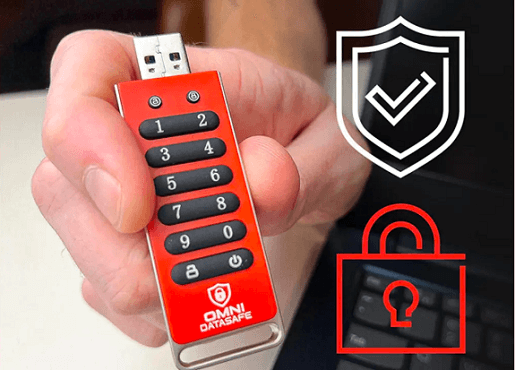
The offer page gives three steps: “Plug in Omni DataSafe,” “Drag your private files to DataSafe,” and “Your data is automatically encrypted the moment you remove DataSafe!”
The keypad does most of the work. The page says your data “is automatically transformed into an unreadable format,” and that you unlock it by entering your PIN on the drive itself. So, by design, the PIN isn’t entered through the computer’s keyboard, which is the main idea behind keypad drives.
The encryption is AES-256. NIST’s page for the AES standard says the Rijndael cipher was chosen as the Advanced Encryption Standard, and “Three members of the Rijndael family are specified in this Standard: AES-128, AES-192, and AES-256.” So the name refers to a real, widely used standard. What the offer page doesn’t say is whether this specific drive’s implementation has been independently tested or certified.
The Features of Omni DataSafe
These are the features the offer page and the brand’s images highlight, with my take on each.
AES-256 Encryption

The page calls it “the same ultra-secure AES-256 encryption trusted by militaries, governments, and banks worldwide.” AES-256 is a strong standard, but “unbreakable” overstates things: security also depends on the PIN you choose and how the drive is built.
Included Software
The page lists “bill tracking, asset management, estate planning, password management, and more.” It doesn’t show screenshots or say whether the software runs the same on Mac, Windows and Linux.
Storage

The page claims “600,000+ Document Capacity,” but doesn’t state the storage size in gigabytes in its visible text. The earlier version of this review said 32 GB, and the page’s source has a “32 GB Storage” option label, but the visible text gives no gigabyte figure, so confirm at checkout.
Transfer Speed

The page promises “lightning-fast transfers.” The brand image labels it USB 3.0 Gen 1. The page gives no speed figures.
Locks When Removed

The page says your data is “automatically encrypted the moment you remove DataSafe!” The seller says it’s a safeguard: if you forget to lock it, unplugging does it for you. The page also says data is changed to “an unreadable format” as soon as you add it, so the exact moment of encryption isn’t clear.
Reset Feature (Unconfirmed)
An older write-up here mentioned a reset feature. The offer page doesn’t describe one, or say what happens after several wrong PIN attempts. Ask the seller before you rely on it.
Custom PIN

You choose your own PIN; the page calls it “your unique PIN.” The page doesn’t say how long it can be. Longer PINs are harder to guess.
File Management

The software is meant to organize documents by category, according to the page. That would suit a family folder for estate papers.
Form Factor
A buyer on the offer page, Sammy L., wrote that “The USB drive and cap are surprisingly heavy metal and sturdy.”
LED Indicators
The same buyer mentioned “the two different LED lights at the top,” and the brand diagram labels a blue LED and a red LED.
30-Day Money-Back Guarantee
The page says, “If for any reason you’re not 100% satisfied with Omni DataSafe, you can easily return it, hassle-free!”
Free Shipping
The page offers “Fast, free shipping on your USA order,” though only the bundles show “FREE SHIPPING” next to them.
Customer Help

The page promises “real humans” who are “quick.” It lists “Support,” “Returns” and “Terms” links at the bottom.
Advantages and Disadvantages of Omni DataSafe
Weighing the offer page against the records I checked, it comes out like this.
Who Should Buy Omni DataSafe?
I think it fits best for people who want one tidy, offline place for the documents a family would need in an emergency.
- Retirees and older parents: the founder story is built around this group, keeping “his will, his medical documents, and financial information” in one place.
- Adult children sharing a parent’s records: the bundles let each sibling keep a copy, as June A. describes.
- People who keep passwords on paper: a PIN-locked drive is a step up from a notebook in a desk drawer.
- Anyone wary of cloud storage: the files stay offline.
I’d skip it if you already use a password manager and an encrypted cloud backup and are happy with them, or if you need large amounts of storage, since the page doesn’t state the capacity in gigabytes.
Omni DataSafe Vs Other Ways To Store Sensitive Files
These are the common alternatives, compared in general terms rather than against any one product.
| Option | Strength | Weak spot |
| Omni DataSafe | Offline, PIN on the drive, organizing software | Specs and certification not listed; one physical copy |
| Plain USB stick | Cheap | Anyone who finds it can open it |
| Password manager | Built for passwords, syncs across devices | Online account; not meant for documents like wills |
| Encrypted cloud storage | Off-site copy, survives a lost drive or a house fire | Depends on your account security |
For most families, I’d combine two of these: a secure drive like Omni DataSafe at home and a second copy somewhere else. That fits CISA’s backup advice, which, although written for businesses, recommends keeping “1 copy stored off-site” as part of its 3-2-1 rule.
Questions To Ask Before You Order
- What’s the storage size? The page gives “600,000+ Document Capacity” but no gigabyte figure in its visible text.
- What happens after wrong PIN attempts? Ask whether repeated wrong PINs erase the drive, since the page doesn’t say what this one does.
- Is there a PIN reset? And if so, does it erase the data?
- Is the encryption certified? The page names AES-256 but no certification.
- Does the software run on your computer? The page says the drive works on Mac, Windows and Linux, but doesn’t say the same of the software.
How to Use Omni DataSafe?

Based on the offer page’s steps:
- Set your PIN: follow the seller’s setup instructions to create a PIN you’ll remember but others won’t guess.
- Plug in: the page’s first step is “Plug in Omni DataSafe.” It doesn’t say whether you enter the PIN before or after plugging in, so check the instructions that come with it.
- Copy your files: “Drag your private files to DataSafe.”
- Unplug to lock: the page says the data is encrypted “the moment you remove DataSafe!”
- Keep a backup: store a second copy somewhere else, such as a second drive in a different place.
Keep a written note of the PIN somewhere safe, apart from the drive. If the PIN is lost and there’s no reset, the files may be lost too; the page doesn’t say.
Does Omni DataSafe Work? Is it Legit/Scam?

It’s a real product sold through a GiddyUp offer page, with a named founder, a Colorado base and a 30-day guarantee. The concept, a hardware-encrypted drive with a keypad, is a recognized type of secure storage.
What I can’t confirm is how well this particular drive is built. There’s no certification listed and no independent test on the page. I also found no Trustpilot profile for omnidatasafe.com or getomnidatasafe.io, and no BBB profile under “Omni DataSafe.” A BBB search for “Prairie IT” found a Prairie IT LLC in Haxtun, Colorado, rated A-, but I couldn’t confirm it’s the same company.
Where it falls down is the sales copy. Phrases like “Unbreakable Security. Period.” and “it’s the ONLY way to be sure your data is safe” promise more than any drive can deliver.
Where Can You Get Omni DataSafe?

The offer page sells it directly. These are the prices I saw in November 2026:
| Package | Price | Retail (per page) | Per drive |
| 1 Omni DataSafe | $79 | $99 | $79 |
| 3 drives (Buy 2, Get 1 Free) | $198 | $297 | $66 |
| 5 drives (Buy 3, Get 2 Free) | $297 | $495 | About $59.40 |
The FAQ says, “We ship all orders within 24–48 hours of receiving them.” The bundles make sense for a family where each adult child keeps a copy, which is how one buyer on the page, June A., describes using them.
What Customers Say About Omni DataSafe?
The earlier version of this review quoted customers I couldn’t trace, so only reviews shown on the offer page appear here.
June A. wrote that when a parent had an accident, “each of my siblings and I had a copy of his data safe so we could help manage things.” Craig W. wrote that a family member “sent me this product as a way to up my security game” after finding passwords kept in a notebook. George D. wrote, “even a tech newbie like me knows a keypad on a USB is more secure than one without.”
These are chosen by the seller. I found no independent reviews on Trustpilot or the BBB to compare.
Claims Vs What I Found
| Claim | What I found |
| “unbreakable AES-256 military grade encryption” | AES-256 is a NIST standard; “unbreakable” isn’t a claim any product can guarantee. |
| “keep your sensitive data 100% safe and secure” | No certification or independent test shown. |
| “AUTOMATIC BACKUPS Saves data without prompts” | Not explained; a single drive isn’t a backup of itself. |
| “600,000+ Document Capacity” | No storage size in gigabytes in the visible text. |
| “it’s the ONLY way to be sure your data is safe” | CISA stresses regular backups as part of a broader strategy. |
I checked these on the offer page, NIST, CISA, Trustpilot and the BBB in November 2026.
Frequently Asked Questions
These are the questions I’d want answered before ordering, with what the offer page says.
What Should You Do If Your Omni DataSafe Is Lost Or Stolen?
The data should stay encrypted without the PIN, per the page. But a lost drive is a lost copy, so keep a backup elsewhere. If any passwords were stored on it, change them anyway.
Is It Easy For Beginners?
The page says it’s easy “even if you’re not tech-savvy,” and George D. called it “Great for Tech Newbies.” The three steps are plug in, drag files, and unplug.
Can You Back Up Omni DataSafe To Another Device?
The page doesn’t explain how. You can copy files from the unlocked drive to a second secure drive. CISA lists regular backups as a basic security habit.
Does Omni DataSafe Store Data Online?
No. The page says “your data is stored offline on the drive,” which avoids cloud breaches but also means there’s no automatic online copy.
Does It Work On Mac, Windows And Linux?
The page says it’s “Instantly Compatible” with “MAC, WINDOWS, & LINUX.” Check whether the included software runs on your system, since the page doesn’t say.
Is Omni DataSafe A Good Gift?
The page pitches it as “Great For Gifting,” and Craig W. got one as a gift from a family member. For an older parent who keeps important papers in a drawer, I think it’s a thoughtful one, as long as someone helps set the PIN and the first backup.
How Many Drives Do You Need?
At least two, in my view: one to use and one stored somewhere else as a backup. The three-pack also covers a family where several people need a copy of the same records, at $66 a drive.
Is The Drive Sturdy?
The page says it “Resists wear & tear,” and Sammy L. wrote that the drive and cap are “surprisingly heavy metal and sturdy.” The page gives no drop or water rating.
What If You Forget The PIN?
The page doesn’t say. Ask the seller before you store anything important, and keep your PIN written down somewhere secure.
Final Verdict
Yes, if you want a simple, PIN-locked drive for wills, medical records, financial files and passwords, especially as a family. I gave Omni DataSafe 8.0 out of 10 for its on-drive keypad, AES-256 encryption, the seller’s auto-lock on removal, included organizing software and 30-day guarantee. It isn’t higher because its “unbreakable” marketing overstates any security product, key details like storage size and forgotten-PIN recovery aren’t on the page, and I found no independent reviews. Keep a second copy elsewhere, and write your PIN down somewhere safe.


