
Remembering every detail of a conversation sounds easy until three people start talking, someone assigns a deadline, and another person changes the plan. I appreciate a good conversation, but I also appreciate having the important details written down afterward. Unfortunately, my brain doesn’t come with a convenient search button.
That is what makes Fieldy AI interesting. This small wearable AI note taker captures spoken conversations and turns them into searchable transcripts, summaries, and useful follow-up information. Instead of relying entirely on handwritten notes or a phone recorder, it brings conversation capture and organization into one system.
In this Fieldy AI review, I’ll examine what makes the device useful, how its features work, and where its limitations matter. I particularly like the idea of turning conversations into organized information, but transcription accuracy, privacy, recording restrictions, and ownership costs deserve just as much attention as convenience.
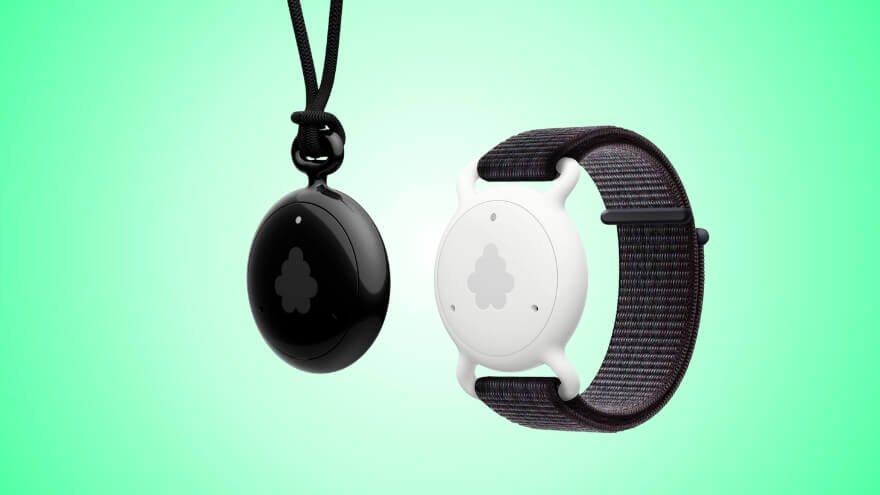
Fieldy AI is a wearable conversation assistant that converts speech into text and organizes information into summaries, tasks, and reminders. It combines a lightweight recording device with mobile and desktop applications, helping users capture details they might otherwise forget.
- Compact, lightweight wearable design
- AI-generated summaries highlight key points, decisions, and useful information
- Up to seven days of typical battery life reduces frequent charging.
- Individual recording sessions are limited to three hours, requiring a new session for longer discussions.
Fieldy AI Quick Verdict: Is It Worth Buying?
Fieldy AI is a wearable AI note taker designed to capture conversations, create searchable transcripts, and organize important details into summaries and follow-up tasks. I appreciate its hands-free convenience, especially for frequent meetings. Despite transcription errors, recording limits, and privacy considerations, it is worth considering for professionals who need reliable access to past conversations.
What Is Fieldy AI and What Does It Do?
Fieldy AI is a wearable conversation assistant that converts speech into text and organizes information into summaries, tasks, and reminders. It combines a lightweight recording device with mobile and desktop applications, helping users capture details they might otherwise forget.
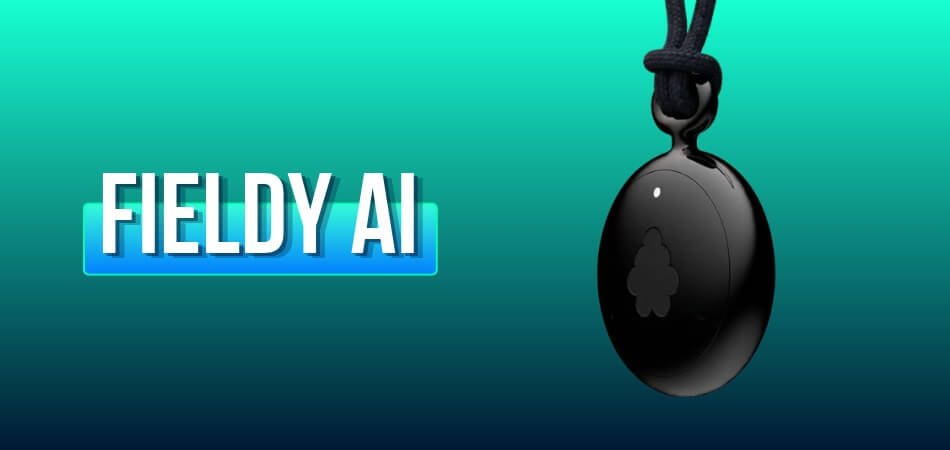
The wearable can be worn as a pendant or attached to a wrist accessory. Its microphone captures speech during an active transcription session, while the companion software organizes the resulting information.
Unlike a traditional audio recorder, Fieldy focuses on what happens after a conversation. Instead of leaving users with a recording they must replay, it provides written information they can search, summarize, and revisit.
That makes it particularly relevant to people handling meetings, interviews, appointments, lectures, and everyday commitments.
Fieldy AI Transcription Accuracy and Real-World Limitations
Fieldy promotes transcription accuracy above 95%, while some earlier product materials present higher figures. These percentages should not be interpreted as guaranteed results in every environment.
Speech recognition depends on several factors:
- Background noise: Loud surroundings can make speech harder to distinguish.
- Speaker clarity: Mumbled words, interruptions, and overlapping conversations can cause mistakes.
- Device placement: Clothing covering the microphone can reduce recording clarity.
- Names and numbers: Unfamiliar terms, figures, and deadlines require particular attention.
The device works best when speech is reasonably clear and the microphone is positioned correctly.
My main consideration is whether the transcript preserves the information that matters, not simply whether it gets most words right. A misplaced comma is usually manageable. An incorrect meeting deadline is another matter entirely.
Fieldy AI can reduce manual note-taking, but important details still deserve a quick review before being used for decisions.
Fieldy AI Features: Transcription, Summaries, Tasks, and Reminders
Fieldy AI combines real-time transcription, AI-generated summaries, action-item extraction, reminders, and conversation search to make spoken information easier to manage.
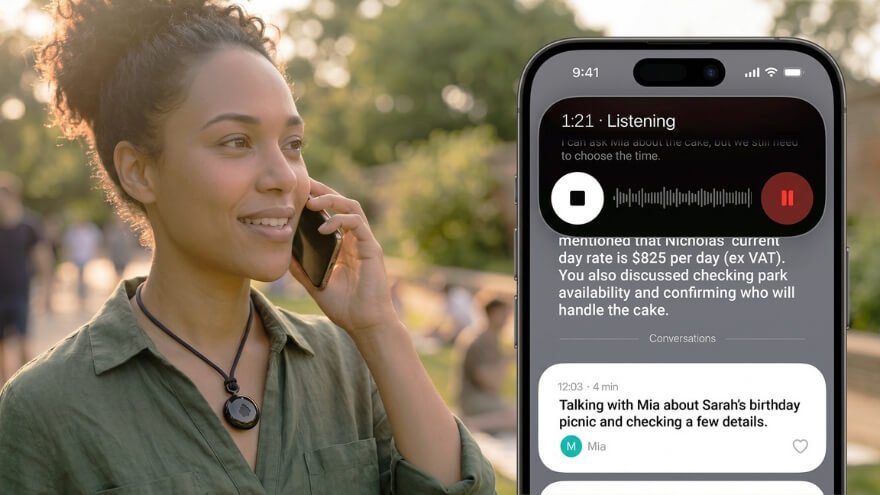
The most useful features work together rather than operating as isolated tools.
Real-Time Conversation Transcription
Fieldy converts speech into written text during an active session. When the wearable is connected to the companion app, users can follow the transcript as the conversation progresses.
Conversations are saved separately, making them easier to review afterward.
The software also identifies different speakers, which helps organize group discussions. Speaker labels are useful, although they should be checked when participants interrupt one another or sound similar.
AI-Powered Conversation Summaries
A complete transcript can contain more information than someone needs for everyday reference.
Fieldy addresses this with summaries that organize important discussion points into a shorter format.
In the mobile app, users open a conversation and select Summarize. They can also choose a suitable summary template.
I appreciate this approach because a useful summary should highlight the important information without requiring someone to read an entire conversation again.
Automatic Tasks and Smart Reminders
Fieldy can identify action items and commitments within conversations.
For example, if a meeting includes an instruction to send a proposal by Friday, the software can identify the task and help organize it for follow-up.
The practical benefit is easier task management, especially when several commitments emerge from a single conversation.
However, an AI-generated task is only useful when it reflects what someone actually agreed to do. Reviewing extracted names, dates, and responsibilities remains important.
Searchable Conversations and AI Chat
Fieldy includes a search function that lets users revisit previously captured information.
Instead of remembering exactly where a detail appeared, users can search for a topic or ask questions about a conversation.
Its AI chat functionality can help locate decisions and explain previously discussed information.
This is one of the features I find most compelling. A searchable conversation history is considerably more useful than a collection of recordings with filenames nobody remembers.
Calendar Connections and Conversation Organization
Fieldy supports Google Calendar and Outlook connections for associating conversations with scheduled events.
These connections can make meeting notes easier to locate alongside the corresponding calendar entries.
Together, these features position Fieldy as more than an AI voice recorder. Its main purpose is to help users retrieve and act on information after conversations end.
Fieldy AI Design, Build Quality, and Technical Specifications
Fieldy AI uses a compact, lightweight wearable design intended for everyday portability. The current Fieldy 3 hardware has a rounded polycarbonate enclosure, a built-in microphone, USB-C charging, and interchangeable wearing accessories.
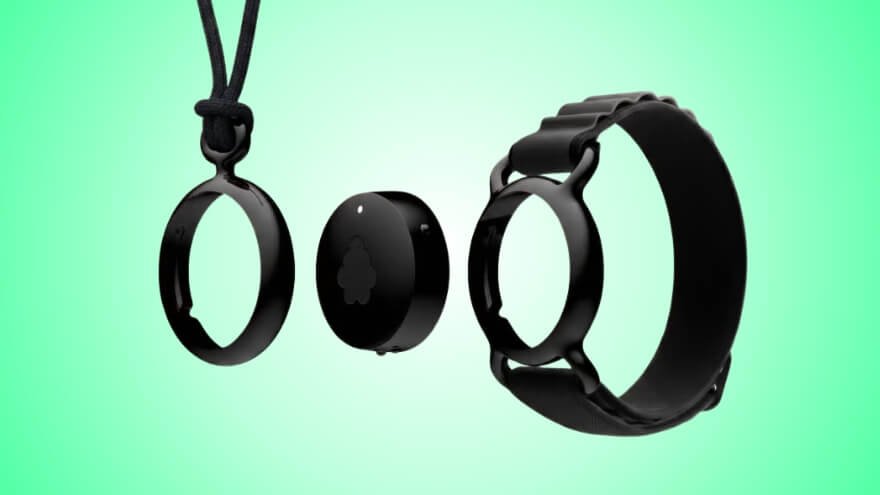
The device avoids the screen-heavy design of many electronic products. Most detailed interactions happen through the companion app.
I like that separation. The wearable handles conversation capture, while the phone handles the more complicated tasks.
Fieldy AI Technical Specifications
| Specification | Details |
| Product type | Wearable AI conversation assistant |
| Current hardware model | Fieldy 3 |
| Dimensions | 29 × 29 × 11 mm |
| Weight | 17 grams |
| Enclosure material | Polycarbonate |
| Microphone | MEMS microphone |
| Connectivity | Bluetooth |
| Charging | USB-C |
| Typical battery life | Up to 7 days |
| Maximum conversation length | 3 hours |
| Offline conversation storage | Up to 3 days |
| Water resistance | IP65 |
| Wearing options | Pendant and compatible wrist accessory |
| Companion software | iOS, Android, Windows, and supported macOS devices |
The physical specifications make Fieldy suitable for users who prefer a small device rather than carrying a separate handheld recorder.
Wearability and Everyday Convenience
Fieldy AI is designed for comfortable, hands-free use, with a compact body and flexible wearing options. Users can wear it around the neck as a pendant or attach it to a compatible wrist accessory, making it easier to capture conversations without holding a separate recording device.
Here are the key design features that support everyday convenience:
- Two Wearing Options: The pendant keeps Fieldy near the upper body, while the wrist accessory provides an alternative for different activities and preferences.
- Twist-Lock Attachment: The mounting system makes it easier to switch between compatible accessories.
- LED Indicators: Built-in lights communicate connection and operating status.
- Vibration Feedback: Haptic alerts provide status notifications without requiring constant attention to the app.
- Lightweight Polycarbonate Body: The compact enclosure supports portability without adding unnecessary bulk.
- IP65 Water Resistance: Protection against dust and water splashes makes Fieldy suitable for everyday situations, including light rain. However, it is not designed for swimming or submersion.
What matters most to me is the combination of portability and flexibility. Being able to switch between pendant and wrist configurations makes Fieldy AI more adaptable to different daily routines. Its compact design is a practical advantage for frequent users, although long-term durability and comfort will depend on actual use.
How Fieldy AI Works: From Conversations to AI-Powered Notes
Fieldy AI works by capturing spoken conversations through its wearable microphone, converting speech into written transcripts, and using artificial intelligence to organize the information into summaries, tasks, and searchable notes. The system combines a wearable recording device with a companion app and AI-powered speech processing, making it easier to turn everyday conversations into useful information.
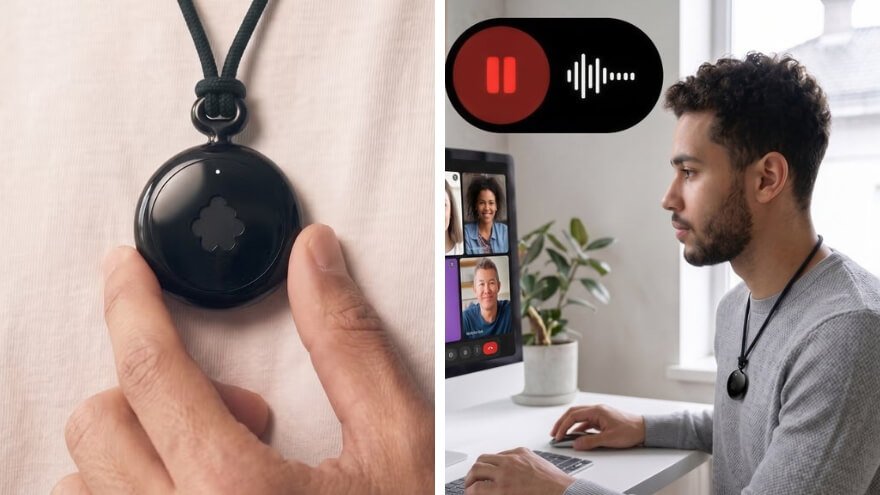
Step 1: Capturing Conversations Through the Wearable Microphone
Fieldy AI uses a built-in MEMS microphone to capture spoken audio during an active recording session. Users can wear the device as a pendant or with a compatible wrist accessory, keeping their hands free while speaking or listening.
The microphone collects speech, while the connected application manages transcription and conversation records. When the phone is temporarily unavailable, Fieldy can store conversation data offline for up to three days and synchronize it after reconnecting.
The important distinction is that the wearable captures the conversation, while the software handles the more advanced information processing.
Step 2: Converting Speech Into Written Transcripts
Fieldy AI uses speech-to-text technology to turn captured audio into readable text. Speech recognition analyzes spoken language and identifies words, allowing conversations to appear as written transcripts.
When Fieldy is connected to the mobile app, users can follow transcription as the conversation progresses. The system also supports speaker identification, helping distinguish contributions from different participants.
However, transcription accuracy depends on speech clarity, background noise, and microphone positioning. Overlapping voices or unfamiliar names can produce errors, so important details should be reviewed.
Step 3: Processing Transcripts With Artificial Intelligence
Once speech has been converted into text, Fieldy’s AI functions analyze the conversation to identify important information.
The software can organize the transcript into several useful outputs:
- Conversation Summaries: Condense longer discussions into key points and decisions.
- Action Items: Identify tasks and responsibilities discussed during conversations.
- Smart Reminders: Help organize commitments that require follow-up.
- Searchable Records: Make previously captured information easier to retrieve.
For example, if someone discusses a project deadline and assigns responsibilities during a meeting, Fieldy can help organize those details into a summary and action items.
The AI interprets the transcript rather than independently knowing what participants intended. This means users should confirm important names, dates, and commitments before acting on them.
Step 4: Searching, Reviewing, and Using Conversation Notes
After processing, Fieldy stores the written conversation records in the user’s account, making them accessible through its companion software.
Users can open individual conversations, review summaries, search for specific information, and use the built-in AI chat to ask questions about previous discussions.
I appreciate this final stage because recording information is only half the job. Being able to retrieve a decision or locate an important commitment later is what makes the complete system useful.
Fieldy AI follows four main stages: capture speech, create a transcript, organize the information with AI, and make it accessible for future reference. This combination of wearable recording and intelligent note organization is its main advantage over a basic voice recorder.
My Experience Using Fieldy AI
What stands out to me about Fieldy AI is its hands-free approach to capturing conversations and organizing important information afterward. Its wearable design and companion app work together to simplify note-taking, especially for people who regularly attend meetings, interviews, or discussions where remembering details matters.
From an everyday usability perspective, three aspects make Fieldy AI interesting:
- Less distraction during conversations: The wearable microphone lets users capture discussions without constantly switching between listening and typing. This can make it easier to stay focused on the conversation.
- Easier access to important information: After a conversation, users can review searchable transcripts and AI-generated summaries instead of replaying lengthy audio recordings.
- Better organization of follow-up tasks: Fieldy can identify commitments, decisions, and action items, helping users keep track of what needs attention.
Where the Everyday Experience Requires Attention
The convenience comes with a few responsibilities. Users need to manage recording sessions, maintain the necessary connections, and review AI-generated information for mistakes. Important names, dates, and deadlines should always be checked before relying on them.
What I appreciate most is the complete conversation-to-notes workflow, not just the recording feature. Fieldy AI brings several useful tools together in one system, making it a practical option for frequent note-takers. Its real value depends on how regularly those tools fit into someone’s daily routine.
How to Use Fieldy AI: Setup, Pairing, and Recording
Using Fieldy AI is straightforward: charge the wearable, connect it to the Fieldy app through Bluetooth, start a transcription session, and review your conversation notes afterward. The companion app handles device pairing, transcription controls, AI summaries, and conversation management.

Follow these steps to set up Fieldy AI and use its main features correctly.
Step 1: Charge Your Fieldy AI Device
Before using Fieldy AI for the first time, connect the wearable to a power source using its USB-C charging cable.
Make sure the device has sufficient battery power before starting a recording session, especially if you plan to capture a lengthy meeting or conversation. Fieldy supports up to seven days of battery life under typical usage conditions, although actual endurance depends on how frequently it is used.
Step 2: Download and Install the Fieldy App
Install the Fieldy companion app on your iPhone or Android smartphone. Open the application and complete the account setup or sign-in process.
The app provides access to your conversation transcripts, AI-generated summaries, reminders, and saved notes. It also manages the connection between your smartphone and the wearable device.
Step 3: Enable Bluetooth on Your Smartphone
Open your phone’s settings and turn on Bluetooth. Keep your smartphone close to the Fieldy device during the initial connection.
Bluetooth allows the wearable to communicate with the companion app and synchronize conversation information. For normal connected use, Fieldy’s recommended Bluetooth range is approximately 30 feet (9 meters).
Important: Pair the wearable through the Fieldy app rather than connecting it directly through your phone’s Bluetooth device list.
Step 4: Turn On the Fieldy AI Wearable
Press and hold the device’s power button for approximately two seconds to switch it on.
Fieldy uses LED indicators and vibration feedback to communicate operating and connection status. Once powered on, the wearable is ready for pairing through the companion application.
Keep the device near your smartphone while completing the connection.
Step 5: Pair Fieldy AI With the Companion App
Open the Fieldy app and select the device-pairing option. Follow the on-screen instructions to find and connect your wearable.
After pairing, confirm that the device appears as connected in the application before attempting your first transcription.
If the connection fails, check that Bluetooth is enabled, the wearable has enough battery power, and the devices are within range. Then repeat the pairing process through the app.
Step 6: Configure Your Preferences and Wear the Device
Once connected, adjust the available language preferences and other relevant settings in the Fieldy app.
You can also create an optional speaker profile to help Fieldy distinguish your voice from other participants.
Next, choose how you want to wear the device. Attach Fieldy to its pendant or a compatible wrist accessory, and secure it properly.
For clearer audio capture, keep the microphone unobstructed and position the device with its logo facing outward. Avoid covering it with thick clothing, as this can affect speech clarity.
Step 7: Start Recording and Transcribing a Conversation
When you’re ready to capture a conversation, open the Fieldy app and select Start Transcribing.
The wearable’s microphone captures spoken audio, and the connected app can display the conversation as written text in real time.
You can continue participating in the discussion while Fieldy handles the transcription. However, clearer speech and limited background noise generally produce more useful results.
Remember to obtain any necessary permission before recording other people.
Step 8: Stop the Recording and Save Your Conversation
When the discussion ends, return to the Fieldy app and select End Transcribing.
Fieldy saves the conversation and processes the resulting transcript and conversation title, making the information available for later review.
Each individual recording session supports a maximum duration of three hours. For longer discussions, users need to begin another session after the previous one ends.
Stopping the recording when it is no longer needed also helps prevent unnecessary conversation capture.
Step 9: Review Transcripts, Generate Summaries, and Organize Tasks
Open your saved conversation in the Fieldy app to review the written transcript.
From there, you can use its AI features to organize the information:
- Generate a Summary: Select the summarization option to create a shorter overview of the conversation.
- Review Important Details: Find key decisions, discussion points, and other relevant information.
- Identify Action Items: Check tasks and commitments extracted from the conversation.
- Use Smart Reminders: Organize follow-up responsibilities when applicable.
- Search Previous Conversations: Retrieve information without manually reading every transcript.
I especially appreciate this part of the workflow because it turns recorded conversations into information that can be used later. Still, important names, numbers, and deadlines should be checked before relying on AI-generated notes.
Step 10: Access Fieldy AI on Your Computer
Fieldy also offers a desktop application for Windows and supported Apple Silicon Macs.
Install the compatible desktop app and sign in using the same Fieldy account to access synchronized conversation records.
The desktop software supports reviewing transcripts, searching previous conversations, using AI chat, and handling compatible online-meeting transcription workflows.
One important limitation: Fieldy’s desktop application does not support capturing meeting audio played through headphones. Users who depend on headphones during online meetings should account for this restriction when choosing their recording setup.
Fieldy AI’s overall workflow is designed to be simple: connect the wearable, start transcription, capture the conversation, and organize the resulting notes. For everyday users, the biggest advantage is being able to focus on the discussion while keeping important information accessible afterward.
Fieldy AI Battery Life, Recording Limits, and Offline Features
Fieldy AI offers up to seven days of battery life under typical usage conditions, supports recording sessions of up to three hours, and can temporarily store conversations offline for up to three days. These features make the wearable suitable for everyday meetings and conversations, although battery endurance, recording duration, and offline storage serve different purposes.
Fieldy AI Battery and Recording Specifications
| Feature | Operating Limit | Practical Benefit |
| Battery life | Up to 7 days | Fewer charging interruptions during typical use |
| Recording duration | Up to 3 hours per session | Suitable for many meetings, interviews, and discussions |
| Offline storage | Up to 3 days | Temporarily saves conversations without a phone connection |
| Bluetooth range | Approximately 30 feet (9 meters) | Allows connection to a nearby smartphone |
| Charging method | USB-C | Convenient charging using a compatible power source |
Fieldy AI Battery Life and Charging
Fieldy AI is designed to provide up to seven days of battery life on a single charge under typical usage conditions. This reduces the need for daily charging and makes the wearable more convenient for people who frequently capture conversations.
The device uses USB-C charging, allowing users to recharge it with a compatible charging cable and power source.
However, the seven-day figure refers to typical battery endurance, not seven days of continuous recording. Actual battery performance depends on how often the microphone is used, recording duration, and other operating conditions.
I appreciate the longer battery rating because a wearable note taker should be ready when an important conversation begins, not constantly searching for the nearest charging cable.
Fieldy AI Recording Duration and Session Limits
Fieldy AI supports individual recording sessions lasting up to three hours. This provides enough recording time for many business meetings, interviews, lectures, and professional discussions.
When a session reaches the three-hour limit, Fieldy stops and saves the conversation. Users can start another session if they need to continue capturing information.
For longer conferences or workshops, this means recording sessions must be managed rather than relying on uninterrupted all-day transcription.
The distinction is important: Fieldy’s battery may last several days, but each individual conversation has its own recording limit.
Fieldy AI Offline Recording and Conversation Storage
Fieldy AI can temporarily store conversation data for up to three days when the smartphone is unavailable or disconnected. This allows users to capture information without maintaining a constant Bluetooth connection.
Once the device reconnects to the companion app, the stored conversation information can synchronize for further processing and organization.
However, offline recording and online AI processing are not the same. Functions such as AI-generated summaries, conversation search, and intelligent chat depend on the relevant software and internet connectivity.
I find offline storage particularly useful for situations where keeping a phone connected throughout a conversation is inconvenient. Still, synchronizing saved information regularly is important to avoid exceeding the temporary storage period.
Overall, Fieldy AI offers a practical combination of extended battery endurance, manageable recording sessions, and temporary offline storage. Its convenience is strongest when users understand these operating limits and plan longer conversations accordingly.
What I Like Most About Fieldy AI
What I like most about Fieldy AI is how it combines hands-free conversation recording, searchable transcripts, and AI-powered task organization in one wearable system. Instead of simply saving conversations, it helps users turn spoken information into organized notes and useful follow-up actions. Three features stand out to me because they address common challenges with traditional note-taking.

Hands-Free Recording That Keeps Conversations Natural
Fieldy AI’s compact wearable design allows users to capture conversations without holding a phone or separate recording device. It can be worn as a pendant or attached to a compatible wrist accessory, providing flexibility for meetings, interviews, and everyday discussions.
What I appreciate most is the opportunity to stay focused on a conversation instead of constantly switching between listening and typing. For professionals who attend frequent meetings, this hands-free approach can make capturing information more convenient and less distracting.
Searchable Transcripts That Make Information Easy to Find
Fieldy AI converts conversations into searchable transcripts, allowing users to revisit important details without manually reviewing lengthy recordings. Its built-in AI chat also helps users find information by asking questions about previous discussions.
For example, someone looking for a specific meeting decision can search their conversation history rather than scroll through pages of notes. My favorite aspect is this ability to retrieve useful information when needed, because saving a conversation has little value if finding the right detail becomes another task.
AI Summaries and Action Items That Support Better Organization
Fieldy AI can organize conversation transcripts into summaries, identify important decisions, and extract follow-up tasks. These features help users move beyond collecting information and focus on managing responsibilities.
I particularly appreciate the connection between AI-generated summaries and actionable reminders. A summary provides a quick overview of what happened, while an action item highlights what needs attention next. This can be especially useful for professionals handling multiple meetings, deadlines, and ongoing conversations.
Overall, Fieldy AI’s biggest advantage is its complete conversation-to-action workflow. The wearable makes capturing information more convenient, while searchable transcripts and AI-powered organization make that information easier to use. For me, this combination offers more practical value than recording conversations alone, provided important details are reviewed for accuracy.
Fieldy AI Privacy and Security: Audio Storage, Data Protection, and Consent
Fieldy AI protects conversation information through encryption, account controls, and audio-processing safeguards, but users should understand how their recordings and transcripts are handled. Since the device captures real conversations, privacy involves more than keeping information secure. It also means controlling what gets recorded, who can access it, and how long it remains stored.

What Happens to Your Recorded Conversations?
Fieldy AI captures spoken audio and processes it to generate written transcripts. Some speech recognition and AI functions use external processing services, meaning conversation information is not handled entirely on the wearable device.
Fieldy states that temporary audio is deleted when it is no longer needed for processing. However, transcripts, summaries, and related conversation records can remain in your account until you delete them. This distinction matters because removing the original audio does not automatically remove the information extracted from it.
| Information | How Fieldy AI Handles It |
| Recorded audio | Processed for transcription and removed when no longer required |
| Conversation transcripts | Stored in the user’s account for later access |
| AI summaries and notes | Available alongside saved conversation records |
| Voice profiles | Used for speaker identification with user consent |
| Account information | Managed through account settings and privacy controls |
How Fieldy AI Protects Your Data
Fieldy AI uses encryption-related security measures and provides controls for managing stored information. Users can delete individual conversations, manage connected services, and request account deletion.
I appreciate these controls because a device that remembers conversations should also give users meaningful ways to manage that information. However, encryption and deletion features do not eliminate every privacy risk, particularly when conversations contain confidential details or involve third-party processing.
Recording Consent and Confidentiality
Fieldy AI users are responsible for following applicable recording laws and obtaining permission when required. Some locations allow recording with one participant’s consent, while others require permission from everyone involved. Workplaces, universities, and professional organizations may have additional restrictions.
For sensitive discussions, I would prioritize three precautions:
- Get permission when required: Inform participants before recording conversations that require their consent.
- Protect confidential information: Avoid capturing restricted business, medical, or personal details without appropriate authorization.
- Manage saved records: Review stored conversations regularly and delete information that is no longer needed.
Fieldy AI offers useful privacy controls, but responsible recording remains essential. Its security features support conversation management, while careful consent practices and thoughtful data handling help users protect the information they capture.
Fieldy AI vs Phone Recorders and Note-Taking Apps
Fieldy AI differs from ordinary phone recorders by combining wearable conversation capture with transcription, summaries, search, and AI-assisted information organization.
A phone recorder can be perfectly adequate for preserving audio. Fieldy’s potential advantage is reducing the additional work needed to turn that recording into useful notes.
| Feature | Fieldy AI | Basic Phone Recorder | Manual Notes |
| Conversation capture | Wearable microphone | Phone microphone | Written by the user |
| Speech transcription | Supported | Depends on app | Not automatic |
| AI summaries | Supported | Depends on app | Created manually |
| Action-item organization | AI-assisted | Depends on app | Manual |
| Searchable information | Yes | Depends on app | Depends on format |
| Additional hardware | Wearable device | Usually none | Usually none |
| Main limitation | Software and recording requirements | Phone placement and app capabilities | Time and attention |
Where Fieldy AI Has an Advantage
The wearable design can make conversation capture more convenient.
Its software also reduces the need to manually convert recordings into summaries and organized tasks.
That combination may be valuable for users who regularly attend meetings or manage numerous spoken commitments.
Where Alternatives Make Sense
A basic phone recorder may be sufficient when someone only needs occasional audio capture.
Modern note-taking applications can also provide transcription and AI features, so Fieldy does not have exclusive access to these capabilities.
For people who prefer handwritten notes or rarely need recordings, purchasing another device may offer limited value.
My preference would depend on frequency of use. A dedicated wearable makes more sense when conversation capture is a regular part of the workflow.
What Concerns Me About Fieldy AI: Drawbacks and Limitations
The main drawbacks of Fieldy AI are potential transcription errors, a three-hour recording limit, privacy responsibilities, and its dependence on companion software. While the wearable makes capturing and organizing conversations easier, these limitations can affect its reliability and convenience in everyday situations. I consider them important factors when deciding whether Fieldy AI is worth buying.
Transcription Accuracy Is Not Always Reliable
Fieldy AI converts spoken conversations into written transcripts, but its speech recognition is not guaranteed to capture every word correctly. Background noise, overlapping voices, accents, and unclear speech can affect transcription accuracy and speaker identification.
These errors can also influence AI-generated summaries and extracted action items. I would be particularly careful when reviewing financial figures, project deadlines, names, and important commitments. Fieldy AI is useful for organizing conversations, but its transcripts should not replace verification of critical information.
The Three-Hour Recording Limit Can Be Restrictive
Fieldy AI supports recording sessions lasting up to three hours, which should accommodate many business meetings, interviews, and everyday discussions. However, longer conferences, workshops, and extended conversations require users to start additional recording sessions.
I find this limitation worth considering because interruptions can affect how completely a lengthy discussion is captured. Anyone who regularly records events lasting several hours should plan around the session limit rather than expect continuous, unrestricted recording.
Privacy and Recording Consent Require Attention
Fieldy AI captures conversations that may include confidential business information, personal details, or discussions involving other people. Although it provides security protections and account management controls, responsible recording practices remain essential.
Users need to understand applicable consent requirements, respect workplace policies, and manage stored transcripts carefully. I would avoid recording sensitive conversations without appropriate permission, especially when the information involves clients, employees, or confidential projects.
Dependence on the Companion App and Connectivity
Fieldy AI relies on its companion software for transcription management, AI-generated summaries, searchable notes, and other advanced features. While the wearable can temporarily store conversations offline, accessing its complete functionality requires the appropriate software and connectivity.
This means users must manage Bluetooth pairing, synchronization, and account access as part of their routine. I appreciate the convenience of its connected features, but people looking for a completely independent recording device may find this dependence less appealing.
Overall, these limitations do not make Fieldy AI a poor choice, but they clarify who will benefit most from the device. I see its strongest value in regularly capturing and organizing conversations, provided users are comfortable reviewing transcripts, managing recording sessions, and following responsible privacy practices.
Fieldy AI Pros and Cons: Key Advantages and Disadvantages
Fieldy AI offers a practical combination of hands-free recording, AI-powered transcription, and intelligent conversation management. Its biggest strengths are convenience, information accessibility, and automated follow-ups. However, a few operating limitations are worth considering before purchasing.
Overall, Fieldy AI’s advantages make it a best option for professionals, students, and frequent meeting participants who want organized conversation records without constant manual note-taking. Its limitations are generally manageable for typical usage, although people who regularly record lengthy sessions or need completely offline AI processing should consider those requirements before buying.
Who Should Buy Fieldy AI and Who Should Avoid It?
Fieldy AI is best for professionals, students, consultants, and other frequent note-takers who want to record conversations, generate AI summaries, and organize follow-up tasks without constant manual note-taking. Its wearable design is particularly useful for people who regularly attend meetings or need to revisit important discussions. However, it may offer less value to occasional users who only need basic voice recording.
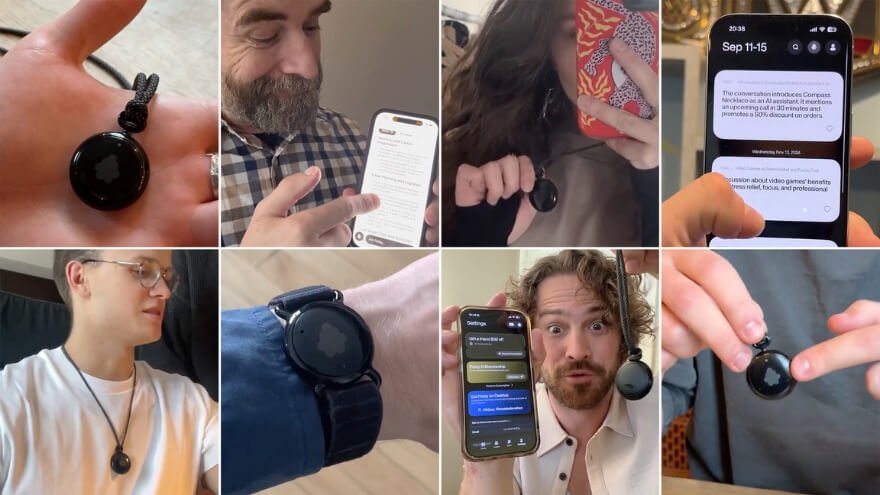
Who Should Buy Fieldy AI?
Fieldy AI is worth considering for people whose daily activities involve important conversations, decisions, and responsibilities.
- Business Professionals and Managers: Ideal for capturing meeting discussions, tracking decisions, and organizing follow-up responsibilities without spending the entire meeting taking notes.
- Consultants and Freelancers: Useful for documenting client requirements, project discussions, deadlines, and agreed-upon tasks that need attention afterward.
- Students and Researchers: Helpful for creating searchable transcripts and summaries of permitted lectures, interviews, and academic discussions.
- Interviewers and Journalists: Suitable for organizing recorded interviews, reviewing conversations, and locating specific statements when preparing written content.
- Entrepreneurs and Business Owners: Practical for managing conversations with clients, partners, and team members while keeping important commitments organized.
- People Managing Multiple Meetings: A convenient option for anyone who frequently needs to recall what was discussed, identify action items, and revisit previous conversations.
Who Should Avoid Fieldy AI?
Although Fieldy AI offers useful conversation management features, it may not be necessary for everyone. Some users may find simpler recording or note-taking methods better suited to their routines.
- Occasional Voice Recorder Users: People who only record a few short voice memos may not need a dedicated wearable device.
- People Who Prefer Fully Offline Tools: Users who want transcription and AI-powered organization without relying on connected software may prefer another solution.
- Users Who Need Verbatim Accuracy: People requiring independently verified, word-for-word transcripts for legal or other high-stakes purposes should not rely on automated transcription alone.
- People With Recording Restrictions: Anyone working in environments where recording is prohibited or cannot be appropriately authorized may be unable to use the device for its intended purpose.
I would recommend Fieldy AI primarily to people who regularly participate in meetings, interviews, client discussions, or other conversations that generate important information. Its greatest advantage is not simply recording speech, but making that information easier to search, summarize, and turn into actionable follow-ups.
For occasional recording needs, a smartphone or traditional note-taking app may be sufficient. However, for someone who frequently needs to capture, organize, and revisit conversations, Fieldy AI offers a more specialized and convenient workflow, provided they are comfortable with its recording limits, software requirements, and responsible-use considerations.
Fieldy AI Price and Subscription Costs: Is It Worth the Money?
Fieldy AI currently starts at $129.99 USD for one device, with discounted bundles available for $194.99 for two devices and $259.98 for three devices. The promotional offer also includes a 14-day money-back guarantee, a one-year warranty, and free shipping on qualifying orders in the USA.
For buyers considering this wearable AI note taker, the bundle options offer additional savings when purchasing multiple devices. The Fieldy companion app is included with the device, although the promotional page does not specify separate subscription prices or usage allowances for its AI features.
Current Fieldy AI Prices and Bundle Deals
Fieldy AI offers three purchasing options, including a single-device package and two discounted multi-device bundles.
| Package | Current Offer Price |
| 1 Fieldy AI | $129.99 |
| 2 Fieldy AI | $194.99 |
| 3 Fieldy AI | $259.98 |
All prices are listed in USD and reflect the promotional offer shown on the supplied purchasing page.
Here’s what each package includes:
- Single Fieldy AI for $129.99: One wearable device at a $50 discount from its advertised regular price. This is the simplest option for individual buyers.
- Two Fieldy AI Devices for $194.99: The Buy 1, Get 1 50% OFF promotion reduces the average cost to approximately $97.50 per device. This package may appeal to couples or colleagues.
- Three Fieldy AI Devices for $259.98: The Buy 2, Get 1 FREE promotion brings the average cost to $86.66 per device. It offers the lowest per-device price among the displayed packages.
I find the bundle pricing particularly appealing for buyers who need multiple devices. However, purchasing a larger package only makes financial sense when the additional units will actually be used.
Does Fieldy AI Require a Monthly Subscription?
The Fieldy companion app is included with the device purchase, providing access to supported features such as conversation transcripts, AI-generated summaries, intelligent chat, and automatic reminders.
However, the promotional purchasing page does not clearly specify whether all transcription allowances and advanced AI functions are available indefinitely without additional fees. It also does not display a separate monthly or annual subscription price.
I would confirm any ongoing membership requirements, usage limits, or premium feature charges before ordering. The hardware price is clear, but understanding the complete software cost is important when evaluating long-term value.
Fieldy AI Shipping, Warranty, and Money-Back Guarantee
Fieldy AI’s purchase offer includes several benefits intended to provide additional confidence when ordering.
- 14-Day Money-Back Guarantee: Customers can return Fieldy within the advertised 14-day satisfaction period, subject to the applicable return conditions.
- One-Year Warranty: Each device comes with a warranty covering one year from the purchase date.
- Free Shipping in the USA: Free, fast shipping is advertised for qualifying orders within the United States.
- International Shipping: Fast international delivery is also available, although shipping charges and delivery times depend on the destination.
- Customer Support: Fieldy advertises access to a customer support team for purchasing questions and product assistance.
These purchase protections improve the overall offer, particularly for first-time buyers. I appreciate the combination of a return window and warranty, but I would still review the exact conditions before placing an order.
Available Payment and Installment Options
The promotional checkout also advertises installment payment options through Klarna, Affirm, and Afterpay. The displayed starting monthly amounts vary depending on the selected package.
- One Fieldy AI: As low as $12 per month.
- Two Fieldy AI devices: As low as $18 per month.
- Three Fieldy AI devices: As low as $24 per month.
These are advertised installment examples rather than guaranteed payment plans. Actual eligibility, repayment schedules, and financing terms should be confirmed with the selected payment provider at checkout.
Is Fieldy AI Good Value for the Price?
At $129.99 for one device, Fieldy AI is worth considering for people who regularly need hands-free transcription, searchable conversation notes, and organized follow-up tasks. Its value comes from combining wearable recording with AI-powered information management rather than functioning as a basic voice recorder.
For frequent meeting participants, consultants, and professionals managing several conversations each day, these features may provide enough convenience to justify the purchase. The two-device and three-device bundles also offer better per-unit pricing for buyers who genuinely need additional devices.
I consider the $129.99 single-device package the most practical starting point for individual buyers, while the $259.98 three-device bundle offers the strongest advertised value per unit. Before buying, I would confirm the final checkout total, shipping eligibility, and any ongoing software charges to understand the complete cost of ownership.
Where to Buy Fieldy AI: Current Offers and Purchase Protection
Fieldy AI is available through its online promotional offer, where buyers can choose their preferred package, review available purchase benefits, and complete their order. The offer includes a 14-day money-back guarantee, a one-year warranty, and shipping options for customers in the United States and other supported countries.
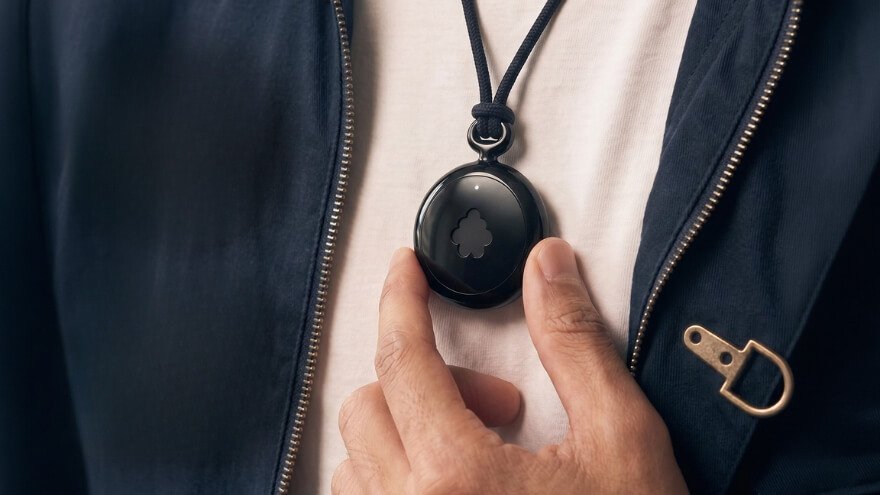
I recommend reviewing the purchasing details carefully before placing an order, especially the included accessories, delivery conditions, and return policy. Here is a simple guide to buying Fieldy AI.
Step 1: Visit the Fieldy AI Purchase Page
Start by opening the Fieldy AI authorized page. The page explains the wearable’s main features, available purchasing options, and customer protection benefits.
I prefer starting with the actual purchasing page because it allows buyers to review the offer and check the available packages in one place. It also helps avoid relying on outdated promotional information from other sources.
Step 2: Choose Your Preferred Fieldy AI Package
Fieldy offers single-device and multi-device purchasing options. Buyers can select the package that best suits their needs before proceeding to checkout.
I would also confirm which accessories are included, particularly if I plan to wear the device as a pendant or on my wrist. Checking the package contents beforehand helps ensure the selected option matches the intended daily use.
Step 3: Review Shipping and Delivery Availability
Fieldy advertises free, fast shipping within the United States on qualifying orders, along with fast international shipping. However, delivery eligibility, shipping charges, and estimated arrival times may vary depending on the destination.
Before placing an order, I would enter the delivery information and check the shipping details displayed at checkout. International buyers should also confirm whether any additional import duties or local taxes apply.
Step 4: Understand the Money-Back Guarantee and Warranty
Fieldy’s promotional offer includes two purchase-protection benefits that are particularly useful for first-time buyers.
- 14-Day Money-Back Guarantee: Fieldy advertises a 14-day satisfaction guarantee that allows customers to request a return if they are unhappy with their purchase, subject to the applicable conditions.
- One-Year Warranty: The wearable comes with warranty protection for one year from the purchase date, subject to the warranty terms.
I appreciate having both protections because they provide additional reassurance when purchasing a new wearable device. However, I would review the return eligibility, warranty coverage, and any applicable exclusions before completing payment.
Step 5: Confirm Your Order and Payment Details
Once the package has been selected, proceed to checkout and review the complete order information. Fieldy’s promotion advertises installment payment options through Klarna, Affirm, and Afterpay, subject to availability and approval.
Before completing the purchase, I would check the following details:
- The selected package and included accessories.
- The final order total, including any shipping fees or taxes.
- The delivery address and available shipping method.
- Any ongoing software charges or feature restrictions.
- The applicable return and warranty conditions.
These checks help buyers understand exactly what they are purchasing and reduce the chance of unexpected costs or misunderstandings.
Step 6: Keep Your Order Confirmation and Contact Support When Needed
After purchasing Fieldy AI, keep the order confirmation and any related payment or warranty information. These records may be useful if you need assistance with delivery, returns, or warranty service.
Fieldy also advertises customer support for product and purchasing questions. I would contact its support team if any important order details remain unclear rather than make assumptions about coverage or delivery.
Frequently Asked Questions About Fieldy AI
These frequently asked questions cover practical Fieldy AI details that buyers often want to understand before purchasing, including device compatibility, phone calls, group conversations, sharing options, and software integrations.
What iPhone and Android versions are compatible with Fieldy AI?
Fieldy AI supports both iOS and Android smartphones through its companion application. According to Fieldy’s current compatibility guidance, the app requires iOS 26 or later on iPhones and Android 13 or later on Android devices. Users with older smartphones should check their operating system version before purchasing to ensure the app can be installed.
What comes in the Fieldy AI box?
The standard Fieldy 3 package includes the wearable device with its pendant accessory already attached, a USB-C charging cable, and a quick-start guide containing a QR code. A wrist accessory may also be included if it was selected with the order. Buyers should verify their chosen package contents before completing checkout.
Can I use Fieldy AI on my computer without wearing the device?
Yes. Fieldy’s desktop application can capture supported conversations using the computer’s microphone and system audio without requiring the wearable device. This makes it possible to transcribe online meetings directly from a compatible Windows PC or Apple Silicon Mac. The wearable remains useful for capturing face-to-face conversations away from the computer.
Can Fieldy AI record and transcribe regular phone calls?
Fieldy can transcribe phone conversations when the audio is captured through a supported recording setup. For example, placing a call on speaker near a computer running Fieldy Desktop allows the computer’s microphone to capture the conversation. This should not be confused with confirmed native recording of ordinary cellular calls directly through the mobile app.
Does Fieldy AI generate conversation summaries automatically?
The Fieldy mobile app creates transcripts and conversation titles after processing, while AI summaries can be requested by opening a conversation and selecting Summarize. Users can choose a summary format before generating the result. The desktop application also supports automatic summary generation after supported recording sessions end.
Can Fieldy AI identify different speakers in a group conversation?
Yes. Fieldy AI uses speaker identification to distinguish different voices and assign speaker labels within a conversation transcript. Users can also create a personal speaker profile to help the software recognize their own voice. Speaker identification is useful during interviews and group meetings, although unclear or overlapping speech can affect labeling accuracy.
Can I wear Fieldy AI under my shirt or keep it inside a pocket?
Fieldy can be carried in different positions, but wearing it underneath thick clothing is not recommended for clear transcription. Fabric can obstruct the microphone and reduce speech clarity, especially in noisy environments. For better results, position the device where its microphone can capture surrounding conversations without being covered.
Can I share Fieldy AI meeting notes with someone who doesn’t have the app?
Yes. Fieldy allows users to generate a sharing link for an individual conversation after creating its summary. Recipients can open the link in a web browser and read the shared summary and transcript without installing the Fieldy app or creating an account. Asking AI questions about shared content requires a free Fieldy account, and anyone with an active link can view the shared information.
Can I export Fieldy AI transcripts to PDF, Word, Notion, or other applications?
Fieldy’s desktop application supports exporting transcripts in PDF, plain text, Markdown, and JSON formats. Users can also copy conversation text into applications such as Notion, Slack, or word processors. A dedicated Microsoft Word export format is not listed in the available guidance, but exported text can be opened or pasted into Word.
Can Fieldy AI connect directly to ChatGPT and Claude?
Yes. Fieldy’s current app documentation describes connections for ChatGPT, Claude, and other compatible AI assistants through its integration settings. Once connected, supported assistants can search and retrieve information from Fieldy conversations, transcripts, and summaries. Availability and access may depend on the connected service and account permissions.
My Final Verdict: Is Fieldy AI Worth Buying?
Fieldy AI is worth buying for people who regularly attend meetings, manage important conversations, and want an easier way to organize spoken information. Its hands-free wearable design, real-time transcription, searchable notes, and AI-powered summaries make it a practical alternative to traditional note-taking. I especially appreciate how it helps turn conversations into useful reminders and follow-up tasks, rather than simply storing recordings.
What makes this Fieldy AI Review positive is the combination of convenience and everyday usefulness. With a starting price of $129.99, up to seven days of typical battery life, and flexible recording options, the device offers several appealing features for frequent note-takers. However, transcription accuracy can vary, recording sessions have limits, and important AI-generated information still requires review. Buyers should also confirm any ongoing software costs before purchasing.
I would recommend Fieldy AI to professionals, consultants, students, and anyone who frequently needs to remember important discussions. If you only record occasional voice memos, a smartphone may be enough. But if keeping track of conversations, decisions, and responsibilities is part of your daily routine, Fieldy AI offers a convenient way to stay focused during discussions and organized afterward.
Fieldy AI is a wearable conversation assistant that converts speech into text and organizes information into summaries, tasks, and reminders. It combines a lightweight recording device with mobile and desktop applications, helping users capture details they might otherwise forget.
- Compact, lightweight wearable design
- AI-generated summaries highlight key points, decisions, and useful information
- Up to seven days of typical battery life reduces frequent charging.
- Individual recording sessions are limited to three hours, requiring a new session for longer discussions.


