
There’s nothing worse than watching your battery drop when you need your phone the most. That’s when the Rush Charge steps in, a small yet powerful charger built to save the day. However, many people who rely on it daily often find themselves wondering—how long does a Rush Charge take to charge?
The Rush Charge Universe usually takes around two to three hours to fully recharge from zero. The charging time can vary depending on the charger type, battery size, and power source strength. Using a 2.4A wall adapter and keeping it at room temperature gives the fastest and most stable results every time.
Would you like to learn more about the factors that actually influence its charging time and how to speed it up? Keep reading, because this article explains all the simple things that make a big difference.
How Long Does a Rush Charge Take to Charge?
The Rush Charge Universe usually takes around two to three hours to fully recharge from zero. The exact time can change depending on several factors, including the type of charger, battery size, and how it’s being used during charging. Now, let’s look at the main things that affect how long it takes to charge.
Type of Charger or Cable
The type of charger or cable you use can make a big difference in how fast the Rush Charge fills up. A high-quality USB-C or Lightning cable can transfer power more quickly than older or cheaper cables. Using a low-quality cable can slow charging speed and even cause unstable power flow.
Battery Capacity
Battery capacity means how much power the charger can hold. In many Rush Charge Universe Review articles, users highlight that its 3300 mAh battery offers a good mix of compact size and reliable performance. Because it’s smaller than large power banks, it recharges faster while still giving enough backup power for phones and small gadgets.
Power Output of the Source
The power output of the wall plug, laptop port, or other power source also affects speed. A 2.4A output charges much faster than a standard 1A port. If you use a weak power source, it will take longer for the Rush Charge to reach full capacity.
Using the Device While Charging
If you use your Rush Charge to power another device while it is charging, the process slows down. The battery splits its power between recharging itself and the connected gadget. To get a full charge faster, it’s better to leave it idle until it’s done.
Temperature
Temperature can affect how efficiently the battery charges. If the environment is too hot or cold, the charger might slow down or pause charging to protect itself. Keeping it at a normal room temperature helps it charge faster and prevents any battery strain.
Signs That Your Rush Charge Is Fully Charged
Knowing when your Rush Charge is fully charged helps you avoid overcharging and keeps the battery healthy for long use. The charger includes simple signs that show charging progress clearly. Paying attention to these helps you recharge safely and use it at the right time.
- Steady LED Lights: When all LED indicators stay lit without blinking, it signals the battery has reached full charge and is ready.
- No Blinking Indicators: During charging, lights flash, but once charging is complete, the blinking stops, showing that the battery is full.
- Stable Power Output: The charger no longer cycles power when connected, proving that it’s completely recharged and holding steady energy.
- Cool to the Touch: Fully charged units stop warming up and return to normal temperature, meaning the internal charging has finished.
- No Charging Sound or Vibration: Some adapters make slight noises while charging; silence or stillness usually means the process is complete.
- Constant Light Color: The LED light changes from flashing to a fixed color once charging is done, clearly signaling a full charge.
- No Increase in Battery Indicator: Watching the battery light remain constant for a few minutes means it’s no longer accepting extra power.
- Device Stops Drawing Power: When connected to a phone or gadget, the current flow ends automatically after the Rush Charge reaches full.
How to Make Rush Charge Charge Faster?
Sometimes your Rush Charge takes longer to refill than expected. A few simple steps can help speed up the process. You just need to use the right tools and charging habits. Follow these easy tips below to make your Rush Charge faster every time.
Use the Right Wall Adapter
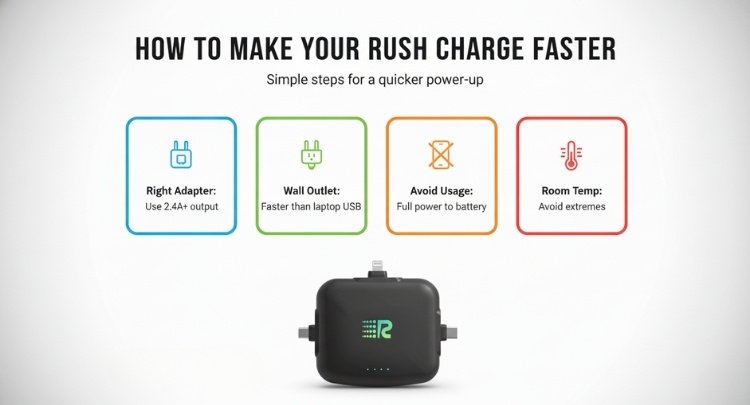
Always use a wall adapter that supports at least 2.4A output. A weak adapter gives low power, slowing down the charge. The Rush Charge Universe works best when it gets a strong, steady current. Using a proper adapter ensures smooth, quick charging without damaging the battery over time.
Plug Into a Wall Outlet
Charging from a wall outlet is faster than using a laptop port. USB ports on laptops give less power, which delays charging time. Plugging directly into a wall socket lets the Rush Charge Universe refill faster. This simple change can cut charging time by nearly half in some cases.
Avoid Using While Charging
Using your phone or tablet while charging diverts the power. The charging process for Rush Charge works best when it receives full, steady power. This back-and-forth slows the process. It’s better to let your Rush Charge finish charging fully before connecting it to any gadget again.
Keep It at Room Temperature
Extreme hot or cold conditions slow the charging process. Batteries work best when they stay at normal room temperature. Avoid leaving your Rush Charge under direct sunlight or in a cold car. Keeping it in a steady environment helps it charge faster and stay healthy longer.
Use the Original Cable
The cable you use affects how quickly power moves. The original cable that comes with your charger is built for the best results. Cheap or damaged cables can slow down charging and waste energy. Always use high-quality or original cables to make your Rush Charge work better.
Disconnect Extra Devices
Sometimes people plug in extra gadgets while charging. This divides the power, making the Rush Charge fill more slowly. Try keeping only one device connected at a time. This helps it focus all power on charging itself instead of splitting it among multiple devices.
Avoid Overcharging
Leaving your Rush Charge plugged in for too long can slow its future speed. Once it’s full, unplug it right away. Overcharging may make it heat up, which hurts the battery’s health. Keeping an eye on LED lights helps you stop charging at the right time.
Clean Charging Ports Regularly
Dust and dirt inside the charging ports block the connection. A weak connection slows down charging or makes it stop. Use a soft brush or dry cloth to clean the port occasionally. Keeping it clean helps electricity flow better and speeds up the charging cycle.
Comparing the Rush Charge With Other Portable Chargers
Choosing a portable charger can be tricky when there are so many options. The Rush Charge Universe stands out because of its simple design and cable-free setup. Below is a clear comparison table showing how it performs against other common portable chargers.
| Feature | Rush Charge Universe | Other Portable Chargers |
| Battery Capacity | 3300 mAh, enough for one to two full phone charges. | Usually 5000–10000 mAh, more backup but bulkier. |
| Charging Style | Built-in Lightning, USB-C, and Micro-USB tips. | Needs separate cables for different devices. |
| Portability | Compact, pocket-sized, easy to carry. | Often larger and heavier due to added ports. |
| Ease of Use | Pre-charged and ready to use. | Often needs setup or separate cords. |
| Charging Speed | 2.4A fast charging with stable output. | Varies from 1A to 2.4A, less consistent. |
| Recharging Options | Works with Lightning, USB-C, or Micro-USB. | Usually supports only one recharging input. |
| Design and Build | Sleek, cable-free, and eco-friendly materials. | Bulkier, with more cables and basic design. |
| Price and Value | Mid-range price, great for travel and daily use. | Lower cost but less convenient and flexible. |
When Should You Use Rush Charging?
Sometimes you just do not have time to wait for a slow charge. That is when rush charging can really save the day. It gives your devices a quick power boost when you are in a hurry. Below are some of the best times to use it effectively.
During Travel or Long Trips
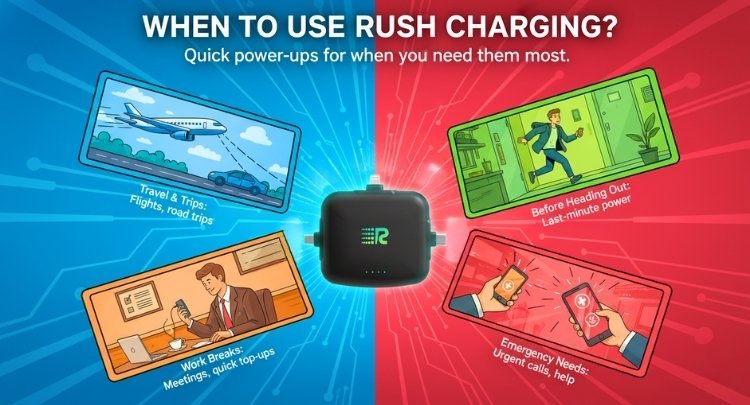
Traveling often means limited access to outlets or power banks. Using rush charging during a flight layover or road trip keeps your devices active. It gives you enough battery to make calls, check maps, or stream music. The Rush Charge Universe is perfect for travel thanks to its compact and cable-free design.
Before Heading Out
You might realize your phone is almost dead right before leaving home. The Rush Charge duration is just right for adding enough power in minutes. It helps you stay reachable for calls or messages without waiting long. This makes it ideal for last-minute plans or busy mornings before work.
During Work Breaks
Office hours can get packed, leaving little time for recharging devices. Plugging in during a short break helps refill your phone quickly. You can top up enough charge to last through meetings or calls. The Rush Charge Universe is handy for this since it charges fast and fits easily in a pocket.
Emergency Power Needs
In emergencies, waiting for a slow charge is not an option. Rush charging gives instant power when you need to make urgent calls or send help messages. It keeps your device ready when time matters most. Having a fully charged Rush Charge nearby can be a lifesaver during such times.
Outdoor or Adventure Activities
When camping, hiking, or spending time outdoors, you may not find outlets. Using rush charging ensures your gadgets stay powered through the trip. It is great for charging phones, cameras, and lights quickly. The small and durable design of the Rush Charge Universe makes it ideal for outdoor use.
During Busy Workdays
Workdays filled with calls, emails, and online tasks can drain your phone fast. Rush charging helps refill your battery quickly between meetings. It saves time and ensures your phone stays active all day. Keeping a Rush Charge in your bag makes it easy to recharge anytime.
While Commuting
Using your device for music, maps, or reading on the go drains power. Rush charging during your bus or train ride can restore battery fast. It gives you enough juice for the rest of the day. The Rush Charge Universe fits well for travel and quick city commutes.
Frequently Asked Questions
There are many small details that can affect how long your Rush Charge takes to fully charge. These questions and answers cover real concerns users may have while using and charging this device. Read on to find clear and helpful answers for everyday use.
Can I Charge My Phone While Charging the Rush Charge?
Yes, but it’s slower because the power splits between both devices. This process is called pass-through charging. For a quicker refill, it’s better to let your Rush Charge finish first. Then, you can use it to charge your phone efficiently afterward.
Why Does My Rush Charge Take Longer Than Usual to Charge?
A low-quality cable, a weak adapter, or a poor power source can cause delays. Charging through a laptop or a car port gives less power. To fix this, use a direct wall outlet and the original cable. It ensures a steady power flow and faster charging.
Can I Use Any Charger to Recharge My Rush Charge?
It works with Lightning, USB-C, or Micro-USB cables. However, the wall adapter should support at least 2.4A output. Cheap or slow adapters can cause unstable charging. For the fastest results, always use a trusted, high-quality wall charger.
Is It Okay to Leave the Rush Charge Plugged in Overnight?
It’s safe because it has built-in smart protection that stops charging automatically. However, unplugging it once full helps keep the battery healthy. Leaving it in too long may slightly warm the unit, which isn’t ideal for long-term use.
How Often Should I Recharge My Rush Charge?
Recharge it after every full use or when the LED drops low. It’s best not to let it drain completely. Keeping it partly charged helps maintain long battery life. Always use proper cables to avoid slow performance.
Why Does My Charger Feel Warm While Charging?
It’s normal for batteries to feel slightly warm. If it gets too hot, unplug and let it cool down. Heat usually means it’s working harder than needed. Use it in a ventilated area to avoid overheating problems.
Can I Use A Fast Charger Adapter With Rush Charge?
Yes, you can safely use fast chargers up to 2.4A output. Anything above that may not make a big difference since the Rush Charge has a set limit. Still, good-quality fast chargers ensure smooth, stable power for quicker results.
Conclusion
Charging your devices shouldn’t feel like a waiting game, especially when you’re in a rush. Whether you’re heading out the door or stuck at the airport, knowing how to speed things up can really make a difference. Little habits like using a strong adapter and the right cable go a long way.
If you’ve ever wondered how long does a Rush Charge take to charge, the answer is usually between two to three hours. But that time can drop when you use it right. Keeping it cool, using fewer devices during charging, and staying plugged into a proper wall socket helps speed things up.
Smart charging isn’t just about power; it’s also about timing. With the right setup, you can keep your Rush Charge Universe ready to go anytime. Try these tips, and you’ll notice the difference.


