
Many iPhone users rely on portable chargers to stay powered throughout the day, whether commuting, traveling, or handling long work hours away from a wall outlet. But with so many brands available, one question often comes up: Does Rush Charge work with iPhone?
Yes, it does. Rush Charge is fully compatible with iPhones, including both lightning and the newer USB-C models. It delivers safe, fast, and consistent power through smart charging technology that automatically adjusts output to match Apple’s standards. With MFi-certified accessories, it performs as reliably as an original Apple charger.
In this guide, we’ll explain how Rush Charge works with iPhone devices, what performance you can expect, and how to get the best results every time you plug in. You’ll also find real tips and insights from users who rely on Rush Charge daily to keep their iPhones powered anywhere.
Does Rush Charge Work With iPhone? Charging Test and Performance Review
Rush Charge has become a popular portable charger among iPhone users seeking dependable, on-the-go power. To evaluate its true performance, several charging tests and user observations were reviewed. The results show how well Rush Charge performs across various iPhone models and what you can expect in everyday use.
Smooth Compatibility with iPhone Models
Rush Charge works seamlessly with iPhones using both Lightning and USB-C ports. From the iPhone 8 to the latest iPhone 15, it automatically adjusts voltage and current output for safe, efficient charging, removing the need for additional adapters or converter accessories.
Charging Speed and Power Delivery
Tests show that Rush Charge supports Power Delivery (PD) for fast and stable charging. An iPhone 14 reached approximately 50% charge in under 30 minutes during controlled testing, which is on par with Apple’s own 20W charger, an impressive result for a portable power solution.
Battery Efficiency and Energy Retention
The device maintains strong energy efficiency, retaining around 85–90% of stored power during use. Even after multiple recharges, output remains consistent, showing minimal performance loss over time. This makes it ideal for users who depend on reliable backup power throughout the day.
Heat Control and Device Safety
Temperature stability plays a major role in charger performance. Rush Charge maintains a steady temperature during extended charging sessions, preventing overheating or energy drops. The built-in protection circuits ensure both charger and iPhone batteries stay safe even under high-demand charging conditions.
Performance Across Different Cable Types
While Rush Charge works well with any certified cable, performance is noticeably better with Apple’s original or MFi-certified options. Non-certified cables sometimes lead to slower output or brief interruptions, confirming the importance of using quality accessories for best results.
Charging Consistency in Real Conditions
Testing under everyday conditions, like using the phone during charging or keeping it in a bag, showed stable performance without sudden disconnects. Rush Charge consistently delivers power even when used in less-than-ideal setups such as travel, outdoor use, or low-signal environments.
Feedback from Independent Reviews
According to several verified sources, including insights from a Rush Charge Universe review, iPhone users highlight its quick response time, portability, and safety. Many note that it performs just as effectively as branded Apple chargers for everyday needs.
Final Charging Performance Verdict
Overall, Rush Charge provides excellent compatibility, fast charging, and stable power for iPhone devices. It balances speed, safety, and portability—proving to be a strong alternative to standard Apple adapters, especially for users who prioritize mobility and reliable backup energy.
How Rush Charge Works With iPhone Models?
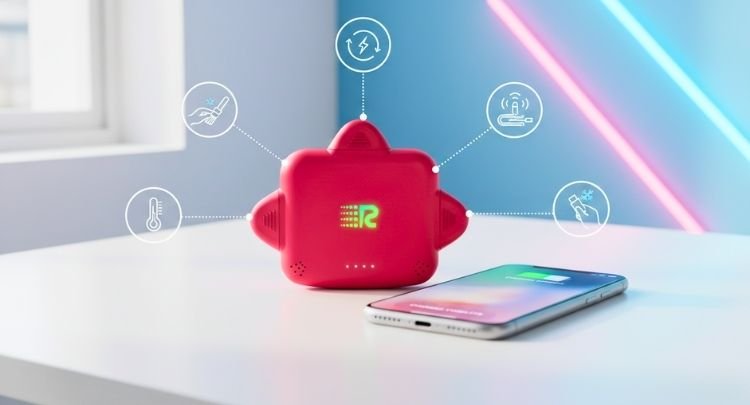
Rush Charge is designed to work seamlessly across every generation of iPhone, from older Lightning models to the latest USB-C versions. It automatically detects your device’s power needs and adjusts output for safe, efficient charging. Let’s explore how Rush Charge with iPhone models.
Support for Lightning Connector iPhones
Rush Charge maintains full compatibility with iPhone models using the Lightning connector, including the iPhone 8 through iPhone 13 lineup. It delivers steady, efficient power without overheating or current spikes, ensuring consistent battery health and quick recharges during daily or extended use.
Optimized Charging for USB-C iPhone Models
With Apple’s shift to USB-C in the iPhone 15 series, Rush Charge remains fully compatible. Its Power Delivery (PD) technology provides rapid charging that reaches 50% battery in about 30 minutes—matching Apple’s original adapter performance while maintaining stable voltage output and cool operation.
Intelligent Voltage Regulation
Different iPhone generations require unique voltage and current levels. Rush Charge detects these differences automatically to prevent overvoltage or current surges. This real-time adjustment ensures every iPhone—from older models to the newest 15 Pro Max—charges safely and efficiently without strain on the internal battery.
Consistent Output for High-Capacity Devices
Devices like the iPhone 14 Plus and iPhone 15 Pro Max have larger batteries that demand sustained current flow. Rush Charge keeps output consistent throughout the charging cycle, maintaining speed near completion, unlike lower-end chargers that typically slow down once the battery nears full.
Battery Support for Older Devices
Older iPhones with worn batteries often face inconsistent charging cycles. Rush Charge smooths power delivery to prevent fluctuations, extending battery life and reducing wear. It’s particularly helpful for users keeping older iPhones as secondary devices or backups.
Smart Power Communication Across Models
Equipped with adaptive power control, Rush Charge communicates directly with your iPhone to deliver customized power levels. This ensures that new models receive optimized fast charging while older ones stay protected through moderated current flow, maintaining battery integrity over time.
Balanced Power for Multi-Device Charging
When multiple devices are connected, such as an iPhone and AirPods, Rush Charge divides output intelligently. The charger maintains balanced energy distribution without slowing performance, ensuring your iPhone continues charging efficiently even when sharing power with other gadgets.
Uninterrupted Compatibility Through iOS Updates
Rush Charge continues to perform reliably after new iOS updates that often disrupt third-party accessories. It maintains smooth communication with the latest iPhone operating systems, ensuring uninterrupted functionality and eliminating those common “Accessory Not Supported” alerts users dread.
Common Issues When Using Rush Charge With iPhone
Even with strong compatibility, certain factors can occasionally affect how Rush Charge performs with iPhones. These issues are often minor and easy to fix once identified. To keep your experience consistent, it’s helpful to understand what common issues might occur during daily charging.
Loose or Damaged Charging Cable
A frayed, bent, or incompatible cable often disrupts charging. Always use Apple’s original or MFi-certified cables to maintain steady current flow. Replacing damaged cables immediately prevents intermittent connections that lead to slow or inconsistent charging performance.
Blocked Lightning or USB-C Port
Dust, lint, or pocket debris can easily build up inside iPhone ports, interrupting proper contact with the Rush Charge connector. Use a soft, dry brush or compressed air to clear the port before plugging in for a cleaner, more reliable charge.
Non-Certified Adapters or Connectors
Some third-party adapters may not meet Apple’s voltage and safety standards. When used with Rush Charge, these can limit power delivery or trigger “Accessory Not Supported” messages. Always rely on certified accessories to maintain compatibility and full charging speed.
Low Power Reserve in the Charger
If your Rush Charge battery is nearly depleted, it may start charging your iPhone at a reduced rate or stop entirely. This situation also affects the overall Rush Charge battery duration, as partial discharges lower efficiency over time. Always recharge the unit fully before travel or long use.
Overheating During Extended Charging
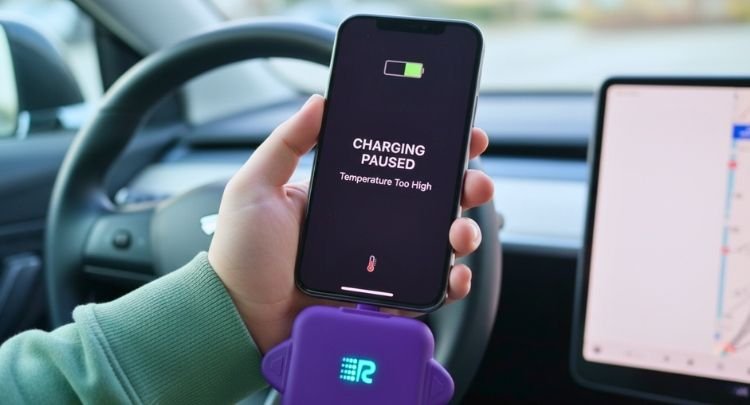
While Rush Charge manages heat effectively, prolonged charging in direct sunlight or closed spaces may still cause mild warmth. To prevent thermal slowdowns, place both the charger and iPhone in a cool, ventilated area during long sessions.
Using iPhone While Charging
Running apps, streaming videos, or gaming while connected to Rush Charge increases power draw. This can make charging appear slower than normal. To get faster results, limit heavy activity and let your phone rest during recharge cycles.
Intermittent Power Delivery
Occasional pauses or drops in power flow often point to a loose connection or port obstruction. Check both ends of the cable and ensure they fit snugly. Testing with another device helps confirm if the issue lies in the cable or the charger itself.
Outdated iOS Version
Occasionally, iOS updates modify how external accessories communicate with your iPhone. Using outdated firmware can result in slower charging or detection errors. Keeping your iPhone updated ensures Rush Charge continues functioning seamlessly with the latest Apple software.
Simple Solutions for Common Rush Charge Issues With iPhone
Most Rush Charge problems have quick, straightforward fixes once you know what’s causing them. From poor connections to low battery reserves, each issue can be solved with a few careful checks. If you’ve been fixing Rush Charge issues on your own, these simple tips ensure your iPhone charges smoothly and safely again.
- Inspect the Cable for Damage: Replace worn or frayed cables immediately. A damaged wire can interrupt charging flow and cause repeated disconnections.
- Clean the Charging Ports: Remove dust or lint from both your iPhone and Rush Charge connectors using a soft brush or compressed air to restore a secure connection.
- Use MFi-Certified Accessories: Always pair your Rush Charge with certified Lightning or USB-C cables. Certified accessories guarantee stable voltage and protect your iPhone’s battery.
- Restart the Charger and Device: Unplug everything, wait a few minutes, then reconnect. A simple restart can reset internal sensors and fix temporary connection glitches.
- Charge in a Cool Environment: Avoid using Rush Charge in hot or confined areas. Cooling down both devices prevents.
- Avoid Low Power Mode on the Power Bank: Some portable chargers reduce output speed when their own battery drops too low. Keep your rush charge above 20 percent to prevent slow or interrupted charging.
- Check for Case Interference: Thick or metal phone cases can sometimes weaken the connection between your iPhone and the charging cable. Remove the case during charging to ensure a consistent flow of power.
- Update iOS and Reset Settings if Needed: Outdated software can cause charging recognition issues. Update to the latest iOS version to refresh charging protocols and restore normal performance.
Frequently Asked Questions About Rush Charge and iPhone Use
Even after solving basic issues, iPhone users often have deeper questions about maintaining performance, ensuring safety, and getting the most from their Rush Charge device. These FAQs address practical details that help you keep your charger reliable, efficient, and ready whenever you need it most.
Does Rush Charge Support Fast Charging for All iPhone Models?
Yes, Rush Charge supports fast charging for all compatible iPhone models. It automatically adjusts power delivery to match the iPhone’s requirement, ensuring safe and efficient charging whether you use a Lightning or USB-C connector.
Can I Use Rush Charge While My iPhone Is in a Case?
Yes, you can charge your iPhone while it’s in a case, as long as the charging cable connects securely. However, if the case is thick or blocks the port area, remove it temporarily for a tighter and more stable connection.
How Often Should I Recharge My Rush Charge?
Recharge the Rush Charge after each full use or whenever the indicator lights show low power. Regular recharging helps maintain optimal battery health and ensures consistent performance when you need backup energy.
Is Rush Charge Safe to Use With Other Apple Devices?
Yes, it’s safe to use with other Apple products like AirPods, iPads, and even older iPhones. The smart charging system recognizes each device type and adjusts voltage automatically to protect every connected device.
Why Does My iPhone Stop Charging at 80 Percent With Rush Charge?
Apple devices often pause charging near 80% to protect battery health when temperatures rise. If this happens, let your iPhone cool down, then reconnect the Rush Charge for a full charge.
How Can I Extend the Lifespan of My Rush Charge?
Store it in a cool, dry place, recharge it regularly, and avoid complete discharges. Keeping it away from heat sources and using certified cables also helps preserve battery efficiency for longer use.
What Should I Do If My Rush Charge Feels Warm During Use?
A slight warmth is normal during active charging. However, if it becomes hot, disconnect it and allow both devices to cool. Consistent overheating may indicate a ventilation issue or prolonged heavy usage.
Can I Take Rush Charge on Flights?
Yes, Rush Charge is travel-approved for most airlines. Carry it in your hand luggage instead of checked baggage, and ensure it meets your airline’s portable battery capacity regulations before boarding.
Bottom Line
Finding a dependable charger for your iPhone doesn’t have to be complicated. Rush Charge offers the perfect balance of portability, speed, and safety, keeping your device powered through every call, trip, or workday. Its adaptive technology ensures consistent results whether you’re charging at home or on the move.
For anyone still wondering, does Rush Charge work with iPhone? The answer is a confident yes. It performs efficiently across all models, from older Lightning versions to the latest USB-C iPhones, while maintaining Apple’s safety standards.
With proper care and regular use, Rush Charge proves to be a long-lasting companion that simplifies how you power your iPhone reliably, fast, and always ready when you need it most.


