
A missing wallet has a special talent for turning an ordinary morning into a small detective investigation. I like keeping everyday things simple, and searching the same pockets three times certainly doesn’t qualify. Sometimes, all you really want is a quicker way to figure out where your belongings have gone.
That’s what makes the Ondrela Gold Smart Tracker interesting. It’s a slim, rechargeable tracking card designed to fit inside a wallet or travel bag, allowing you to check an item’s location through a compatible smartphone finding service. Its gold-colored design is also a little different from the usual plastic tracking accessories.
My Ondrela Smart Tracker review focuses on whether that convenience translates into meaningful everyday value. The compact design is appealing, and the combination of location tracking, separation alerts, and wireless charging sounds practical. Still, compatibility, location accuracy, battery performance, and price deserve a closer look before deciding whether this little gold card belongs in your wallet.
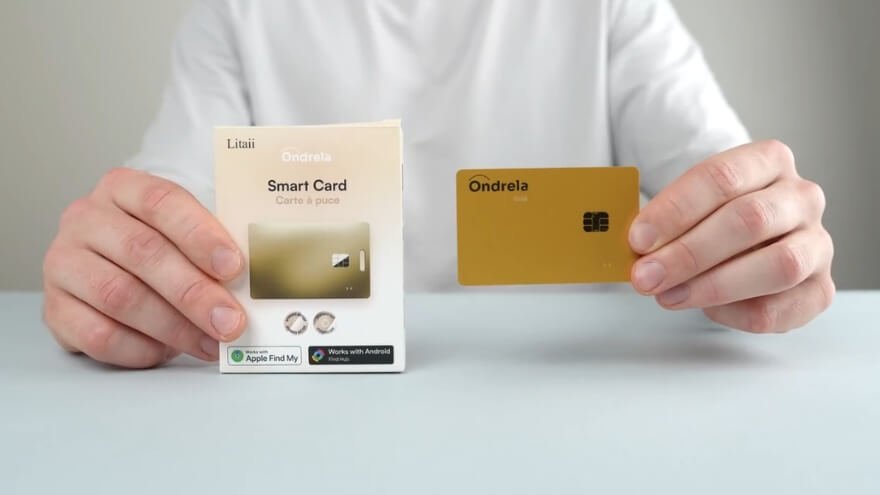
Ondrela Gold Smart Tracker is a card-shaped electronic tracking device designed to help you locate personal belongings through your smartphone. Rather than attaching a bulky accessory to your wallet, you can slip this thin card into a suitable compartment and associate it with an item in a compatible finding application.
- Ultra-slim 1.7 mm design fits comfortably inside suitable wallet compartments.
- Attractive gold finish with a stylish, card-shaped design.
- Compatible with Apple Find My and Google Find Hub.
- Card-shaped design is less convenient for attaching directly to keys.
My Quick Verdict
Ondrela Smart Tracker combines a slim 1.7 mm card design, wireless charging, and smartphone-based locating features to help you find misplaced wallets and bags. I like its practical design and convenient features, especially for everyday use. However, tracking accuracy, phone compatibility, and actual battery endurance remain important considerations before buying.
What Is Ondrela Gold Smart Tracker?
Ondrela Gold Smart Tracker is a card-shaped electronic tracking device designed to help you locate personal belongings through your smartphone. Rather than attaching a bulky accessory to your wallet, you can slip this thin card into a suitable compartment and associate it with an item in a compatible finding application.
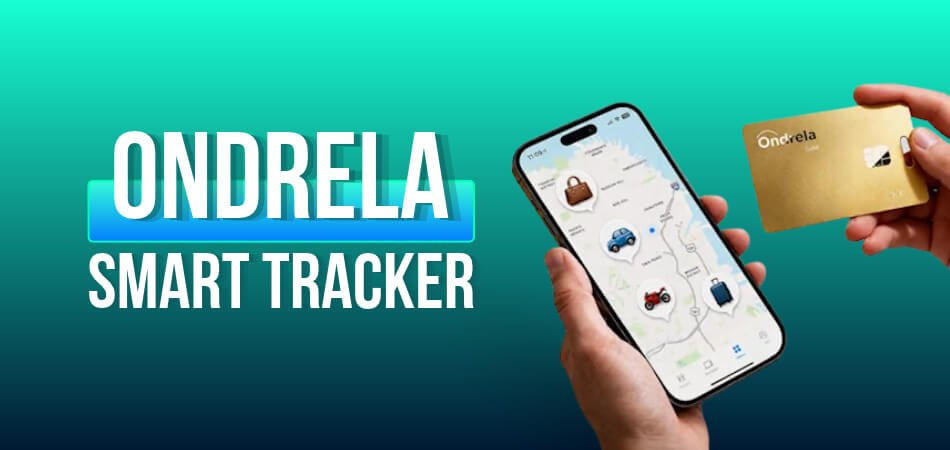
Its main purpose is straightforward: make it easier to locate belongings when you can’t remember where you left them. The product is designed around Apple Find My and Google Find Hub, with additional features such as left-behind notifications, an audible locating alarm, and rechargeable battery power.
Ondrela is intended for several everyday situations:
- Wallets and cardholders: Keep a tracker alongside your essential cards.
- Handbags and backpacks: Check the reported location of a bag you’ve misplaced.
- Luggage and passport holders: Maintain a convenient way to look up a travel item’s location.
- Other personal belongings: Use additional cards for suitable items you want to track separately.
Keys and bicycles also appear in Ondrela’s promotional examples, although the exact attachment arrangement isn’t completely clear from the physical product footage.
I see the greatest appeal in wallets and bags, where the card can remain tucked away without requiring a complicated mounting arrangement.
There’s also an important distinction worth making. Despite its gold finish and decorative chip-shaped design, Ondrela isn’t a payment card. Its purpose is locating belongings, not replacing your credit or debit cards.
Ondrela Smart Tracker Design, Wallet Fit, and Specifications
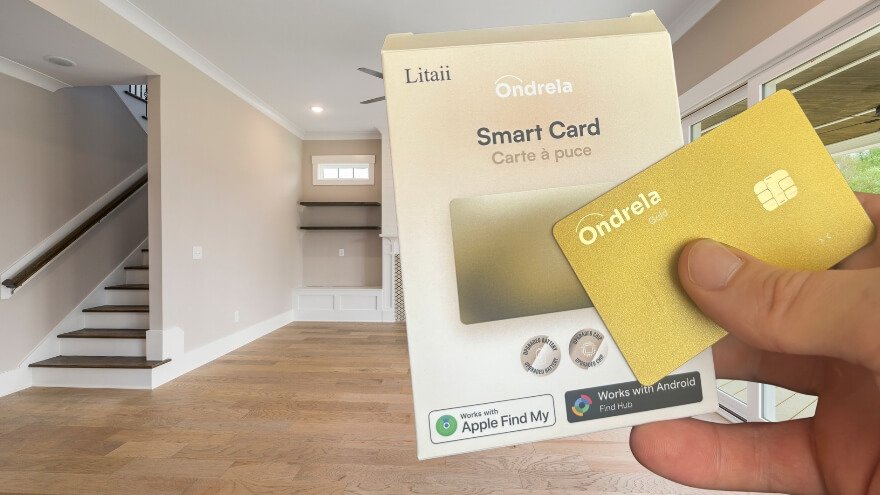
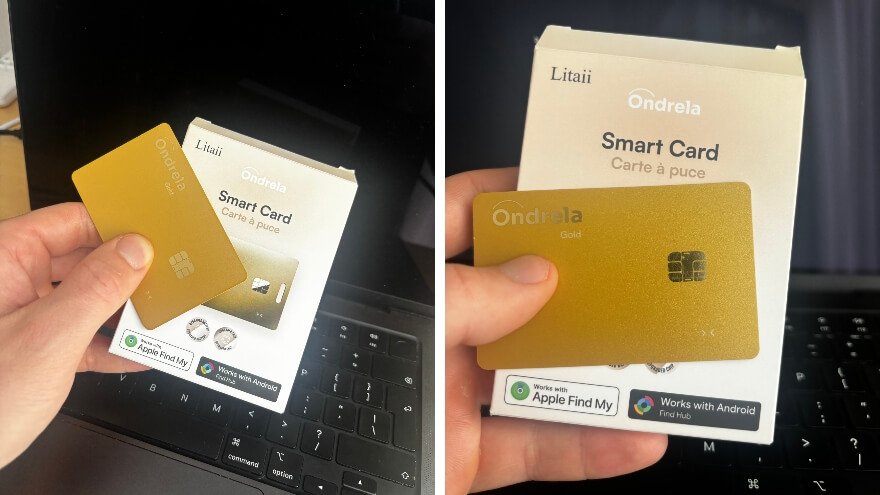
Ondrela Smart Tracker features an ultra-slim 1.7 mm card design that fits neatly inside a wallet without adding noticeable bulk. Its gold-colored finish, rounded corners, and credit-card-style shape make it practical for everyday carry. I especially like the compact design because it allows you to keep the tracker alongside your essential cards.
The card also includes wireless charging, smartphone-based location tracking, and an audible finding alarm. These features make Ondrela useful for locating wallets, bags, and other personal belongings without carrying a bulky tracking accessory.
Ondrela Smart Tracker Specifications
| Feature | Key Details |
| Product Type | Rechargeable smart tracking card |
| Thickness | 1.7 mm |
| Design | Slim, gold-colored card |
| Wallet Fit | Fits inside a standard wallet compartment |
| Compatibility | Apple Find My and Google Find Hub |
| Location Tracking | Smartphone-based item locating |
| Audible Alarm | 90 dB (stated) |
| Alarm Range | Up to 200 feet (advertised) |
| Battery Life | Up to 6 months per charge (claimed) |
| Charging | Wireless |
| Water Resistance | Water-resistant; IP rating unspecified |
| Subscription | No monthly tracking fee advertised |
My favorite design feature is its slim profile. It makes Ondrela a practical option for anyone who wants to track everyday belongings without adding another bulky gadget. Exact materials, weight, and long-term durability remain unspecified.
Ondrela Smart Tracker Tracking Accuracy and Performance
Ondrela Smart Tracker helps locate misplaced wallets, bags, and other belongings by displaying their reported locations through Apple Find My or Google Find Hub. Its tracking performance depends on how recently the item’s location was updated. While it can help you find lost belongings, continuous real-time tracking and precise location accuracy aren’t guaranteed.
Recent Location vs. Last-Known Location
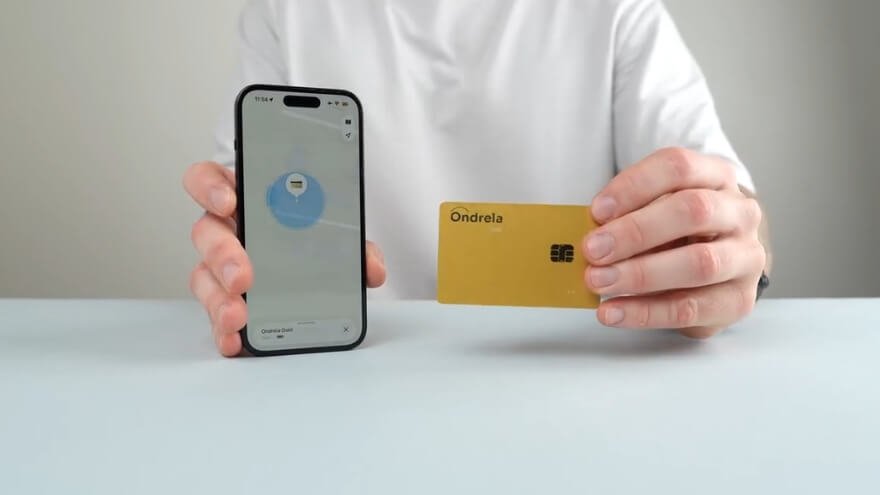
Ondrela’s finding interface displays location information with timestamps, helping you understand when an item was last reported.
- Recent location: A wallet example showed a location updated three minutes earlier, providing a useful starting point for finding a recently misplaced item.
- Last-known location: A travel-bag example showed a location from the previous day, which could help identify where to begin searching but might not reflect its current position.
- Map directions: The finding interface can provide directions toward a reported location, helping you navigate to the area.
Ondrela Tracking Performance in Everyday Situations
| Situation | How Ondrela Can Help |
| Misplaced wallet | Check its recently reported location |
| Forgotten bag | View the last-known location |
| Nearby belongings | Use the audible finding feature when available |
| Lost luggage | Check its reported location and follow map directions |
| Moving belongings | Location updates may not reflect continuous movement |
For everyday situations, I find the combination of location information, map directions, and nearby audible finding useful in principle. However, Ondrela’s exact accuracy, location-update frequency, and performance with moving belongings haven’t been independently established.
My assessment: Ondrela is best suited to finding misplaced belongings and checking their last-known locations rather than providing guaranteed continuous GPS-style tracking.
My First Impression of Ondrela Gold Smart Tracker
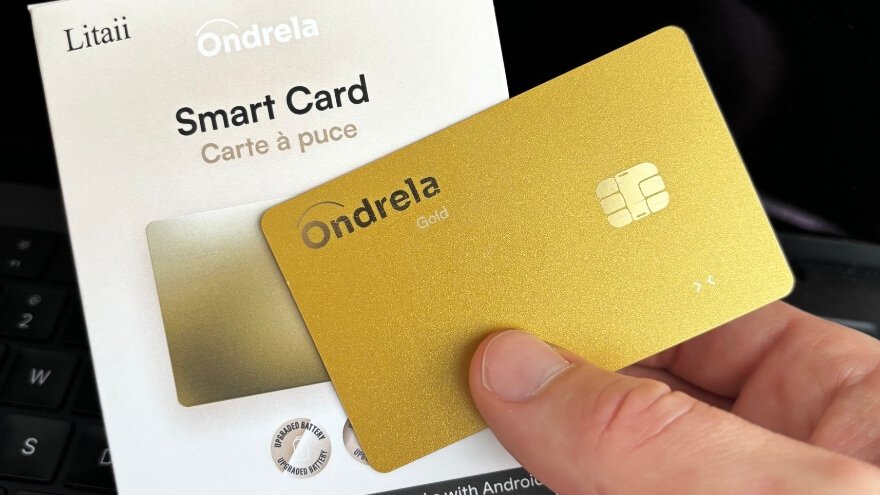
My first impression of Ondrela Gold Smart Tracker is positive, mainly because of its slim, practical design and convenient tracking features. The gold finish gives it a premium appearance, while the card-shaped body makes it an interesting alternative to bulky tracking accessories.
Three things particularly appeal to me:
- Slim and stylish design: The flat, gold-colored card looks attractive and is designed to fit naturally inside a wallet.
- Everyday convenience: I like the idea of keeping a tracker alongside essential cards without carrying an additional accessory.
- Rechargeable battery: Wireless charging and the stated six-month battery life make it an appealing low-maintenance option.
What I appreciate most is the balance between appearance and practicality. Ondrela looks like a convenient everyday item finder, although its actual tracking reliability and long-term durability matter more to me than its appearance. Those are the details I’d consider carefully before buying.
How Ondrela Smart Tracker Works: Location Tracking Explained
Ondrela Smart Tracker works with Apple Find My and Google Find Hub to help locate wallets, bags, and other belongings through a smartphone-based finding network. Instead of relying on a confirmed built-in GPS receiver, it is designed to use compatible finding services to display reported item locations, provide map directions, and support nearby locating features.
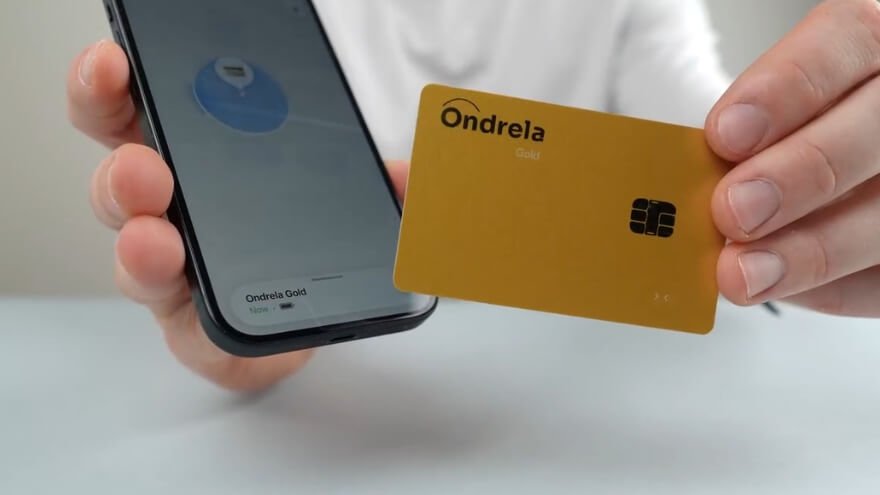
Process 1: Wireless Communication With the Finding Network
Compatible item-tracking networks generally use short-range wireless signals to identify nearby trackers. Ondrela is designed to connect with Apple Find My or Google Find Hub, allowing the card to be associated with an item in the supported ecosystem.
The exact wireless protocol and internal tracking hardware used by Ondrela haven’t been specified, so its individual communication method cannot be confirmed in greater technical detail.
Process 2: Location Detection Through Nearby Devices
In compatible finding networks, participating devices can detect signals from supported trackers and help provide location information.
This network-based approach can make it possible to locate belongings beyond the immediate distance between your phone and the tracker. However, location availability depends on the finding network and when a new position is reported.
Process 3: Location Reporting and Map Updates
The finding service displays the item’s reported location on a map, along with information about when that position was last updated.
Ondrela’s finding interface also supports map directions, helping users navigate toward the reported location. A recent update can be more useful than an older position, particularly when an item is moving.
The system shouldn’t be confused with guaranteed continuous real-time GPS tracking.
Process 4: Nearby Finding Through an Audible Alarm
For belongings misplaced nearby, Ondrela includes an audible locating feature. The card is specified to produce a 90 dB alarm, with an advertised activation distance of up to 200 feet.
The alarm is intended to help identify an item’s position when it’s close enough to hear. That 200-foot figure applies to the advertised alarm function, not the maximum geographic distance for map-based finding.
Process 5: Separation Detection and Left-Behind Alerts
Ondrela also offers left-behind notifications designed to warn users when a tracked belonging becomes separated from them.
This feature is intended to help prevent items from being forgotten rather than relying entirely on searching after they’re lost. The exact separation threshold and notification timing haven’t been independently established.
Ondrela’s main strength is combining network-based location finding, map information, nearby audible locating, and separation alerts in one compact card. I find that combination practical for everyday belongings, although its exact hardware and location-update reliability remain important considerations.
Ondrela Smart Tracker Compatibility With Apple Find My and Google Find Hub
Ondrela Smart Tracker supports Apple Find My and Google Find Hub, allowing iPhone and Android users to locate their belongings through their respective smartphone finding services. This dual-platform compatibility makes the card a flexible option for tracking wallets, bags, and other everyday valuables.
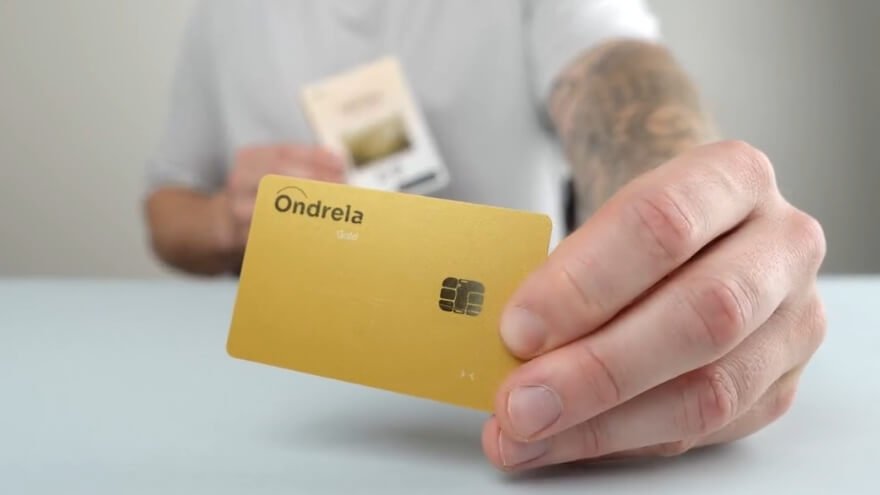
Apple Find My Compatibility
Ondrela integrates with Apple Find My, giving iPhone users access to familiar item-finding features.
Key functions include:
- Location tracking: Check an item’s reported position on a map.
- Map directions: Get directions toward its last-known location.
- Location history details: See when the current position was last reported.
- Audible finding: Access sound controls to help locate nearby belongings.
I like the convenience of keeping item tracking within Apple’s familiar Find My interface. It makes sense for someone who already uses an iPhone and prefers managing important belongings in one place.
Google Find Hub Compatibility
Google Find Hub provides the Android-side finding ecosystem for Ondrela. It allows Android users to manage compatible tracking devices and access supported item-finding functions through their phones.
This is particularly useful for people who prefer a wallet-style tracker but don’t use an iPhone.
The exact Android versions, supported devices, and Ondrela-specific functions may vary, so checking your phone’s compatibility remains important.
Apple Find My vs. Google Find Hub
| Feature | Apple Find My | Google Find Hub |
| Smartphone | iPhone | Android |
| Finding Service | Apple Find My | Google Find Hub |
| Main Purpose | Locate personal belongings | Locate personal belongings |
| Map-Based Finding | Supported interface function | Depends on supported device functions |
| Nearby Finding | Available sound controls | Device-specific support to confirm |
| Exact Phone Requirements | Check compatibility | Check compatibility |
Supporting both Apple and Google finding ecosystems is a practical advantage. However, I wouldn’t assume one Ondrela card can connect to both platforms simultaneously or that every feature works identically across all phones. Confirming those details before buying is especially important for households using a mix of iPhone and Android devices.
How to Set Up and Use Ondrela Smart Tracker
Setting up Ondrela Smart Tracker involves connecting the card to Apple Find My or Google Find Hub, assigning it to a personal belonging, and using your smartphone to locate that item. The process is designed to be straightforward, even if you’re new to smart trackers. Once the initial connection is complete, you can keep Ondrela inside your wallet, bag, or luggage. Follow these steps to get started and make use of its finding features.
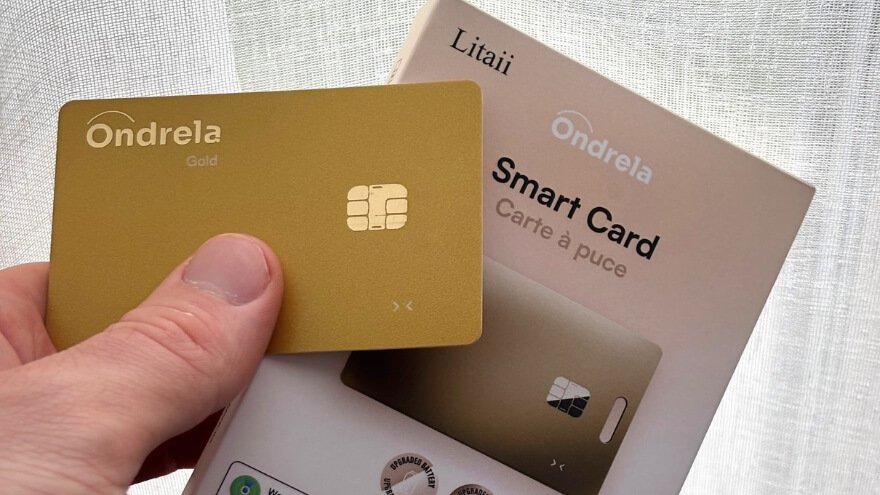
Step 1: Prepare Your Ondrela Smart Tracker
Take Ondrela out of its packaging and inspect the card before setting it up. Keep your smartphone nearby so you can complete the connection process without interruptions. If the card needs charging, place it flat on a compatible wireless charging pad and follow its charging instructions. Starting with sufficient battery power helps make the initial setup smoother.
Step 2: Open the Finding App on Your Smartphone
Choose the finding service that matches your smartphone. iPhone users should open Apple Find My and select the Items section, while Android users should open Google Find Hub on a compatible device. Make sure the phone’s required wireless and location settings are enabled so the finding service can operate correctly. Keep the app open and your phone close to Ondrela while preparing to connect the card.
Step 3: Connect Ondrela to Your Smartphone
Follow the activation instructions included with Ondrela to put the card into its pairing mode. Then use the compatible finding service to add the tracker, following the prompts shown on your phone. Keep Ondrela close to your smartphone throughout the connection process and allow it to finish before moving the card away. Once the tracker appears as a connected item, it’s ready to be associated with the belonging you want to locate.
Step 4: Give Your Tracker a Recognizable Name
After connecting Ondrela, give the item a simple name that matches the belonging you plan to track. For example, you can use Wallet, Backpack, Travel Bag, or Passport Holder where the finding service supports item naming. Clear names make it easier to identify the correct tracker, especially when managing several belongings. I recommend avoiding similar names for multiple items because you want to recognize the right one immediately when something goes missing.
Step 5: Place Ondrela Inside Your Belonging
Slide Ondrela into a suitable compartment inside your wallet, handbag, backpack, or luggage. Its 1.7 mm slim design makes it particularly convenient for wallet storage without adding much thickness. For larger bags, choose a secure compartment where the card won’t move around or accidentally fall out. Keep the tracker with its assigned item so the name in your finding app always matches the belonging you’re tracking.
Step 6: Check Your Belonging’s Location
Whenever you need to find an item, open the finding app and select its assigned name. The app can display the item’s reported location on a map, helping you identify where to begin searching. Check the last-updated time to understand how recently that position was reported, especially if the belonging may have moved. When directions are available, use them to navigate toward the reported location rather than searching without a starting point.
Step 7: Locate Nearby Items Using the Audible Alarm
If your wallet or bag is somewhere nearby, open the associated item in your finding app and look for the Play Sound control. Use that option when available to activate Ondrela’s locating alarm, then listen carefully to identify where the sound is coming from. Ondrela has a stated 90 dB alarm with an activation range of up to 200 feet, although actual operation depends on the conditions. This feature is particularly useful for belongings hidden inside bags, drawers, or other places where checking a map alone may not be enough.
Step 8: Set Up Left-Behind Notifications
Ondrela includes left-behind alerts intended to help you notice when an important belonging becomes separated from you. Open the relevant item settings in your finding service and check whether separation notifications are available for your connected card. Enable the supported alert option and review any additional notification settings offered by the app. These alerts can provide a useful reminder when you forget a bag or wallet, although their availability and timing depend on the supported device and finding service.
Step 9: Maintain the Battery and Keep Ondrela Ready
Ondrela has a stated battery life of up to six months per charge, so it shouldn’t require frequent charging under its intended operating conditions. Check the battery information in your finding service if that information is available for the connected card. When charging is needed, place Ondrela flat on a compatible wireless charging pad and follow its charging guidance. Keeping the battery charged helps ensure the tracker is ready when you need its locating features.
My advice is to become familiar with Ondrela’s location map, sound controls, and available notifications before you actually misplace something. Give each tracker a clear name and keep it securely with the correct belonging. Once everything is connected, everyday use mainly involves opening your finding app whenever you need to check an item’s location. That simplicity is what makes a compact tracking card appealing for everyday use.
Ondrela Smart Tracker Battery Life and Wireless Charging
Ondrela Smart Tracker features a rechargeable battery that can last up to six months on a single charge, along with convenient wireless charging. This means you may only need to recharge it twice a year, depending on usage. I like this low-maintenance design because a wallet tracker should be ready when needed without requiring constant attention.
What I Appreciate About Ondrela’s Wireless Charging
Ondrela uses wireless charging, so there’s no need to connect a cable directly to the card. Simply place it flat on a compatible wireless charging pad and allow it to charge for a few hours. I appreciate this straightforward approach because it makes charging convenient without adding a physical charging port to the slim design.
Battery Life and Long-Term Maintenance
- Battery life: Up to six months per charge.
- Charging method: Wireless charging pad.
- Charging time: A few hours, according to the product guidance.
- Charging frequency: Approximately twice yearly, depending on usage.
My favorite part is the convenience of rechargeable power. The six-month battery life is a stated maximum rather than independently measured endurance, and the charging pad’s inclusion isn’t confirmed. Even so, the combination of wireless charging and a long claimed battery life makes Ondrela appealing for everyday use.
What I Like Most About Ondrela Smart Tracker
What I like most about Ondrela Smart Tracker is how it combines a slim wallet-friendly design, smartphone location tracking, left-behind alerts, and rechargeable convenience in one compact device. These features address the everyday frustration of misplacing important belongings. I particularly appreciate that Ondrela focuses on making item tracking convenient without adding a bulky accessory to your daily routine.
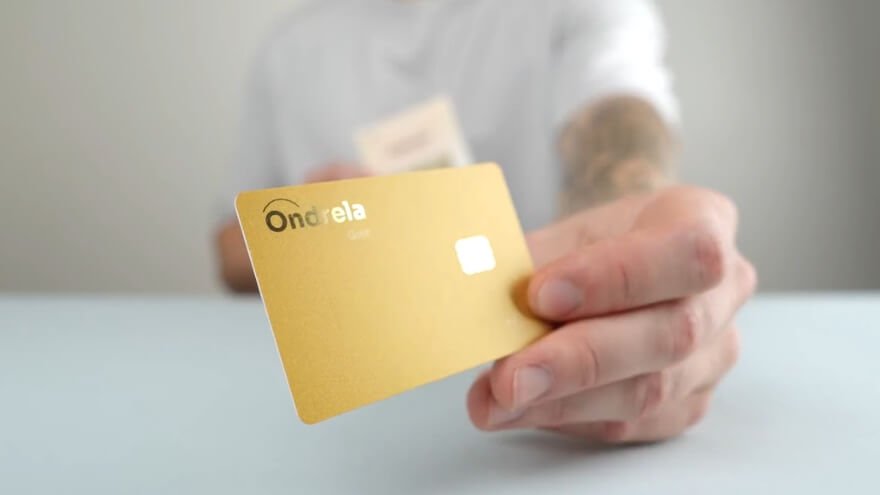
1. Slim and Wallet-Friendly Design
Ondrela’s 1.7 mm card-shaped body is my favorite feature because it fits neatly into a suitable wallet compartment. Unlike larger tracking accessories, its flat design allows you to keep it alongside your essential cards. I like this approach because the tracker can stay with your wallet without requiring a separate attachment.
2. Convenient Smartphone Location Tracking
I appreciate being able to check a belonging’s reported location through Apple Find My or Google Find Hub on a compatible phone. The map and last-known-location information can provide a useful starting point when a wallet or bag goes missing. Having this information available through a familiar finding service makes the tracking experience more convenient, although location updates aren’t always immediate.
3. Helpful Left-Behind Alerts
The left-behind notification feature is another reason I find Ondrela appealing. It’s designed to warn you when a tracked belonging becomes separated from you, potentially helping you notice a forgotten wallet or bag sooner. I especially like the preventive aspect because remembering something before traveling too far is more convenient than searching for it later.
4. Audible Alarm for Nearby Finding
Ondrela includes a 90 dB locating alarm with a stated activation range of up to 200 feet. I find this particularly useful in principle for locating a wallet hidden inside a bag, drawer, or another nearby place. Instead of relying only on map directions, the sound feature gives you another way to narrow your search, although its actual loudness and operating range haven’t been independently measured.
5. Rechargeable Battery and Wireless Charging
The combination of wireless charging and up to six months of battery life per charge makes Ondrela attractive for everyday ownership. I like the convenience of placing the card on a compatible charging pad instead of connecting a charging cable directly to it. Although actual battery endurance can vary, the stated charging interval could make maintenance much easier.
6. No Monthly Tracking Subscription
Another benefit I appreciate is Ondrela’s no-monthly-fee approach to item tracking. Once you’ve purchased the card, there’s no separate recurring Ondrela tracking subscription listed for its core finding features. That makes the ongoing cost easier to manage, especially if you want to keep several belongings associated with individual trackers.
Overall, the combination of portability, locating features, and rechargeable power is what makes Ondrela interesting to me. I particularly value the slim design and the ability to check an item’s location without carrying another bulky gadget. The actual performance of its finding features still matters, but these are the practical advantages that make Ondrela worth considering.
Ondrela Smart Tracker Water Resistance, Durability, and Privacy
Ondrela Smart Tracker combines a water-resistant design, slim construction, and smartphone-based location finding for everyday use. Its card-shaped body is convenient for carrying inside wallets and bags. However, water protection, physical durability, and location privacy are important considerations for long-term ownership.
Water Resistance
Ondrela is designed to handle everyday moisture, such as light rain and accidental splashes. However, it doesn’t have a specified IP water-resistance rating. I recommend avoiding submersion, washing, or prolonged exposure to water because its protection limits aren’t clearly defined.
Durability and Build Quality
The 1.7 mm slim design makes Ondrela easy to carry inside a wallet without unnecessary bulk. Its flat, rounded shape is practical for everyday storage. However, its exact materials, bending resistance, and long-term durability haven’t been confirmed, so I recommend keeping it in a secure compartment.
Location Privacy and Security
Ondrela works with Apple Find My and Google Find Hub to help manage item locations through compatible smartphones. These finding services handle location-related information, while purchase and support details are managed separately. I appreciate the use of familiar finding ecosystems, although Ondrela’s complete privacy and unwanted-tracking protections haven’t been independently verified.
Ondrela Smart Tracker vs. Other Wallet Trackers: Key Differences
Ondrela Smart Tracker stands out with its ultra-slim 1.7 mm design, wireless rechargeable battery, and compatibility with Apple Find My and Google Find Hub. It combines several practical finding features in a card-shaped device that fits inside a suitable wallet compartment. Compared with other wallet trackers, its main appeal is the combination of portability, rechargeable convenience, and support for both major smartphone ecosystems.
Ondrela Smart Tracker vs. Other Wallet Trackers
| Feature | Ondrela Smart Tracker | Other Wallet Trackers |
| Design | Slim, gold-colored card | Various shapes and finishes |
| Thickness | 1.7 mm | Varies by model |
| Wallet Fit | Fits inside a suitable card slot | Depends on size and design |
| Compatibility | Apple Find My and Google Find Hub | Apple, Google, or model-specific |
| Location Finding | Map location and directions | Features vary by model |
| Audible Alarm | 90 dB stated output | Volume varies |
| Battery Life | Up to 6 months (claimed) | Varies by battery type |
| Charging | Wireless rechargeable | Rechargeable or replaceable battery |
| Left-Behind Alerts | Included feature | Depends on model |
| Water Resistance | Water-resistant; IP rating unspecified | Protection varies |
| Monthly Fees | No Ondrela tracking subscription | Depends on product and service |
My preference is Ondrela’s slim design and rechargeable convenience. These features make it an appealing option for everyday wallet tracking without unnecessary bulk. However, other trackers may suit different needs, so I’d compare phone compatibility, battery maintenance, and locating features before deciding which one offers better value.
Who Should Buy Ondrela Smart Tracker and Who Should Skip It?
Ondrela Smart Tracker is a practical choice for people who want to locate misplaced wallets, bags, luggage, and other everyday belongings using their smartphones. Its slim 1.7 mm design, wireless charging, and finding features make it especially appealing for convenient daily use. I recommend considering Ondrela if you value portability, simple item tracking, and rechargeable convenience.
Who Should Buy Ondrela Smart Tracker?
Ondrela is best suited to people who regularly carry important belongings and want an easier way to find them when misplaced. Its combination of location finding, audible alerts, and compact design can be useful in several everyday situations. Here are the buyers I believe would benefit most.
1. People Who Frequently Misplace Their Wallets
Ondrela is especially suitable for anyone who occasionally forgets where they placed their wallet. Its slim card design fits inside a suitable wallet compartment, while smartphone location information helps narrow down where to look. The nearby audible finding feature adds another convenient way to search.
2. Frequent Travelers and Commuters
Travelers can keep Ondrela inside luggage, backpacks, or passport holders to check their reported locations when needed. I particularly like its compact design because it doesn’t require much storage space. However, location updates may not always reflect an item’s current position while it’s moving.
3. People Who Often Forget Their Belongings
Ondrela’s left-behind alerts make it appealing to people who occasionally leave bags or other essentials behind. These notifications are intended to help you notice when an item becomes separated from you. I appreciate this feature because identifying a forgotten belonging early can save unnecessary searching later.
4. Buyers Who Prefer Rechargeable Trackers
Ondrela is a convenient option for people who prefer wireless charging over regularly replacing batteries. With a stated battery life of up to six months per charge, it is designed to require relatively little maintenance. I find that especially appealing for a tracker intended to remain inside a wallet or bag.
5. People Managing Multiple Belongings
Ondrela can also appeal to people who want separate tracking cards for their wallets, bags, and travel essentials. Available multi-card packages make it possible to buy several trackers together. This approach makes sense when each card has a specific purpose and your phone supports the intended finding features.
Who Should Skip Ondrela Smart Tracker?
Ondrela may not be the best choice for everyone, particularly buyers who need continuous location monitoring or independently verified tracking performance. Its greatest appeal is convenient everyday item finding rather than advanced location monitoring. I’d consider another tracking solution in the following situations.
- People needing continuous real-time GPS tracking: Ondrela doesn’t have verified standalone GPS capabilities or guaranteed continuous location updates.
- Buyers requiring precise tracking accuracy: Independent accuracy measurements and consistent update intervals aren’t available.
- People needing fully waterproof equipment: Ondrela has no confirmed IP rating for prolonged water exposure or submersion.
- Users with unconfirmed phone compatibility: Check your specific iPhone or Android model before relying on its finding features.
- People who rarely misplace belongings: A tracking accessory may provide limited value if you don’t have a regular need for one.
Ondrela makes the most sense for everyday wallet owners, travelers, and people who want a slim rechargeable item finder. I particularly like its combination of portability and useful locating features. However, if continuous GPS-style tracking or independently verified performance is essential, I’d choose a solution designed and tested for those requirements.
Ondrela Smart Tracker Pros and Cons
I like Ondrela Smart Tracker for its slim design, convenient finding features, and rechargeable battery. It brings several useful functions together without making everyday item tracking complicated. The advantages are particularly appealing for wallets, bags, and travel essentials, although there are a few practical trade-offs.
Overall, I appreciate how Ondrela combines portability, practical finding features, and low-maintenance charging. Its strongest advantage is the ability to keep a tracker inside a wallet without adding much bulk. I would choose it for everyday item finding rather than continuous GPS-style monitoring, where more specialized tracking capabilities would be necessary.
Ondrela Smart Tracker Price, Bundle Deals, and Overall Value
Ondrela Smart Tracker starts at approximately $50.63 for one card, with bundle prices dropping to around $28.12 per card when buying four. I like the multi-card packages because they offer better value for people tracking several belongings. The four-card bundle provides the lowest cost per card.
Ondrela Smart Tracker Price and Packages
| Package | Price Per Card | Total Price |
| 1 Card | $50.63 | $50.63 |
| 2 Cards | $39.38 | $78.75 |
| 3 Cards | $33.75 | $101.25 |
| 4 Cards | $28.12 | $112.49 |
The four-card package offers the best value per card, while the two-card bundle is a practical choice for tracking a wallet and another important belonging. I would choose based on how many items I actually need to track rather than buying extra cards just for a discount.
Shipping and Additional Costs
- Standard shipping: Approximately $5.57.
- Monthly fees: No monthly tracking subscription.
- Payment methods: Apple Pay, PayPal, and major credit cards.
- Available packages: 1, 2, 3, or 4 cards.
My recommendation: Ondrela’s bundle pricing makes it attractive for tracking multiple belongings. I prefer the four-card package for its lower unit price, but the two-card option offers a sensible balance of price and quantity. Always check the final checkout total before ordering.
Where to Buy Ondrela Smart Tracker
You can buy Ondrela Smart Tracker online through its official seller checkout. The ordering process lets you select your preferred card package, enter your delivery information, and choose a payment method. I recommend using the direct purchase link below to access the available packages and complete your order.
How to Order Ondrela Smart Tracker
Ordering Ondrela is straightforward, with a checkout designed for convenient online purchasing. Here’s how to complete your order:
- Open the Ondrela Smart Tracker Order Page.
- Select your preferred card package.
- Enter your name, email address, and phone number.
- Provide your complete delivery address.
- Choose an available payment method, such as PayPal, Apple Pay, or a supported credit card.
- Review your order details and complete checkout.
Shipping and Delivery
Ondrela provides international shipping to supported countries, with delivery availability and estimated arrival times depending on your location. Enter your country and complete address during checkout to see the available delivery options. After ordering, you can use the seller’s order-tracking service to follow your shipment.
60-Day Return Policy
Ondrela offers a 60-day return window starting from the date you receive your order. You can request a return for eligible products, including defective items, incorrect orders, or a change of mind. Contact customer support within the return period to obtain a Return Merchandise Authorization (RMA) before sending anything back. Products must meet the applicable return conditions, including original packaging requirements for non-defective items.
Warranty and Customer Support
Ondrela provides customer support for ordering questions, delivery concerns, returns, and product-related issues. Warranty claims are subject to eligibility requirements and exclusions, so coverage isn’t an unconditional replacement guarantee. I recommend keeping your order confirmation and contacting support promptly if you receive a defective or incorrect product.
My recommendation: Buying through the direct Ondrela checkout keeps the ordering process simple and gives you access to the seller’s customer support and return procedures. I appreciate having payment options and a defined return window, although it’s important to review the conditions before completing your order.
Frequently Asked Questions About Ondrela Smart Tracker
Ondrela Smart Tracker is designed to make finding everyday belongings more convenient. However, there are a few practical questions worth understanding, especially when traveling, managing several cards, or dealing with an item that has gone missing.
Do I Need to Download a Separate App for Ondrela Smart Tracker?
No separate Ondrela app is required. The tracker works through Apple Find My on compatible iPhones and Google Find Hub on supported Android phones. You simply use the appropriate finding service to connect and manage your card, although some Android devices may require the app to be installed or enabled.
Can I Connect Multiple Ondrela Smart Trackers to One Phone?
Compatible finding apps can manage multiple named items, making separate tracking cards useful for wallets, bags, and other belongings. Each card should be connected and identified individually so you can recognize the correct item. The exact maximum number of Ondrela cards supported by one account hasn’t been specified.
Does Ondrela Smart Tracker Work Internationally?
Ondrela can help locate belongings while traveling internationally wherever its compatible finding network provides coverage. This makes it relevant for luggage, backpacks, and passport holders during trips abroad. However, location updates depend on nearby participating devices, so coverage can vary between countries and locations.
Can Ondrela Find My Belongings in Remote Areas?
Ondrela’s finding network is more likely to provide useful location updates where compatible participating phones are available. In remote areas with fewer nearby devices, updates may take longer or become less frequent. You can still check the last-reported location when the finding service has one available.
What Happens if Ondrela Smart Tracker Runs Out of Battery?
When Ondrela’s battery runs out, the card cannot continue its normal powered tracking and audible finding functions. Your finding app may still display an earlier reported location, depending on the service. Recharging the card is necessary to restore its normal operation, so keeping track of battery maintenance is important.
Will Ondrela Still Work if My Phone Is Turned Off or Lost?
Turning off your phone doesn’t necessarily prevent other participating devices from detecting a powered tracker through the finding network. However, you won’t be able to check the location using your switched-off phone. Depending on your Apple or Google account and supported devices, you may be able to access available finding information elsewhere.
Can Ondrela Smart Tracker Help Find a Stolen Wallet?
Ondrela may help you identify the reported location of a stolen wallet if the tracker remains inside and location information becomes available. However, it cannot prevent theft or guarantee recovery. If you suspect theft, I recommend sharing relevant location information with the authorities rather than attempting a potentially unsafe recovery yourself.
Does Ondrela Work Inside an RFID-Blocking or Metal Wallet?
Metal and certain RFID-blocking materials can interfere with the wireless signals used by item-finding devices. If you carry Ondrela inside a metal or RFID-blocking wallet, test its nearby finding function with the card in place. The amount of interference depends on the wallet’s construction, so performance may differ between designs.
Why Is My Ondrela Smart Tracker Location Not Updating?
Location updates can be delayed when the tracker is outside direct phone range or there are few participating devices nearby. First, check the card’s battery, your phone’s required settings, and the finding app’s connection. If the last-reported location remains unchanged, allow time for another network detection and follow the app’s troubleshooting guidance.
Can Ondrela Smart Tracker Be Used to Track Pets or Children?
Ondrela is primarily an item-finding device rather than a dedicated pet tracker or personal safety monitor. Its location updates may be delayed, making it unsuitable for situations requiring dependable live monitoring. For children or pets, I would choose a purpose-built solution with appropriate safety features instead of relying on a wallet tracker.
My Final Verdict: Is Ondrela Smart Tracker Worth It?
Ondrela Smart Tracker is a practical choice for anyone who wants a slim, rechargeable way to locate wallets, bags, and everyday essentials. What I like most is how its 1.7 mm design, smartphone finding features, and wireless charging work together to make item tracking more convenient. I particularly appreciate that it can stay tucked inside a wallet without adding unnecessary bulk.
Throughout my Ondrela Smart Tracker review, I’ve focused on the features that matter most to me: everyday convenience, reliable location information, and ease of use. The combination of Apple Find My and Google Find Hub compatibility, left-behind alerts, and audible finding makes Ondrela an appealing option. I especially like its rechargeable design, although location updates and battery endurance can vary in real-world use.
I would recommend Ondrela to people who frequently misplace their belongings, travel regularly, or simply want extra peace of mind. Its compact design and practical finding features make it a useful everyday accessory, especially when paired with a compatible smartphone. For me, Ondrela’s strongest selling point is simple: it offers a convenient way to keep track of important belongings without making everyday life more complicated.
Ondrela Gold Smart Tracker is a card-shaped electronic tracking device designed to help you locate personal belongings through your smartphone. Rather than attaching a bulky accessory to your wallet, you can slip this thin card into a suitable compartment and associate it with an item in a compatible finding application.
- Ultra-slim 1.7 mm design fits comfortably inside suitable wallet compartments.
- Attractive gold finish with a stylish, card-shaped design.
- Compatible with Apple Find My and Google Find Hub.
- Card-shaped design is less convenient for attaching directly to keys.


