
Ever pressed play on your Groovz earbuds and felt the sound was not quite powerful enough? Small settings can make a big difference in how music, calls, and podcasts actually feel. If you have been wondering how to increase volume on Groovz Earbuds, you are not alone. Many users overlook simple adjustments that unlock fuller, clearer audio without distortion or discomfort.
The good news is that boosting volume is easy. You can use touch controls, adjust device settings, enable equalizer options, improve Bluetooth stability, or reset and re-pair your earbuds for better performance. These steps help increase loudness while keeping clarity intact. Keep reading to discover each method in detail and get the best sound from your Groovz earbuds.
Indications That You Should Raise the Volume on Your Groovz Earbuds
Sometimes, your earbuds may be on, but the sound just doesn’t feel right. With Groovz Audio, it’s easy to know when your volume might need a boost to get the full listening experience. Here are the key signs that it’s time to raise the volume on your earbuds:
- Difficulty Hearing Details in Music: If the instruments, background layers, or vocals feel muted or lack clarity, your volume may be too low. According to many Groovz Audio review, the earbuds are designed to deliver crisp, balanced sound, so raising the volume slightly can help you catch every nuance in your favorite tracks.
- Straining to Hear Calls or Podcasts: When you find yourself leaning in or increasing effort to hear voices during calls or podcasts, it’s an indication that the audio level is below optimal. With Groovz’s dual microphones and ENC noise control, a moderate volume increase ensures voices remain clear and natural.
- Background Noise Overpowers Audio: Walking on a busy street, commuting, or working in a noisy room? If environmental sounds are drowning out your music or calls, turning up the volume can help you hear without having to isolate your earbuds excessively.
- Missing Out on Low or High Frequencies: Sometimes the bass feels weak, or the highs sound dull. Groovz’s dynamic drivers are capable of rich lows and sparkling highs, so adjusting the volume can unlock the full depth and clarity of your audio.
- Feeling Underwhelmed by the Experience: If your listening session feels flat or lifeless, it might simply be that the volume isn’t enough. Groovz earbuds are built to deliver a wide soundstage and natural vocal presence, which only shines when the audio is set to a comfortable yet engaging level.
Pro Tip: Always increase volume gradually to a comfortable level. Groovz earbuds are efficient and clear even at mid-level volumes, so you don’t have to blast the sound to get the full experience.
How to Increase Volume on Groovz Earbuds?
Getting the right audio level on your Groovz earbuds can transform your listening experience. From calls to music, optimal volume ensures clarity and comfort. Follow these simple steps to boost your earbuds’ sound.

Step 1: Use Touch Controls Effectively
Groovz earbuds feature touch-sensitive panels on each bud. Tap or swipe according to the manual to raise the volume. Learning the gesture patterns ensures consistent control without interrupting playback or calls. Touch controls are intuitive for daily adjustments.
Step 2: Adjust Volume Through Your Device
Your connected phone, tablet, or laptop can directly control Groovz volume. Increase levels via system settings or on-screen sliders. This method works even if touch controls feel unresponsive or if you need a precise increment of sound output.
Step 3: Enable Equalizer Settings
Many devices offer EQ options that enhance loudness and clarity. Adjust bass, mids, and treble to increase perceived volume without distortion. Using an equalizer can create a richer soundstage and improve your Groovz listening experience for music or podcasts.
Step 4: Check Bluetooth Connection Quality
A weak Bluetooth signal may reduce audio output. Ensure your Groovz earbuds stay within a 32-foot range of the paired device. Stronger connections maintain consistent volume and prevent sudden drops in sound levels during calls or streaming.
Step 5: Use Voice Assistant Commands
If your device supports voice assistants, you can request volume adjustments hands-free. Commands like “increase volume” or “turn it up” provide precise control, especially during workouts or commutes, enhancing your Groovz earbuds experience seamlessly.
Step 6: Reset and Re-Pair the Earbuds
If volume feels low, uneven, or keeps dropping, reset the connection. Go to your phone’s Bluetooth settings, forget “Groovz Earbuds,” turn Bluetooth off and on, then pair the earbuds again. This often fixes volume glitches, improves connection stability, and restores normal sound output without any extra apps.
Following these strategies ensures your Groovz earbuds deliver maximum sound clarity and comfort. Consistent use of device controls, touch gestures, and re-pair keeps your listening experience vibrant and balanced throughout the day.
Factors That May Impact the Audio Performance of Groovz Earbuds
Understanding what affects your Groovz earbuds’ audio quality can help you get the best listening experience. From device settings to environmental factors, small adjustments can make a big difference. Read on for key insights.

Bluetooth Signal Strength
The stability of your Bluetooth connection plays a major role in audio performance. Weak or interrupted signals may cause sound drops or distortion. Keep your device within the recommended 32-foot range to maintain consistent, clear audio.
Ear Tip Fit and Seal
Properly fitting silicone ear tips ensure optimal sound isolation and bass response. Using the wrong size can reduce volume, clarity, and comfort. Adjusting tips or switching sizes helps Groovz earbuds deliver balanced and immersive audio.
Device Volume and EQ Settings
Audio output also depends on your device’s volume and equalizer settings. Low volume or poorly adjusted EQ can make sound feel flat or muffled. Optimizing these settings enhances clarity, depth, and overall listening experience.
Environmental Noise and Interference
External sounds such as traffic, crowds, or fans can impact perceived audio quality. Using the ENC noise control and positioning yourself in quieter areas improves call clarity and music enjoyment on Groovz earbuds.
Battery Level and Charging
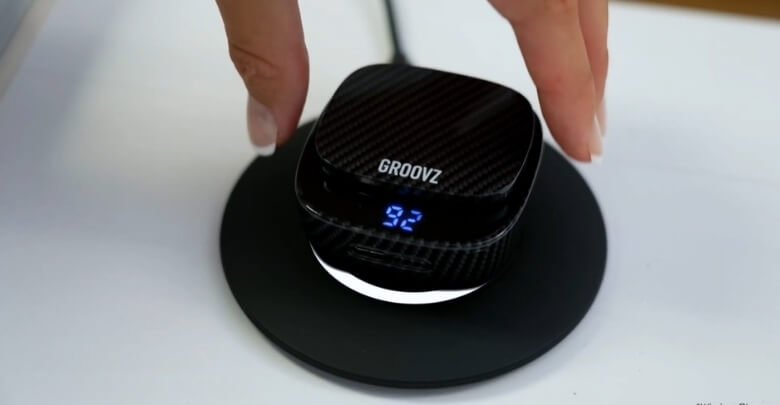
Low battery levels may reduce performance or audio consistency. Learning how to charge Groovz earbuds without wires using the included case and compatible wireless pads ensures stable sound output during long listening sessions.
Reset and Keep Your Phone Updated
If audio feels inconsistent, forget the earbuds in Bluetooth settings and re-pair them to refresh the connection. Also, keep your phone’s OS updated, since system updates can improve Bluetooth stability, touch responsiveness, and overall sound performance.
By considering these factors, you can maximize Groovz earbuds’ sound quality and reliability. Simple adjustments to fit, device settings, and environment make a noticeable difference in daily use.
Is Raising Groovz Earbuds Volume Safe for Ears?
Raising Groovz earbuds volume is safe when listened to at moderate levels. Users in the US and worldwide should avoid prolonged loud playback to protect their ears. Scroll down to learn the best practices for using Groovz earbuds.
Follow the 60/60 Rule
Listening at more than 60 percent of maximum volume for over 60 minutes can stress your ears. Keep Groovz earbuds at moderate levels and take breaks to protect long-term hearing while enjoying music or calls.
Use Built-in Volume Controls
Groovz touch-sensitive controls or connected device sliders help you manage audio output precisely. Gradual adjustments prevent sudden loud spikes, ensuring safer listening and reducing the risk of ear fatigue during extended sessions.
Maintain Proper Ear Tip Fit
A secure and comfortable fit improves sound isolation, allowing you to listen at lower volumes without losing clarity. Proper silicone ear tips enhance bass and mid-range sound while reducing the need to raise volume excessively.
Limit Exposure in Noisy Environments
Background noise may tempt you to increase the volume. Using the ENC feature on Groovz earbuds or finding quieter locations allows you to maintain safer volume levels without compromising audio quality.
Take Listening Breaks
Regular pauses during long listening sessions reduce ear strain. Removing Groovz earbuds for a few minutes every hour helps your ears recover, maintaining comfort and protecting hearing over daily or weekly use.
Monitor Ear Health
Pay attention to signs like ringing, muffled hearing, or discomfort. Adjust volume settings accordingly and avoid prolonged high-volume use. Listening responsibly with Groovz earbuds ensures clarity, comfort, and long-term ear safety.
Following these practices allows you to enjoy Groovz earbuds safely without compromising audio quality. Balanced volume, proper fit, and periodic breaks are key to maximizing sound while protecting your hearing.
Extra Tricks to Maximize Audio Output Without Strain
Boosting audio performance on Groovz earbuds goes beyond simple volume adjustments. By leveraging hidden settings, device pairing tips, and sound layering techniques, you can enjoy richer sound while keeping your ears safe. Explore these expert tricks below.
Optimize Bluetooth Pairing Channels
- Use Groovz earbuds with a device supporting Bluetooth 5.3 or 5.4 for stable bandwidth.
- Avoid pairing multiple devices simultaneously, which can reduce signal clarity and limit peak volume output.
Leverage Dynamic Driver Response
- Select tracks or streaming apps that support high-bitrate audio formats.
- Groovz 13 mm drivers deliver richer lows and crisp highs when the source audio has enhanced dynamic range.
Adjust Digital Sound Enhancers
- On compatible devices, activate spatial audio or virtual surround features to expand the soundstage.
- Fine-tuning treble and mid-range on advanced EQ apps increases perceived loudness without increasing ear strain.
Manage Environmental Interference
- Keep earbuds away from strong Wi-Fi routers or crowded Bluetooth zones.
- Using Groovz earbuds in low-interference areas allows a consistent audio signal, preventing sudden dips that tempt higher volume.
Use Case Orientation and Positioning
- Position the earbuds slightly forward in the ear canal to maximize natural sound resonance.
- The LED charging case can also act as a signal stabilizer if earbuds are resting nearby while idle.
Maintenance and Performance Tips
- Reset and re-pair the earbuds if audio becomes inconsistent, volume drops, or one side sounds quieter.
- Gently performing cleaning Groovz earbuds helps prevent muffled sound and keeps them hygienic for long-term use.
- Store earbuds in the charging case to avoid dust, moisture, and accidental damage.
These advanced tricks help you unlock the full audio potential of Groovz earbuds safely. Smart pairing, high-quality audio, careful positioning, and proper maintenance ensure clear, dynamic sound without ear strain.
Frequently Asked Questions
Users in the US and around the world often have extra questions about Groovz earbuds beyond basic setup and volume controls. These FAQs help you understand care, compatibility, and practical features you may want to know before and after buying.
How Long Do Groovz Earbuds Take To Fully Charge?
Groovz earbuds typically take about 1.5 to 2 hours to fully charge inside the case using USB‑C or wireless charging pads. Charging time may vary slightly based on the power source or cable used.
What Devices Are Compatible With Groovz Earbuds?
Groovz earbuds work with any Bluetooth‑enabled device, including iOS and Android phones, tablets, laptops, and smart TVs. Ensure Bluetooth 5.3 or higher support for the best connection experience.
Can I Use Only One Earbud At A Time?
Yes, you can use a single Groovz earbud while the other stays in the case. This is helpful for calls, extended battery life, or staying aware of your surroundings.
What Should I Do If One Earbud Has Lower Volume Than The Other?
If one side sounds quieter, try cleaning the speaker mesh, checking ear tip fit, or resetting the Bluetooth connection to rebalance audio output.
Does Groovz Support Voice Assistant Activation?
Yes, Groovz earbuds support voice assistant commands on compatible devices. You can trigger your phone’s assistant to adjust settings, play music, or handle calls hands‑free.
What Does IPX4 Water Resistance Really Mean?
IPX4 means Groovz earbuds resist light splashes, sweat, and minor moisture. They are suitable for workouts and light rain, but should not be submerged or rinsed under running water.
How Do I Reset Groovz Earbuds?
To reset Groovz earbuds, place them in the charging case, close the lid, then follow the manual’s reset steps (often involving holding touch controls). This fixes pairing or connection issues.
Where Can I Find Replacement Ear Tips For Groovz Earbuds?
Replacement ear tips are usually available through the official Groovz online store or authorized accessories retailers. Choose the correct size to maintain comfort and sound isolation.
Final Thoughts
After exploring all the features and tips, it’s clear that Groovz earbuds are designed for both clarity and comfort. Following proper practices, like adjusting fit, managing background noise, and using touch or device controls, ensures you enjoy every note, call, or podcast without straining your ears.
If you’re still thinking how to increase volume on Groovz earbuds?, the key is gradual adjustment using touch panels, device settings, or EQ features while keeping a balanced listening level. Combining these tips with proper maintenance, smart positioning, and cleaning Groovz earbuds helps you get the richest, safest sound experience every day.


