
Portable chargers are handy little gadgets that help you stay powered up anywhere. They’re small, easy to carry, and work when your phone battery runs low. Some people use them all the time, even while the charger itself is plugged in. That’s why many wonder, Can you use a portable charger while it’s charging?
Yes, you can use a portable charger while it’s charging, but only if it supports pass-through charging. This means it safely powers your phone and charges itself at the same time. Without this feature, using it that way may cause overheating or damage. Always check the charger’s manual or label before trying it.
Curious if your brand supports it or what signs to look for? If so, then continue reading to learn everything you need to know about using your portable charger the right way.
Can You Use a Portable Charger While It’s Charging?
Using a portable charger while it’s charging can be very handy when you need quick power. It saves time by filling both your device and the charger at once. However, this works safely only if your portable charger supports pass-through charging to prevent heat or damage. To make the most of this feature, here’s how to use your portable charger the right way.
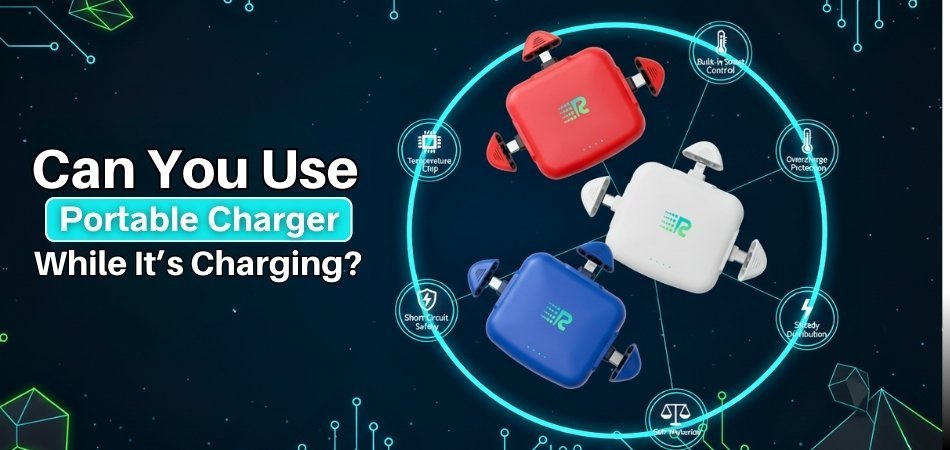
Plug the Charger Into a Wall Outlet
Start by connecting your portable charger to a wall outlet using the right cable. When choosing the right portable charger, make sure it supports stable power flow for safe and fast charging. Avoid plugging it into a laptop or a weak port. Wall sockets give steady power, helping both the charger and your phone charge smoothly without any interruption.
Connect Your Device to the Charger
Once your charger is plugged in and charging, connect your phone or gadget to one of its output ports. This allows it to send power to your device while refilling itself. Make sure both connections are firm so power flows evenly between them.
Watch for Charging Indicators
Keep an eye on the LED lights or display symbols while charging. They show when power is being transferred correctly. Flashing lights usually mean active charging, and steady lights mean a full battery. These signals help you know both devices are charging as they should.
Keep the Setup Stable
Place your portable charger and device on a flat surface while charging. Moving or bumping them can loosen the plugs, slowing or stopping the charge. Keeping everything still ensures steady power flow and prevents any cable or port damage.
Avoid Overuse During Dual Charging
Charging both devices at once can make the charger warm after some time. Let it rest after full charging to prevent stress on the battery. Regular short breaks between uses keep the battery strong and safe.
How Can You Tell If Your Power Bank Supports Safe Pass-Through Charging?
Sometimes it’s hard to know if your power bank can charge itself and your phone at the same time. Not every model is built for that purpose. The good news is, you can easily check with a few simple steps. Continue reading to learn how to do it safely and correctly.
Check The Product Label
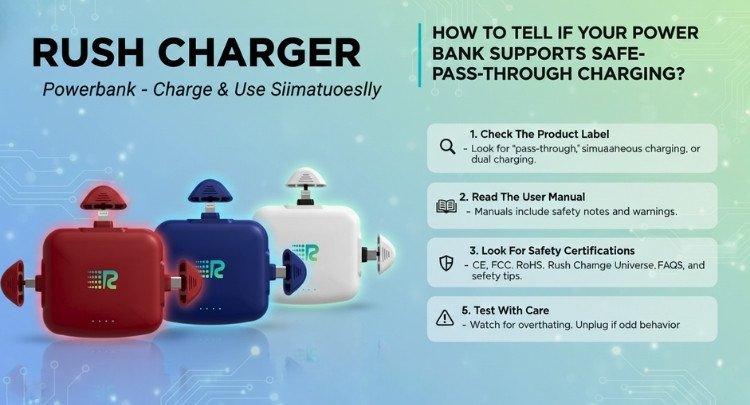
Start by looking at the label printed on your power bank. Many brands clearly list whether they support pass-through charging. Look for words like “pass-through,” “simultaneous charging,” or “dual charging.” If these terms are missing, it may not be safe for dual use.
Read The User Manual
Your power bank’s manual is one of the best sources of information. It tells you whether you can charge both the device and the power bank together. Manuals also include safety notes and warnings that can prevent overheating or damage. Always read them before trying pass-through charging.
Look For Safety Certifications
Power banks with safety marks are usually tested for safe performance. Certifications like CE, FCC, or RoHS mean the device meets quality standards. One of the portable chargers, called Rush Charge Universe is known for following these safety checks. Such certified chargers are safer for pass-through charging and long-term use.
Visit The Manufacturer’s Website
If you’ve lost the manual, the brand’s website can help. Many companies share product details, FAQs, and safety tips online. Look for your exact model name to find whether it supports pass-through charging. Online support pages can give clear answers in seconds.
Test With Care
If you decide to test, do it carefully. Connect your charger to the wall first, then plug in your phone. Watch for signs of overheating or flashing lights. If it gets too warm or behaves oddly, unplug it immediately to avoid damage.
Do All Brands Offer This Feature in Their Portable Chargers?
No, not all brands offer this feature in their portable chargers. Some models include pass-through charging, while others skip it to cut costs. It mostly depends on the design, battery quality, and brand’s focus on safety. Always check the label or manual to confirm before using both functions together.
Many well-known brands add pass-through charging because people prefer quick and easy power options. These chargers can refill themselves and charge your phone at the same time. However, budget chargers may overheat or drain faster when doing both. That’s why it’s better to buy from trusted names that focus on battery protection.
If your charger doesn’t mention dual charging, don’t try forcing it. Using it that way can damage the battery or circuit. Always follow the maker’s guide for safe use. Choosing a charger with tested safety features saves time and keeps your devices working for a long time.
How Does Rush Charge Universe Manage Power Flow Safely?
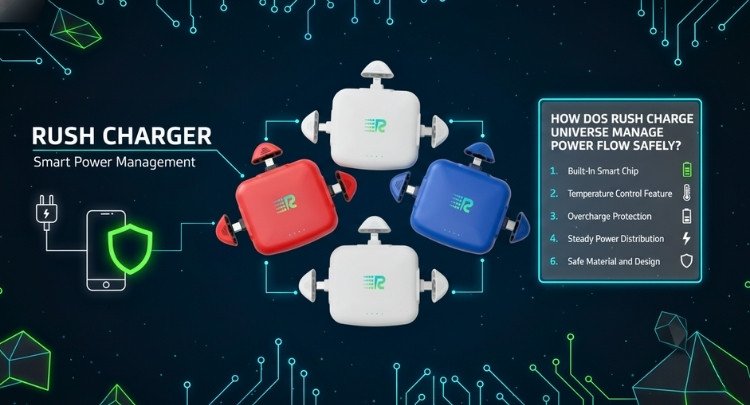
Keeping your devices safe while charging is important for lasting performance. The Rush Charge Universe is built with smart power control that protects both your phone and itself. It manages power flow in a way that avoids overheating or short circuits. Let’s look at how it keeps charging safe and steady every time.
Built-In Smart Chip
Inside the Rush Charge Universe, there’s a smart chip that controls power delivery. It senses how much charge your device needs and adjusts the output safely. This chip prevents overcharging, keeping both the phone and the power bank secure. It helps maintain stable performance and avoids battery wear over time.
Temperature Control Feature
The device has sensors that watch the internal temperature closely while charging. If it gets too hot, the charger slows down or pauses power flow automatically. This prevents overheating that could harm the battery. Temperature control ensures the Rush Charge Universe stays cool and safe during every use.
Overcharge Protection
When your phone or charger reaches full capacity, power flow stops on its own. This keeps the battery from taking in unnecessary energy. Overcharge protection helps extend the life of both devices. It ensures safe charging even if you forget to unplug the charger right away.
Short Circuit Safety
The Rush Charge Universe includes protection against sudden power surges or short circuits. If an issue is detected, it cuts power instantly to prevent damage. This built-in portable charger safety system gives users peace of mind. It’s designed to protect the charger, connected devices, and even your wall adapter.
Steady Power Distribution
This charger divides energy evenly between connected devices. It sends the right amount of power where it’s needed most. Steady power distribution prevents sudden drops or spikes that could interrupt charging. That balance helps the Rush Charge Universe work smoothly in all situations.
Safe Material and Design
The outer shell and internal parts are made with fire-resistant materials. These materials handle heat better and reduce risks during long charging hours. The compact build also supports proper air circulation. This design helps the charger stay strong, safe, and reliable for long-term use.
Do’s and Don’ts to Extend the Battery Life of a Portable Charger
Maintaining the condition of your portable charger extends its lifespan. Simple habits can make a big difference in battery life. Follow these helpful do’s and don’ts to keep your charger working strong and safely every time you need it.
Do’s
- Charge It Regularly: Use your portable charger often to keep the battery active and strong. Leaving it unused for long periods weakens its performance slowly.
- Use the Original Cable: The cable that comes with your charger is built for perfect power transfer. Cheap replacements may cause slow charging or possible damage.
- Store at Room Temperature: Keep your charger in a cool, dry place away from sunlight. High temperatures can reduce its battery strength over time.
- Unplug After Full Charge: Disconnect the charger once all indicator lights stay solid. Overcharging puts pressure on the battery and shortens its lifespan.
- Clean the Ports Carefully: Use a soft cloth or small brush to remove dust from charging ports. Dirt buildup can block the connection and slow charging efficiency.
- Check Power Source Strength: Always plug into a stable wall socket instead of weak USB ports. Unstable or low-power outlets can cause uneven charging flow.
- Use It Once a Month: Even if not needed, charge and use it once month. Regular use keeps the internal battery cells active and balanced.
Don’ts
- Don’t Leave It in Heat: Avoid keeping the charger inside a hot car or under direct sunlight. Too much heat can permanently damage battery cells.
- Don’t Overuse While Charging: Using your charger to power another device while it’s charging stresses it. This may cause overheating and slower battery recovery time.
- Don’t Use Damaged Cables: Frayed or loose cables can cause sparks or unstable power flow. Always replace damaged cords before charging your portable charger.
- Don’t Keep It Wet: Keep your charger away from water or moisture at all times. Liquids can damage internal parts and make it unsafe to use.
- Don’t Ignore Warning Lights: If the LED lights blink abnormally or don’t turn on, stop using it. Unusual signals may show internal issues needing repair.
Frequently Asked Questions
Portable chargers make life easier, but people often get confused about using them while charging. This section clears up those doubts. Here, you’ll find simple answers to the most common questions about safe use, charging habits, and care for your portable charger.
Can A Portable Charger Work Without Being Fully Charged?
Yes, it can. A portable charger will still supply power to your device even when it isn’t fully charged. However, the charge may drain quickly, and it might not provide steady power. It’s best to recharge it completely before long use for better performance.
Does Charging Two Devices at Once Damage the Power Bank?
Charging two devices together won’t damage the power bank if it supports multiple outputs. But it may reduce charging speed or generate heat. Always check the manual for maximum load limits. Using too many devices at once can shorten battery health over time.
What Happens If You Leave It Plugged In Overnight?
Leaving it plugged in overnight may cause overcharging if it lacks built-in protection. Over time, this weakens the battery cells and performance. Use power banks that stop charging automatically when full to prevent overheating and energy waste during long connections.
How Long Should You Charge A Portable Charger?
Most portable chargers take between two to five hours to fully charge. The time depends on battery size and power input. Always check the indicator lights to see when it’s full. Unplugging once charged helps protect the battery and saves energy.
Can Heat Affect Charging Speed and Battery Life?
Yes, high heat slows charging and weakens the battery over time. Warm air or direct sunlight can make the battery expand slightly. Always charge in a cool, dry place to help maintain charging speed and extend the life of the device safely.
What Type Of Cable Is Best For Charging?
Use the original or certified cable that came with the charger. These cables match the device’s voltage and prevent current drops. Cheap or untested cables may cause slow charging or short circuits. A good-quality cable helps power flow safely and efficiently.
Can Using a Weak Adapter Harm the Charger?
Yes, weak adapters can slow charging or damage internal circuits. Power banks work best with adapters that provide at least 2A output. Low-output adapters make charging take longer and may cause unstable power flow. Always use the recommended power source for safety.
What Should You Do If the Lights Don’t Turn On?
If LED lights don’t turn on, keep the charger connected for 15–20 minutes. The battery might be deeply discharged. If there’s still no sign, try a different cable or outlet. Persistent issues could mean the battery or circuit board needs repair.
Can You Use It During a Power Outage?
Yes, portable chargers work perfectly during power cuts as they store energy inside. However, ensure it’s pre-charged before emergencies. A half-filled charger may not support long hours. Keeping it charged regularly ensures your devices stay powered when electricity is unavailable.
Why Does My Charger Get Warm While in Use?
It’s normal for chargers to warm slightly during use or dual charging. The battery releases heat as energy is transferred. However, if it becomes very hot, unplug it and let it cool. Excessive heat can reduce the battery’s long-term strength and performance.
Conclusion
A good charger makes life easier, especially when you’re always on the move. Knowing how to use it safely can save both time and trouble. Portable chargers are built to make charging smoother, but not every model supports dual charging. Understanding its features helps you get the most out of your power bank every day.
So, can you use a portable charger while it’s charging? Yes, but only when it supports safe pass-through charging. Always check labels, watch for signs of heat, and let your charger rest after use. Treat it with care, and it will serve you well for years. The right habits keep both your charger and your favorite gadgets powered up whenever you need them most.


