
Running out of battery always seems to happen at the worst time. That’s where the Rush Charge comes in, giving your devices quick power wherever you are. It’s small, easy to carry, and built for people who are always on the go. However, many users who have this or intend to purchase it are curious about how do you charge Rush Charge.
To charge a Rush Charge, connect it to a wall outlet using a USB-C, Micro-USB, or Lightning cable. It usually takes around two to three hours to reach full capacity. The LED lights blink while it charges and stay solid once it’s full, showing it’s ready for use.
Are you curious about how to keep your Rush Charge working smoothly and lasting longer? Then continue reading because this article explains everything you need to know about using, charging, and maintaining your Rush Charge properly.
Who Actually Needs a Rush Charge?
Everyone uses their devices differently, but running out of battery always feels the same. That’s where Rush Charge comes in, a tiny but powerful tool that fits right in your pocket. It helps people stay connected wherever they are. Let’s find out who actually needs one the most.
Travelers and Commuters
People who travel often or spend long hours commuting will love the Rush Charge. Airports, buses, and trains rarely have easy charging spots. This device gives you quick power without carrying bulky cords. It’s light, compact, and perfect for staying charged between destinations or during long rides.
Office Workers and Professionals
Busy professionals who rely on phones for calls, meetings, and messages need steady power. Many find that the Rush Charge functionality keeps them connected through their day without hunting for outlets. It charges quickly during breaks or meetings. Keeping one at your desk ensures your phone never dies in the middle of work.
Students and Learners
For students who use tablets or phones for studying, Rush Charge is a time-saver. It helps them keep devices charged during long study sessions or online classes. No tangled cables or heavy power banks needed. Its small size fits easily in a backpack or pencil case.
Outdoor Lovers
Campers, hikers, and adventurers can benefit the most from Rush Charge. It’s easy to carry and works great for powering small gadgets. When you’re outdoors and away from plugs, this charger becomes a real help. It gives power when you need it the most in nature.
Social Media Users
People who spend hours scrolling, recording videos, or streaming can quickly drain their phone battery. Rush Charge gives fast backup power anywhere, anytime. It’s handy during events, festivals, or while filming content outside. You won’t miss any fun moment because of a dead phone.
Emergency Users
Anyone who wants to be ready for emergencies should keep a Rush Charge nearby. It ensures your phone works when power goes out or during travel delays. A quick charge can make a big difference when you need to call for help. It’s reliable for unexpected moments.
How Do You Charge Rush Charge?
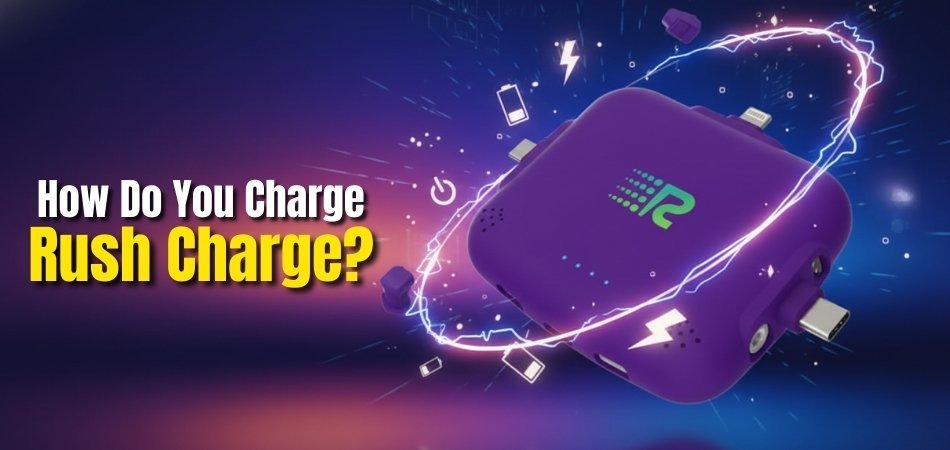
Charging your Rush Charge is simple and quick, making it ready whenever you need it most. You don’t need special tools or setup to make it work. Just a few easy steps can keep it fully powered for daily use. Follow the guide below to understand exactly how to charge it right.
Use the Right Cable
Start by checking which cable fits your Rush Charge model. Most work with USB-C, Micro-USB, or Lightning inputs. Always use a high-quality or original cable for safe power transfer. A good cable ensures steady current and helps your Rush Charge fill up faster.
Plug Into A Wall Outlet
For the best results, plug your charger into a wall outlet instead of a laptop or power bank. Wall sockets provide a stronger and more stable current. This helps the device reach full charge within two to three hours. Avoid low-power sources to save charging time.
Watch the LED Indicators
The small LED lights on your Rush Charge show charging progress clearly. Many users mentioned in the Rush Charge Universe Review that these lights make it easy to track charging status. Flashing lights mean it’s charging, and solid lights mean it’s full. Watching them helps you unplug at the right time.
Keep It Still While Charging
Moving or bumping the charger while it’s plugged in can loosen the connection. A weak connection slows charging or stops it completely. Always place it on a flat surface during charging. This helps the cable stay secure and keeps the device safe from damage.
Charge in Normal Temperature
Avoid charging in places that are too hot or cold. Temperature affects how quickly the battery fills up. Charging at normal room temperature helps it work smoothly and safely. It also prevents the battery from losing power or getting damaged over time.
Unplug Once Fully Charged
Once all the LED lights stay solid, the Rush Charge is full. Unplug it right away to protect the battery. Leaving it connected for hours can slowly reduce its capacity. Regularly checking the lights helps you know the right time to disconnect.
What to Do If Rush Charge Isn’t Charging Correctly?
When your Rush Charge doesn’t seem to charge correctly, it can be frustrating. Most of the time, the problem is small and easy to fix at home. A few quick checks can help you find out what’s wrong. To get it working again, simply follow the instructions outlined below.
Check the Cable and Adapter
Look closely at your charging cable and adapter for any signs of wear. Bent ends, broken wires, or loose plugs can cause poor power flow. Try switching to another working cable or adapter. This small step often fixes charging issues right away.
Try a Different Power Source
Sometimes the socket or USB port may be the problem, not the charger. Plug the Rush Charge into another wall outlet or power source. Avoid using old or loose sockets that might not supply steady power. A good connection helps it charge smoothly again.
Clean the Charging Port
Dust or dirt can block the connection between the cable and charger. Use a soft brush, dry cloth, or a toothpick to gently clean the port. Be careful not to damage the inside pins. A clean port helps power flow properly during charging.
Let It Cool Down
If your Rush Charge feels hot, stop charging and let it cool down. High temperature slows down or stops the charging process to prevent damage. Wait at least 10 to 15 minutes before plugging it back in. Charging at room temperature keeps it safe and fast.
Leave It Connected for a While
Sometimes, when the battery is deeply drained, it needs time to wake up. Leave the charger connected for 15–20 minutes even if the lights don’t turn on. After a short while, the LED should start blinking. Once it does, it means charging has started again.
How Do You Know If It’s Charging the Right Way?
Sometimes it’s hard to tell if your Rush Charge is actually charging the right way. Luckily, the device includes clear lights and signs that make it easy to check. These small indicators show what stage of charging it’s in. Read below to know how to spot when it’s working correctly.
Flashing LED Lights
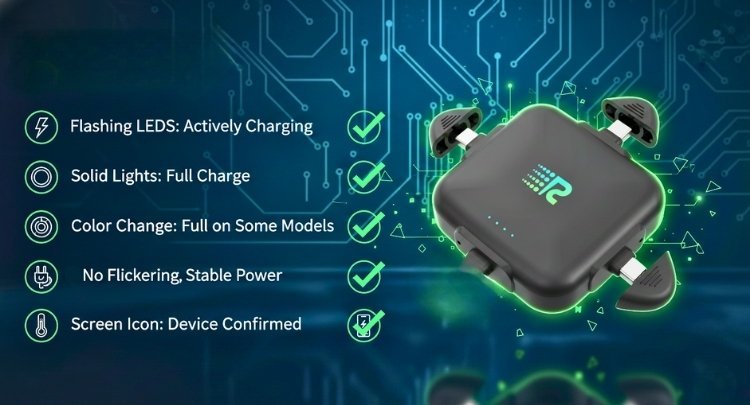
When you plug in your Rush Charge, the LED lights start blinking. This shows that it’s actively charging and getting power. As the battery fills up, the lights become steady. If they don’t blink at all, check the cable and wall adapter for issues.
Steady Lights on Full Charge
Once charging is complete, all the LED lights stay solid. This shows the Rush Charge charging time has ended, and the battery has reached full power. Unplug the charger when you see this to protect the battery. It helps keep your Rush Charge lasting longer and performing well.
Color Changes In Indicator Lights
Some models show color changes during charging. The light may turn from red to blue or green when full. Watching this color shift helps you know the current status. If the color does not change, it might still be charging or have a weak connection.
No Flickering Or Dim Lights
The LED lights should glow clearly without flickering or dimming. Flickering may mean a loose cable or a low power source. Make sure the plug fits tightly into the socket. A steady glow confirms that your Rush Charge is charging the right way.
Slight Warmth While Charging
It’s normal if the device feels a little warm while charging. This means the power is flowing correctly through the battery. But if it becomes too hot, unplug it and let it cool. Light warmth is fine, but overheating should never happen often.
Visible Power Symbol On Screen Devices
If your Rush Charge is connected to a device with a screen, you might see a small battery symbol. This sign confirms that your gadget is charging properly. No power symbol means the connection might be loose or the charger is not working.
Can You Charge Your Phone While Charging the Rush Charge?
Yes, you can charge your phone while charging the Rush Charge at the same time. This feature is called pass-through charging, and it makes charging easier and faster. It allows both your phone and the Rush Charge to refill their batteries without needing separate outlets or waiting for one to finish.
While both are plugged in, the Rush Charge first sends power to your phone. After your phone’s battery is full, the Rush Charge starts storing energy for itself. This helps save time and makes sure your phone always stays ready, even when the charger still needs power.
Pass-through charging is safe and made for everyday use. It doesn’t overheat or harm your devices when used with a good-quality cable. Always make sure the charger is connected properly and the LED lights are working, showing that both are charging correctly.
What’s the Easiest Way to Carry and Store Your Rush Charge?
Keeping your Rush Charge safe and ready to use is very simple. Its small and lightweight design makes it easy to take anywhere. Whether you’re traveling, working, or just going out, it fits easily in your pocket or bag. Let’s look at some easy and smart ways to carry and store it safely every day.
Keep It in a Small Pouch
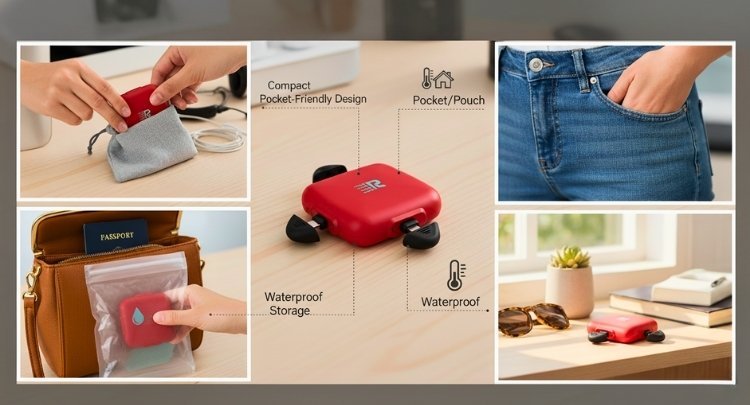
Storing your Rush Charge in a small pouch keeps it protected from scratches or dirt. Soft cases work best since they prevent pressure on the charging tips. You can also carry cables or adapters in the same pouch. It keeps everything organized and easy to find when you need power.
Use the Built-In Connectors
The built-in connectors make carrying your Rush Charge simple and tangle-free. You don’t have to bring extra wires or adapters around. Fold the tips back into their slots after use to protect them. This helps keep the charger neat and ready for quick use anytime.
Store It at Room Temperature
Always keep your Rush Charge in a cool and dry place. Avoid storing it in direct sunlight or very hot areas. Extreme heat or cold can reduce the battery’s life over time. Room temperature helps it stay charged longer and perform better when needed.
Carry It in Your Pocket or Purse
The compact shape makes it perfect for carrying in your pocket or purse. It’s light enough that you’ll barely notice it’s there. Just make sure the connectors are folded in to avoid bending. This way, it stays safe while remaining easy to access for quick use.
Keep It Away from Liquids
Avoid storing your Rush Charge near water bottles, drinks, or wet surfaces. Moisture can damage the inner circuits and affect performance. Always use a waterproof bag if you plan to carry it outdoors. Keeping it dry helps it last longer and charge safely every time.
Charge Before Storing
If you won’t be using it for a few days, charge it halfway before storing. Keeping it partly charged helps maintain the battery’s health. Avoid storing it when fully drained or overcharged. This small step can make a big difference in keeping it long-lasting.
Clean It Regularly
Dust can collect in the charging ports or LED area over time. Wipe it gently with a soft, dry cloth every week. Avoid harsh cleaners or sprays that could harm the finish. Keeping it clean ensures smooth performance whenever you need to recharge your devices.
Frequently Asked Questions
Charging your Rush Charge is simple, but small doubts can still come up while using it. Many people wonder about the right methods, cables, and habits for safe charging. Here are some common questions and clear answers to help you use your Rush Charge the right way.
Can You Leave the Rush Charge Plugged In Overnight?
Leaving it plugged in overnight is not harmful for short periods, but it’s better to unplug after it’s full. The LED lights show when charging is complete. Keeping it plugged too long may slowly reduce the battery’s lifespan. Regularly unplugging on time keeps it healthy longer.
Is It Okay to Use a Fast Charger With Rush Charge?
Yes, you can use a fast charger as long as it matches the device’s power limit. A 2.4A wall adapter works best. Avoid overly strong adapters since they might create extra heat. Stick to the recommended wattage for safe and efficient charging.
How Often Should You Charge Rush Charge?
You should charge it whenever the LED lights show low power. Keeping it partly charged rather than fully drained helps maintain performance. If unused for long periods, recharge it every few weeks. Regular top-ups prevent the battery from wearing out early.
What Happens If You Overcharge Rush Charge?
Overcharging doesn’t cause major harm because it has built-in protection. However, keeping it plugged in for many hours can warm the battery. This might reduce capacity over time. It’s best to unplug once all lights stay solid.
Can You Use a Power Bank to Charge Rush Charge?
Yes, you can charge it with another power bank if needed. However, wall outlets work faster and are more efficient. Power banks may deliver lower output, which extends charging time. Use them only when wall power isn’t available.
Does It Charge Faster When Turned Off?
Yes, it charges a bit faster when not in use. Disconnecting from devices allows the full current to refill the battery. This saves time and ensures better energy transfer. Always avoid using it while it’s charging for best results.
Why Do the Lights Blink Slowly While Charging?
Slow blinking means the Rush Charge is charging normally and storing energy. As the battery fills, the lights blink less often. Once fully charged, they stay steady without blinking. This simple light pattern helps track the charging progress easily.
Concluding Lines
Most people underestimate how simple it is to keep their portable charger ready. Once you learn how Do You Charge Rush Charge the right way, it becomes a smooth part of your routine. With its built-in connectors, LED lights, and fast-charging design, this tiny gadget fits perfectly into busy lives without needing extra setup or effort.
Treat it like your everyday tech buddy, not just a backup device. Charge it with care, store it properly, and use good cables for the best results. These small habits make sure your Rush Charge stays strong, safe, and always ready when you need quick power. With the right attention, you’ll never be left searching for a socket again.


